Gestan Cloud Guide

This page provides essential information about Gestan Cloud.
April 2026 Windows Update: A new security warning now appears when connecting to Gestan Cloud. This is normal, and your connection remains secure. Learn more →
Connecting to Gestan Cloud
There are two ways to connect to Gestan Cloud:
- via a web browser: ideal when using a client's computer or a public computer, as nothing needs to be installed;
- via a Remote Desktop connection: ideal when using your own computer, as it is faster than the browser.
Via a web browser
Open your preferred web browser (Opera, Brave, Firefox, Safari, Chrome, Edge, etc.), then use the URL corresponding to the server where your account is hosted.
| Your server | Corresponding URL |
|---|---|
| Server 1 | https://cloud1.gestan.fr |
| Server 2 | https://cloud2.gestan.fr |
| Server 3 | https://cloud3.gestan.fr |
| Server 4 | https://cloud4.gestan.fr |
| Server 5 | https://cloud5.gestan.fr |
| Server 6 | https://cloud6.gestan.fr |
| Server 7 | https://cloud7.gestan.fr |
| Server 8 | https://cloud8.gestan.fr |
| Server 9 | https://cloud9.gestan.fr |
| Server 10 | https://cloud10.gestan.fr |
You will arrive at the login screen, where you can enter the Gestan Cloud credentials and password provided by the support team.

There are two connection options: HTML5, which works on any machine (Linux, macOS), or Remote App (equivalent to the connector method described below).
Via a Remote Desktop connector
If you are using Windows, follow the procedure below.
- Download and install the connection program Setup-ConnectionClient-A1.exe.
- Download and install the program Setup-VirtualPrinter-Client-A1.exe.
- Then, download the connector corresponding to your server number and the number of printers connected to your computer. If there are no printers, choose the PDF connector.
| Your server | Single-printer connector | Multi-printer connector | PDF connector |
|---|---|---|---|
| Server 1 | Download | Download | Download |
| Server 2 | Download | Download | Download |
| Server 3 | Download | Download | Download |
| Server 4 | Download | Download | Download |
| Server 5 | Download | Download | Download |
| Server 6 | Download | Download | Download |
| Server 7 | Download | Download | Download |
| Server 8 | Download | Download | Download |
| Server 10 | Download | Download | Download |
You can place this connector on your desktop, for example.
Double-clicking the connector opens the login screen shown below.
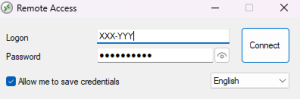
Log in using the Gestan Cloud server login code and password provided by the support team when your account was created.
⚠️Only check the “Remember my credentials” box if you are the only person using your computer!
ℹ️ If you are using a system other than Windows (Linux, Android, Mac OS), please consult this page.
Your login credentials
These were provided to you by the Gestan Cloud service, which specified:
- your server number, e.g., “Server 1”
- your server access code (always in the format XXX-ZZZ) and the corresponding password.
Codes and passwords are case-sensitive.
ℹ️ We never share codes or passwords over the phone; they are sent only by mail or to the email address registered with your Cloud subscription, via a dedicated interface.
⚠️ If you make more than three consecutive errors, the Gestan Cloud protection system will blacklist your machine, preventing it from connecting to the Cloud. You will need to provide your IP address to support to have it re-authorized (see this page).
Common questions
Remote Desktop
Gestan Cloud provides a remote desktop organized into two drives:
- “U”, reserved for your personal use, and
- “V”, shared with your company.
➡️ For more information, see the page: remote desktop.
Printing with Gestan Cloud
Printing from Gestan Cloud is handled via a universal driver or a virtual printer.
➡️ For more information, see the page: Printing with Gestan Cloud.
Connection issues
The Gestan Cloud connection may be refused by the server or interrupted by your computer.
➡️ For more information, see the page: Connection issues.
Protected server directories
For certain operations, you may encounter the following message: “This operation has been cancelled due to restrictions in effect on this computer. Please contact your system administrator.”

This message appears because File Explorer is attempting to open a default directory to which you do not have access. This is not a critical issue; click OK, and the file explorer will display the available directories.
Gestan Cloud Support
Technical support is included with the Gestan Cloud plan: a dedicated support technician is available to answer any questions regarding the operation of Gestan.
You can contact support:
- By phone 🩵: at 01 88 33 58 46, Monday to Friday, from 9:00 AM to 5:00 PM.
- By email at cloud@gestan.fr for non-urgent inquiries.
For any questions requiring follow-up (such as feature requests or bug reports), please use the forum.
In most cases, technical support will assist you remotely by accessing your computer using remote control software—specifically Anydesk or Rustdesk—which you can download via the links below. Download RustDesk for Windows (open source)
Download RustDesk for macOS (open source)
ℹ️ Other “Gestan Cloud” articles