Mass product modification
 A1 proofreading not yet effective for this page. In the meantime, you can ask any questions on the forum.
This screen allows you to make mass modifications to all or part of the products you offer.
It is thus possible to easily modify:
- sales prices,
- purchase prices,
- VAT rates,
- PAMPs,
- Suppliers,
- and more…
Using the screen
Access: Tools → Administration → Data processing → Modify products
The modifications made by this screen are definitive: it is strongly recommended to make a backup of the database beforehand. You can thus test the effect obtained on a sample of products before carrying out mass treatments, or on a test basis.
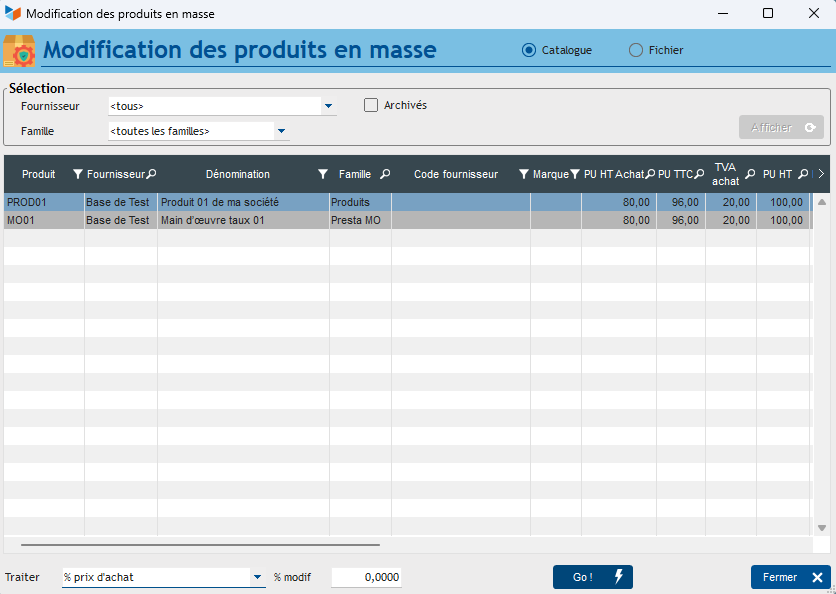
The upper part of the screen (Selection) allows you to select the products you wish to modify, by supplier, family, and possibly sub-family, taking into account, or not, the archived products.
The context menu of the table allows you to add products that are not in the selection, or to remove them (without deletion in the file).
The Process combo allows you to define the modification you wish to make:
- <delete>: deletes the product
- % of purchase price : application of a percentage on the purchase price.
- PAMP → purchase price : the purchase price will be updated with the PAMP (weighted average purchase price), which will be recalculated for the occasion. To possibly be supplemented with an update of the sales prices.
- % sales price from the PV: recalculation of the sales price by applying a percentage to the current sales price.
- % sales price from PA: recalculation of the sales price by applying a percentage to the current purchase price.
- % sales VAT rate: application of a VAT rate to the sales price
- % purchase VAT rate: application of a VAT rate on the purchase price
- % supplier discount: application of a fixed amount as supplier discount, and recalculation of the purchase price. To possibly be supplemented with an update of the sales prices.
- Gross amount: application of a fixed amount as the sales price excluding tax.
- Addition of gross amount: Addition of an amount to the current sales price excluding tax of the products
- PU excluding VAT excluding supplier discount: Application of a fixed amount as the sales price excluding VAT excluding supplier discount.
- PAMP recalculation: recalculation of the Weighted Average Purchase Price
- Supplier: change of supplier
- Family/sub-Family: change of family and/or sub-family
- WEEE: application of the tax on Waste electrical and electronic equipment
- Out of catalog: to move the products to Out of catalog
- EAN13 auto: to supply a random EAN13 code if the EAN13 is not entered.
- Product image optimization: reduces the size of product catalog images.
- Customs code: update of the customs nomenclature code.
- Managed/Unmanaged: allows you to change the stock management status of products to unmanaged or managed (with possible deletion of stock movements if you go from managed to unmanaged.
- Margin objective allows you to update the product margin objective.
 Other “Products” articles