Product refills
 A1 proofreading not yet effective for this page. In the meantime, you can ask any questions on the forum.
This screen displays, for a customer, all the products quoted, ordered, invoiced, or delivered.
It provides useful information to sales departments, particularly field salespeople: before a customer visit, it is advisable to have the list of products ordered by the customer, in order to consider refill orders.
It allows you to print a completion sheet.
Using the screen
//Access :
- contact list → context menu → commercial information → recompletion
- product list → Parts → select customer → Recompl
- Statistics → Product Statistics → Recompl
//
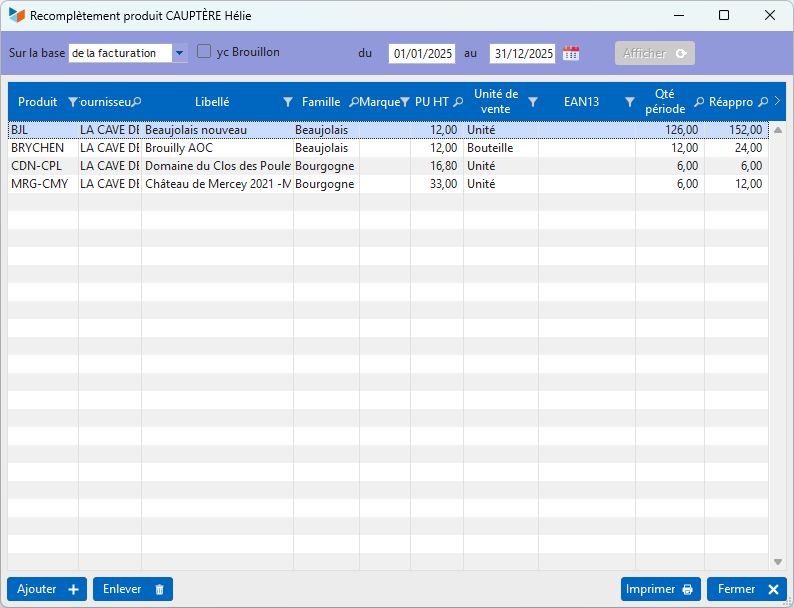
The screen allows you to enter two optional dates (if they are not entered, the calculation is carried out without notion of period).
The Show button triggers the display of the products concerned by the operation specified in the On base combo.
The Restock column can be entered: it is possible to enter the quantities to be restocked. The Replenishment with period qty option from the table context menu allows you to populate the Replenishment column with the contents of the Period qty column.
It is possible to add products and remove them.
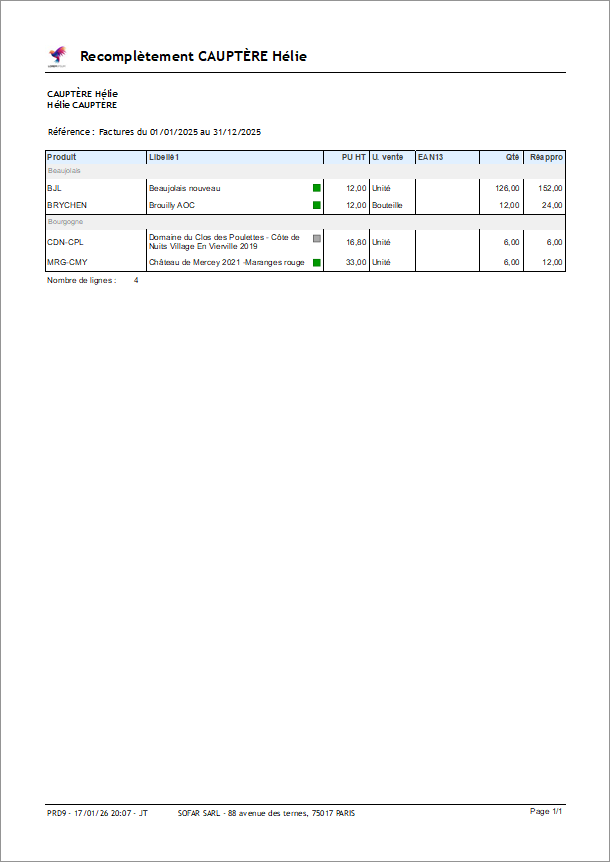
The Print button triggers the printing of the completed form (PRD9) ready to be negotiated with the customer.
 Other Product articles