Inventory update
 A1 proofreading not yet effective for this page. In the meantime, you can ask any questions on the forum.
This program enables you to update your current stock from a spreadsheet.
This corresponds to the following use case: at the end of the financial year, your warehouses carry out an inventory, and send you a spreadsheet sheet containing the product codes, and the volume of stock at inventory. The program enables you to update your inventory based on this spreadsheet.
Using the screen
Access : Tools → Administration → Data import → Load inventory
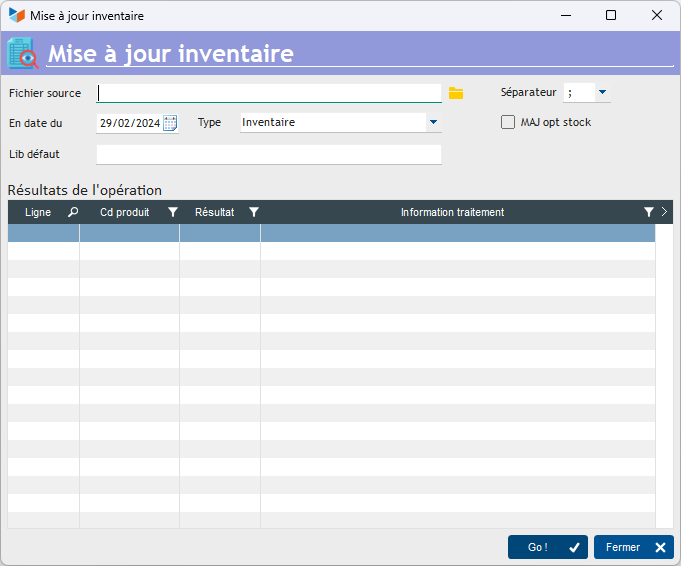
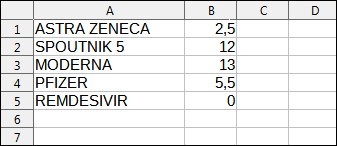
The source file must be a text format with separator, such as csv format with separator “;”.
It contains two columns:
- the product code
- the inventory quantity
If you manage locations, add a third column containing :
- the location code, or code ### if you want the location on which the inventory movement is made to be the location of the last movement for the product.
Lines beginning with “#” will be considered as comments.
Enter the As of date on which you wish to generate an inventory movement, and the type of movement.
The program will create an inventory movement that will bring the current stock up to the quantity you have entered in the spreadsheet.
For example, if you had a current stock of 12 for the product “SPOUTNIK 5” and you entered 10 in the inventory sheet, the program will generate an inventory movement of 2 on issue for this product.
 Other “Stocks” articles