====== ======Company Directory
This is the list of company members (they are registered as “users” ).
This directory is accessible to all registered users, including those without administrative rights.
Using the screen
Gestan===== =====//**Access: ** Company → Company Directory //

The screen displays a list of non-archived users, showing their login authorisation but without indicating their privileges.
The logged-in user can open their own personal record for editing, but not those of other users.
Context menu for the table

The table’s context menu allows you tosend an SMS to the selected user.
It also allows you to switch to administrator mode temporarily. This menu opens a screen for entering a code and password. If an administrator code and password are entered, the current user will be treated as an administrator Gestan, and the edit context menus will once again be available.
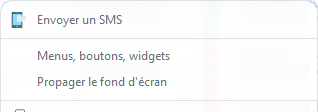
The menus and permissions can therefore be very easily adapted for the current user. Upon exiting the directory screen, temporary administrator mode is deactivated.
ℹ️ Other “Users” articles