Administrator login
This screen allows you to configure permission settings in administrator mode for the logged-in user.
Using the screen
**Access: ** Tools → Admin Login
This menu is only displayed for non-administrator users of Gestan.
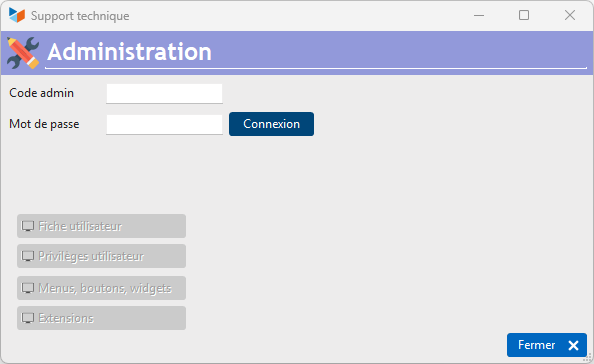
Enter an Admin code ( Gestan user ID with administrative privileges) and the corresponding , then click the Log inbutton.
If the username and password are correct and belong to an administrator, four buttons allow you to configure user options:
- User profile
- User privileges
- Menus, buttons and widgets
- Extensions
 Other “Admin” articles
Audit des données
Base de test
Benchmark lectures
Connexion administrateur
Crédit-temps
Extensions Gestan
Fonctionnement en mode Client/Serveur (C/S)
Formations Gestan
Historique des modifications
Impression d'étiquettes
Installation de Gestan - Mode Classique
Journal des événements de l'application
Licence des extensions *
Licence Gestan
Messages désactivables
Migrer son ERP actuel vers Gestan
Multilinguisme
Nettoyage des liaisons C/S
Ordinateurs du réseau
Prise de main à distance
Sessions
Support Gestan