Favorites and passwords
 A1 proofreading not yet effective for this page. In the meantime, you can ask any questions on the forum.
Gestan lets you save various codes and passwords, as well as the corresponding URLs for websites.
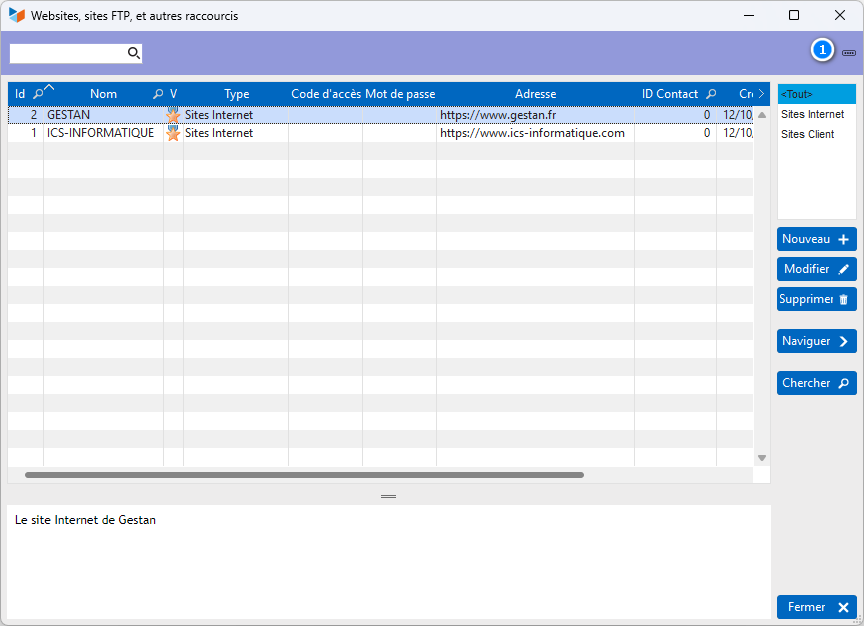
Shortcuts can be classified by type, to facilitate display if there are many of them.
If the URL is entered, the Browse button launches the default browser on the URL in question.
Tips for managing bookmarks
 Generation of random passwords
On the shortcut card screen, a 1 random password generation button can be used to create a password that is reasonably difficult to find.
Right-click on this button to set random password characteristics: length, with or without digits, etc.
Access to FTP sites
If you begin your shortcut url with ftp://, Gestan will be able to connect to the FTP site via your browser, if you have entered the access code and password.
icons associated with shortcuts
Gestan comes with a set of icons - thanks famfamfam - so you can delete the ones you don't need, and add your own: just put them in the <Installation directory>\RESSOURCES\ICONES} directory (usually C:\Program Files X86\GESTAN\RESSOURCES\ICONES). Use 16*16 icons!
 Other “Miscellaneous functions ” articles