Message templates
 A1 proofreading not yet effective for this page. In the meantime, you can ask any questions on the forum.
Gestan's message templates cover e-mails, letters and SMS messages.
This program allows you to define a template for mail templates, which will then be generated using the same graphic template.
Using the screen
//**Access : ** From the context menu of the list of standard messages //
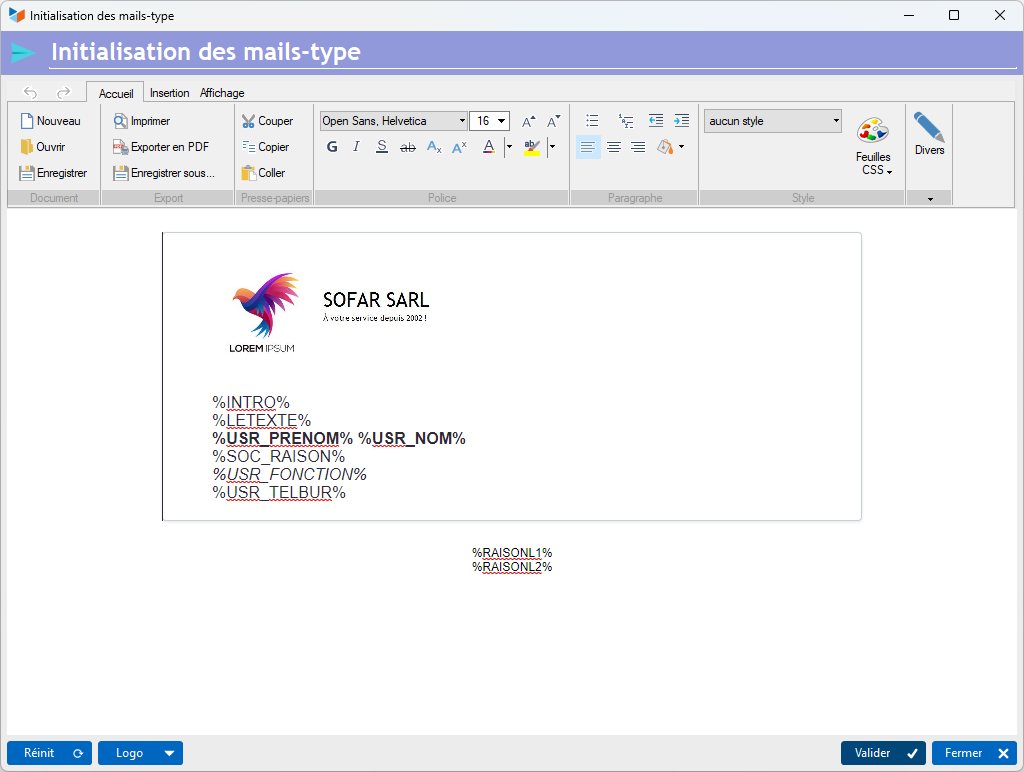
The template includes the following keywords, which will be replaced when generating mail types:
- %INTRO%: text introduction (salutation)
- %LETEXT%: message text
- %USR_PRENOM% %USR_NOM%: first and last name of signatory
- %SOC_RAISON%: company name
- %USR_FUNCTION%: signatory's position
- %USR_TELBUR%: signatory's office telephone number
- %RAISONL1%: company address line 1
- %RAISONL2%: company address line 2
The 1 button resets the layout to the default value.
The 2 button lets you select a logo image for the layout, and optimize it for size before integrating it into the layout. But you can also do this “normally” via the layout screen.
 The contextual menu of the logo image for layout allows you to select a height. The default is 100 pixels.
 Other “Comm ” articles