DEB/DES
Within the European Union (EU), most trade transactions require the monthly submission to customs of a goods trade declaration (DEB) detailing all trade in goods with EU Member States, and a European Services Declaration (DES) if you provide services to companies based in other EU countries.
This screen allows you to extract the data required for the DEB and the DES. It enables you to generate:
- an Excel file in DEB format, which can be uploaded directly to the French customs portal
- an Excel file in INTRASTAT format, for the Luxembourg customs portal
 Further information on the DEB and DES is available on the site French Customs website.
Further information on INTRASTAT is available on the portail Luxembourg statistics.
=== Activating the ===feature
Tick the “Import-Export” box in the general settings (Company tab, Legal/Tax sub-tab).
===== Using the =====screen
Access: Statistics → DEB/DES.
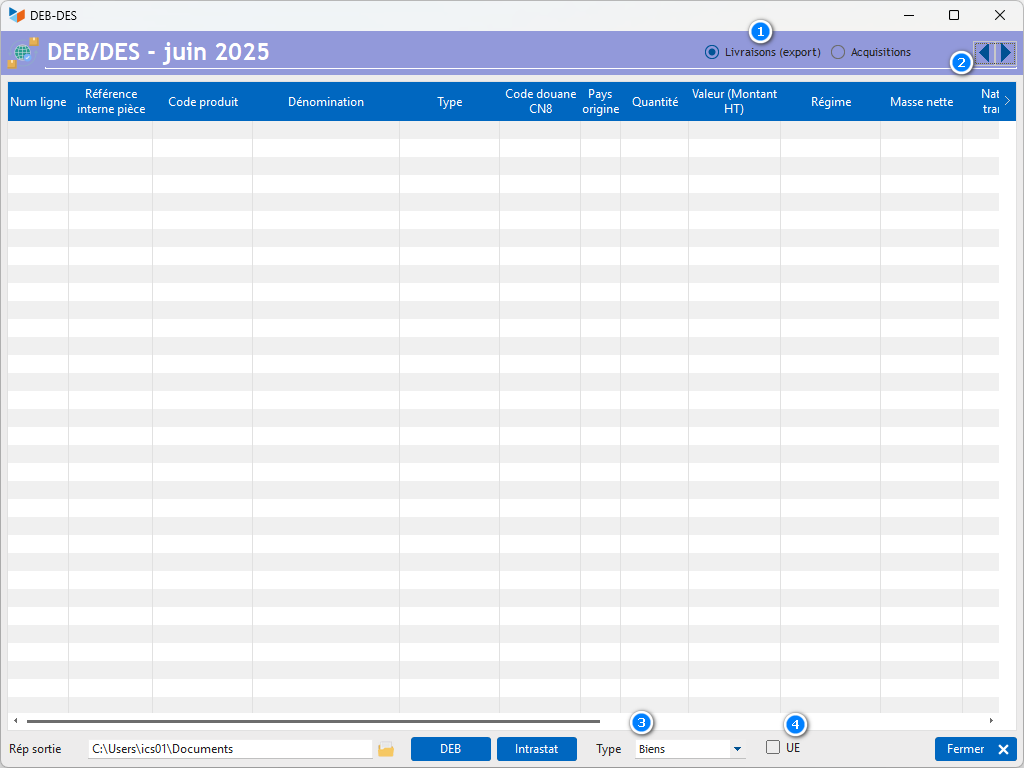
The selector 1 allows you to select the type of extract: either export data (option Deliveries) or import data (option Acquisitions). The spin 2 allows you to select the month to be displayed.
The drop-down menu Type 3 allows you to select the type of product families you wish to include: goods, services, or a combination of several.
The tick box EU 4 allows you to select only customers subject to EU VAT rules. This takes into account companies whose VAT number does not correspond to the country. For example, consider a Belgian company (with a Belgian address) but with a Luxembourg VAT number, for a Luxembourg DEB. Invoices for this company appear in the export due to its address, but it should not be included as this is not an intra-Community sale. This also allows you to exclude all over-the-counter sales to foreign residents who are charged local VAT.
The button DEB button generates an Excel file that can be uploaded to the customs portal. The INTRASTAT button generates an Excel file in INTRASTAT format. The Output directory allows you to specify the output directory for the Excel files.
Non-catalogue products are highlighted in yellow. For these products, the CN8 field is populated with the product code, the country of origin code is set to the company’s country, and the net weight is set to zero. These three fields can be edited directly in the table.
INTRASTAT example

(the columns in green are mandatory)
In ‘Deliveries’ mode
The screen selects, for the given month, all non-draft customer invoices where the customer’s address contains a country code of a European Union member state.
In “Purchases” mode
The screen selects, for the given month, all non-draft supplier invoices where the customer’s address contains a country code for a European Union member state and where the “Reverse charge” box is ticked.
ℹ️ Other “Stats” articles