General settings: The company
 A1 proofreading not yet effective for this page. In the meantime, you can ask any questions on the forum.
In this tab of the general settings, the elements which concern the company as such are grouped: address, tax regime, SIRET identification, etc.
Identity Pane
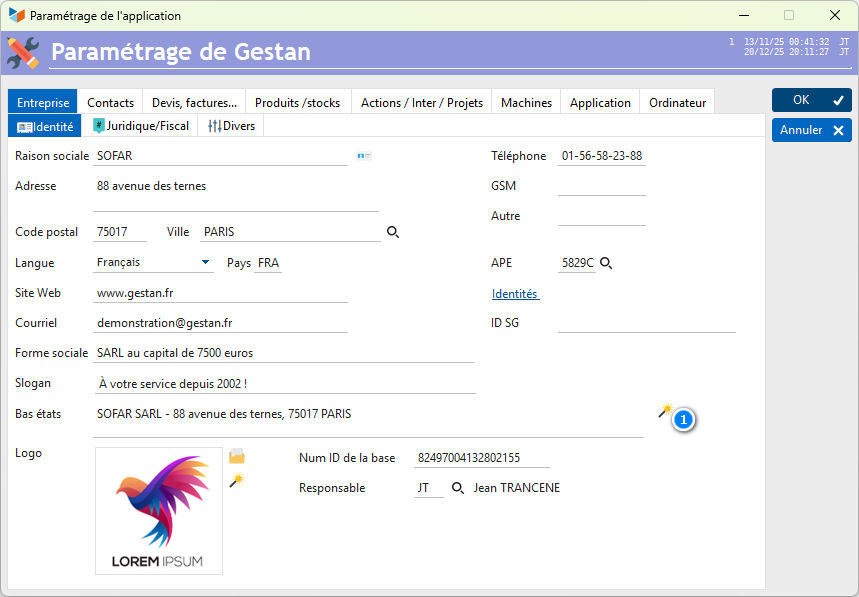
The 1 button to the right of the company name allows you to store the connected user's business card in VCF format in the clipboard, and to paste it via ctrl+V into any other application .
It is possible to declare several different commercial identities. This is useful for example if you make sales under two different brands, but dependent on the same social entity.
The corporate form is a free wording which will be included at the bottom of the documents (legal obligation in France).
The commercial Slogan is used to generate the header image for your quotes, invoices, etc. It is optional.
The low status label is the one that is printed on all reports other than documents (quotes, orders, invoices, etc.), such as the contact list or the actions list. You can use the 2 magic wand to automatically generate it based on the business credentials you specified.
Legal/Tax Section
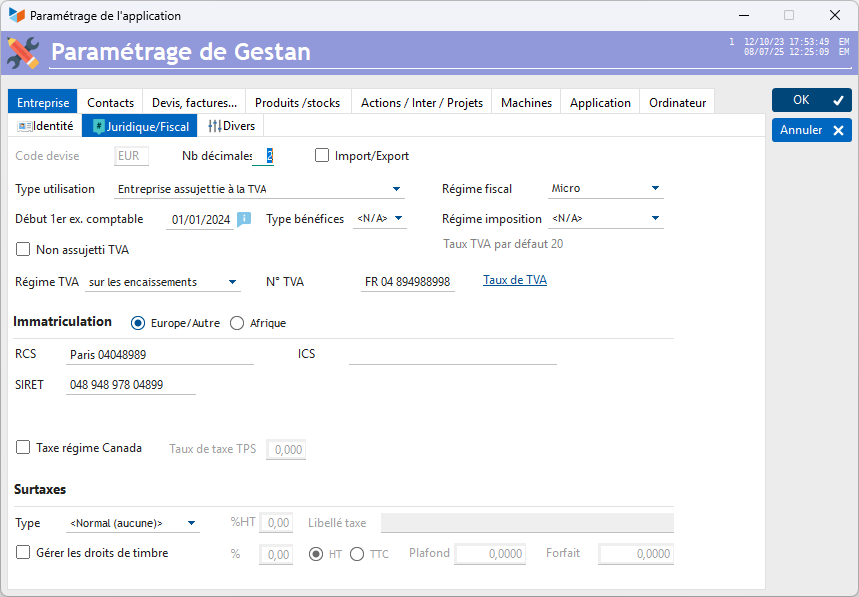
All accounting data will be recorded under a reference currency code (more information). If necessary, another currency code and exchange rate will be stored in the records, for cases where this is necessary (invoice expressed in dollars for a company working in euros, for example).
You can indicate the ISO code of the currency (for example EUR for Euro), or its representation ( for Euro, for example).
 If a first coin has been generated, it is no longer possible to modify the currency! In this case, you must request an intervention from support (or start again on an empty basis).
Specify the number of decimal places taken into account for this currency.
If the Import/Export box is checked, Gestan will display the menu allowing you to make your declarations of exchange of goods (DEB) or services (DES).
The type of use (company subject to VAT, micro-enterprise, etc.) will determine your VAT tax regime.
Tax regime and tax regime are here for the record. The tax regime determines the methods for calculating your profit (normal regime, simplified regime, micro) as well as the frequency of VAT declarations (monthly, half-yearly or annual). It depends on the turnover of your company:
- the Micro BNC or BIC scheme for very small businesses (VSE), in which the profit is calculated as a flat rate proportion of turnover (70% for businesses, 50% for services).
- the simplified real tax regime (RSI) for small businesses, in which profit is calculated by the difference between actual revenue and expenses.
- the normal real tax regime (RNI) for medium-sized companies.
- the synthetic diet (Africa)
The 1st financial year date is the theoretical date of your first financial year. For example, if you close on 12/31 of each year, and you started your activity on 03/09/2019, indicate 01/01/2019 in this area. This date conditions the display of the lists of parts (quotes, invoices, credit notes, orders, BL). If you had indicated a date such as 01/01/SSAA, your documents will be displayed by calendar years, because the calendar year is your accounting year. But if you indicate for example a date like 01/06/SSAA, your documents will be displayed from 01/06/N to 01/06/N+1.
The non-VAT liability option:
- if this box is checked (company not subject to VAT), the VAT column will not appear in quotes, invoices and other customer documents. It will be possible to enter a special wording which will be printed on quotes and invoices: “VAT not applicable, art 293 Bis of the CGI”, for example.
- if it is not checked (company subject to VAT), the VAT column will appear in quotes, invoices and other customer documents. An Intra VAT zone will allow you to enter the so-called intra-community VAT number for European countries, which can be printed on invoices.
You can record a VAT Regime on receipts, on debits, or optionally on debits.
- In VAT on debits, VAT is due upon issue of the invoice
- In VAT on collection, VAT is due at the time of collection of invoices
Registration
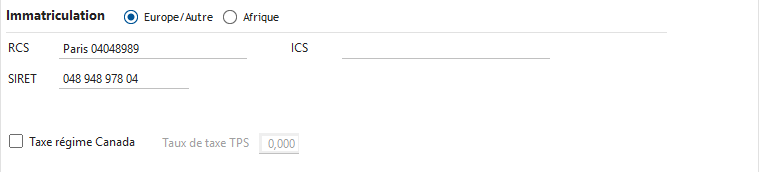
You can use Gestan to always have the registration of your company on hand, depending on your continent of operation, in particular:
If you are in Europe:
- The SIRET number: 14-digit digital establishment identifier, composed of the company's SIREN number (9 digits), and the NIC (Internal Classification Number - 4 digits), and a digit of control.
- The RCS code (trade and services register). Any natural or legal person qualifying as a trader must register with the RCS.
- The APE code (Main Activity code, four numbers and one letter) is a French classification. This code comes from the French activity nomenclature. Assigned by INSEE to any company upon registration in the SIRENE directory, it characterizes the company's main activity by reference to the French activity nomenclature (NAF rev). This code is the basis of the classifications of companies by sector of activity.
- The ICS: this is the SEPA Creditor Identifier, which is assigned to you by the Banque de France if you are in France, or the central bank if you are elsewhere in Europe (The SEPA standard is the replacement , in 2014, of the AFB-CFONB standard).
If the Canada regime tax option is checked, you will need to specify the GST tax rate (federal goods and services tax applicable in Canada).
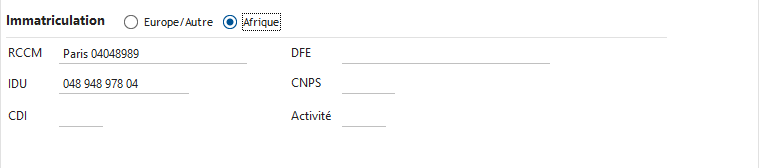
If you are in Africa:
- the RCCM: Credit and furniture trade register number, for example CI-ABJ-2018-B-2757
- the DFE: Tax Declaration of Existence, issued upon creation of the company, e.g.: 1875678 E
- the CDI: Number of the Tax Center attached to the company.
- the Activity code: identification number of the main activity.
- the CNPS number: employer number.
- the IDU: Unique identifier which registers each legally constituted company. Established in 2019, it will replace the RCCM.
VAT on collection or VAT on debits?
VAT on services is due on the date of receipt of the amount of the service, while for deliveries of goods, VAT is due on the date of delivery. In the latter case, as the delivery date is not always materialized by a delivery note separate from the invoice, the due date taken into consideration is the invoice date.
From this rule arise the two major VAT regimes (in France):
- VAT on collection, corresponding to the services provided
- VAT on debits, corresponding to sales of goods.
The VAT regime on collection applies by default for service providers. However, it is possible for them to opt for the VAT regime on debits. In this case, the invoices issued must bear the mention: VAT paid on debits.
The VAT regime on debits applies to all suppliers of goods and merchandise, without possibility of option.
Find out more about the VAT regimes: https://www.statutentreprise.com/regime-tva/
Surcharges

In certain countries, often illiberal, where the mechanisms for controlling administrative absurdities are ineffective, there are various fanciful surcharges, which unnecessarily complicate the lives of citizens under generally pretexts fallacious.
It is thus possible to activate a surcharge:
- of FODEC type (the FODEC tax applies in Tunisia): it is calculated on the basis of the amount excluding tax to which a percentage of tax is applied, which itself is taxed! For example, if we have an item costing 100 dinards, with a FODEC at 1% and a VAT at 18%, the amount including tax will be 100 * 1.01 * 1.18, or 119.18.
- of Type CPS (the CPS has been applied in French Polynesia since April 1 (sic) 2022): it is calculated on the basis of the amount excluding tax, on which a percentage of tax is applied, but this will not be not subject to VAT. For example, an invoice for 1000 with a VAT of 20 and a CPS of 1, the amount including tax will be (1000 + 10) * 1.2, or 1212.
The %HT and Tax wording fields allow you to enter the rate and wording of the tax in question. The tax wording will be printed on the parts.
Manage stamp duties: allows you to print the amount of any stamp duties at the bottom of the invoice. If this box is checked, the calculation method can be specified via the %, HT/TTC, Ceiling and Package fields.
Miscellaneous section
The Anomaly management drop-down list allows you to specify whether anomalies must be managed, and, if so, in what mode. It is possible to attach, or not, anomalies to many Gestan entities (contacts, quotes, invoices, products, etc.), and, if these anomalies are managed, to process them either in simple mode, or in a detailed mode which allows you to record all the steps in resolving the anomaly. Essential if you want to be ISO  .
.
Asset nomenclature Soon in production. Allows you to declare a nomenclature for the classification of fixed assets, identical to the product nomenclature (see product nomenclature). Will be activated when Gestan manages fixed assets!
Hours
The Type of time management drop-down list allows you to declare that you manage your work times by the hour, by the quarter of an hour, or by the minute. This will be used to monitor the time consumed per project, and, therefore, the invoicing of your work under management.
The Weekly rest boxes allow you to specify rest days in your company. This will be useful for diaries and schedules - Thanks to MM Sarközy, Attali, Macron and Quarante-Neuftrois, thanks to them employees can finally work on Sundays in France…
The schedules of the standard day, as well as the duration of the Midday break make it possible to calculate a normal weekly working time (useful for activity reports (CRA) which can serve as a basis for establishing the pay of your company's employees).
NB hours / man-day is the number of hours in a day, and is used to convert man-days into hours, and vice-versa. For example, if you declared 16 hours of work on a project, whose product code indicates an invoicing unit in day/man, and if you had indicated 8 hours per day/man, when you are going to invoice, Gestan will indicate a quantity of 2.
Geolocation of vehicles
Gestan allows you to geolocate any vehicle or mobile.
In this case, a code and a password are communicated to you by our services, the geolocation code and password fields allow you to memorize them.
Certificate
You can select a security certificate, generated by yourself or purchased from an issuing organization. It allows you to add an electronic signature to documents that you transmit in PDF. If your clients are hackers, the NSA, or politicians, this may not be useless 
 Other articles “General settings”