Customisable labels
This screen allows you to define all the “generic labels” that can be used by Gestan.
You can therefore configure:
- a contact type
- a machine type
- a project type
- a contact role within a project
- and many other labels!…
List of customisable labels
Access: via Tools → Admin → Customisable Labels
For example, set up a few contact types, then go to the contact details page.
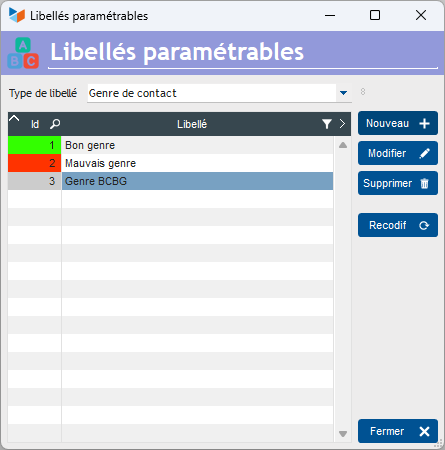
On the contact details page, a drop-down menu will appear, allowing you to select the type of contact you defined on the customisable labels screen.
The button Recodif button allows you to change the code in all relevant records, or to delete it. For example, this allows you to recode to “Incorrect type” all contacts of the type “Preppy style”, or to reset them to “Undefined” all contacts by genre “Good taste”.
Special features
Some labels have specific characteristics.
Payment methods
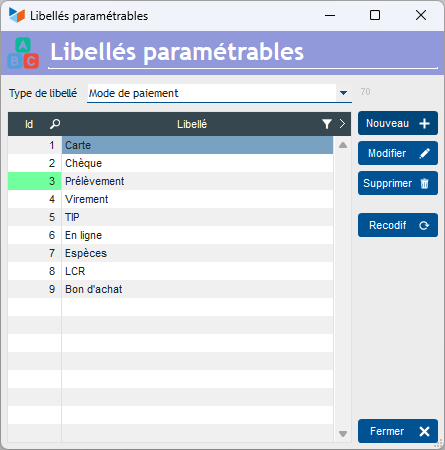
For “Payment method” labels, the functional meaning of the label cannot be changed for labels with IDs 1 to 9.
For example, label ID 2 will always be “Cheque” (prompting you to enter the cheque number when creating a journal entry), even if you rename it “Card” (a pop-up message will alert you to this when you try to change it). This is because certain payment methods dictate the behaviour of certain screens: for example, for a cheque payment, Gestan will prompt you to enter the cheque number.
Units (for products)
For units, you can enter:
- an ISO code (this is the one that will be sent to the FacturX monitoring system – a list is available on the UNECE.)
- a number of labels. For example, if you select “6” as the number of labels for the unit “half-dozen”, Gestan will understand that you need to print 6 labels each time a half-dozen of your product arrives.
Please note: the ISO code C62 corresponds to “Unit”.
Most common ISO codes
| UN/CEFACT code | Official name (English) | Common name (French) | Typical use |
|---|---|---|---|
| C62 | One / Piece | Unit / Piece | Unit items, general flat rates |
| H87 | Piece | Piece | Individual physical items |
| KGM | Kilogram | Kilogram | Standard weight (note: KG stands for ‘keg’) |
| TNE | Metric ton | Metric ton | Freight mass |
| MTR | Metre | Metre | Length, cabling, fabrics |
| MTK | Square metre | Square metre | Areas, property, carpets |
| MTQ | Cubic metre | Cubic metre | Volume, gas/water supply |
| LTR | Litre | Litre | Volume of liquids |
| HUR | Hour | Hour | Services, labour |
| DAY | Day | Day | Services based on a daily rate |
| SET | Set | Set / Kit | Sets of inseparable products |
ℹ️ Other “Reference” articles