Importing an Inventory
This programme allows you to update your current stock levels from a spreadsheet.
This corresponds to the following scenario: at the end of the financial year, your warehouses carry out a stock-take and send you a spreadsheet containing the product codes and the stock levels recorded during the stock-take. The programme allows you to update your stock levels using this spreadsheet-based stock-take.
⚠️As with all programmes that perform bulk updates, it is strongly recommended that you back up the database before use.
===== Using the ‘ =====’ screen
Access: Tools → Administration → Data Import → Upload an inventory
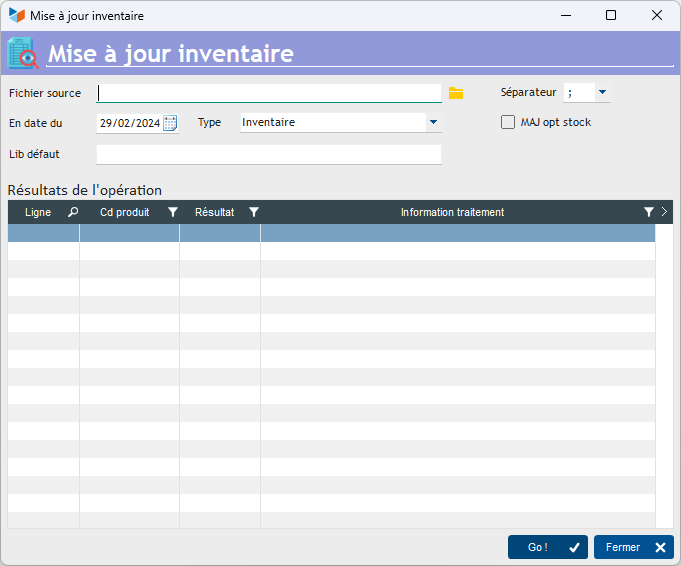
The source file must be in a text format with a delimiter, such as CSV with a ‘;’ delimiter. If you are using Excel, please use the semicolon delimiter.
It contains two columns:
- product code
- stock quantity
If you manage storage locations, there is an additional column:
- location code
Lines beginning with “#” will be treated as comments.
Two additional columns are available, showing the theoretical stock you should record and the product description, for information purposes.
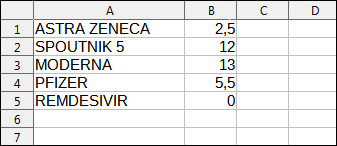
You can give this file to the people carrying out the stock-take, who must fill in:
- the Inventory quantity
- the Location code column if you manage stock locations. If you enter ### as the code, the location to which the stock movement is made will be recorded as the location of the product’s last movement.
Loading data
To load data from the source file :
- Enter the date As of, which will be the date of the stock movement
- Select the Type of movement
- If required, specify a default description for the stock movements that will be created
- If you tick the Optional Stock Update, if the product for which the stock quantity is to be recorded is not declared as stock-managed, the programme will automatically make this declaration in the product file; otherwise, the transaction will not be processed.
The Go! triggers the immediate loading of data.
The programme will create an inventory transaction that will update the current stock to the quantity you have entered in the spreadsheet.
For example, if you had a current stock of 12 for the product “ANR” and you entered 10 in the inventory quantity, the programme will generate an inventory movement of 2 out for this product.
ℹ️ Other “Stock” articles
Détails des stocks produits
Emplacements (de stock)
Etat des stocks
Fabrication de produits composés
Importer un Inventaire
Mouvements de stocks
Niveaux d'alerte
Recalculer / apurer / épurer les stocks
Reliquats
Stocks : généralités sur la gestion des stocks
Stocks : modes de gestion *
Stocks par numéros de série *
Transfert d'emplacements (de stock)