Table des matières
Agenda of actions
 A1 proofreading not yet effective for this page. In the meantime, you can ask any questions on the forum.
The calendar presents all the actions making up the internal activity (as opposed to interventions, which represent the external activity) of the company: appointments, work to be done, telephone contacts, various documents, etc.
Using the screen
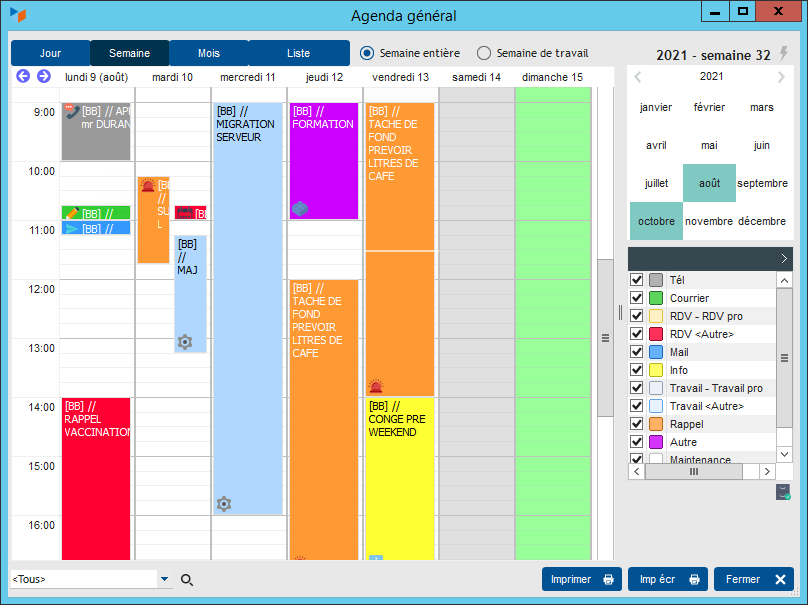
The actions calendar allows them to be managed graphically: actions can be created, moved or modified with the mouse.
Only actions which represent a duration, i.e. which have a specified start date and time, as well as a specified end date and time, are displayed.
Context menu
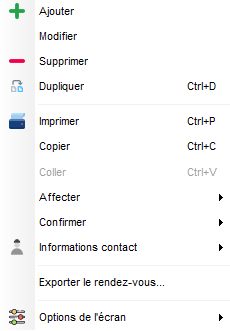
In the options available in the context menu:
- Assign to all allows you to copy the selected action and assign it to all non-archived users in the database
- Confirm allows you to send a confirmation email or SMS (useful for confirming a particular appointment)
- Show on 24 hours allows you to display the calendar in the range from 00:00 to 24:00 (otherwise, the normal hours work interval is displayed.
- Print all addresses is an option which allows you to print on the appointment card all the addresses of the contact in question (otherwise it is the professional address if the contact is a company, or the personal address if the contact is an individual).
 Other Activity articles