Table des matières
General settings: Actions / Interventions / Projects
 A1 proofreading not yet effective for this page. In the meantime, you can ask any questions on the forum.
This tab groups together the settings for actions, interventions, and projects, tasks and work times (consos).
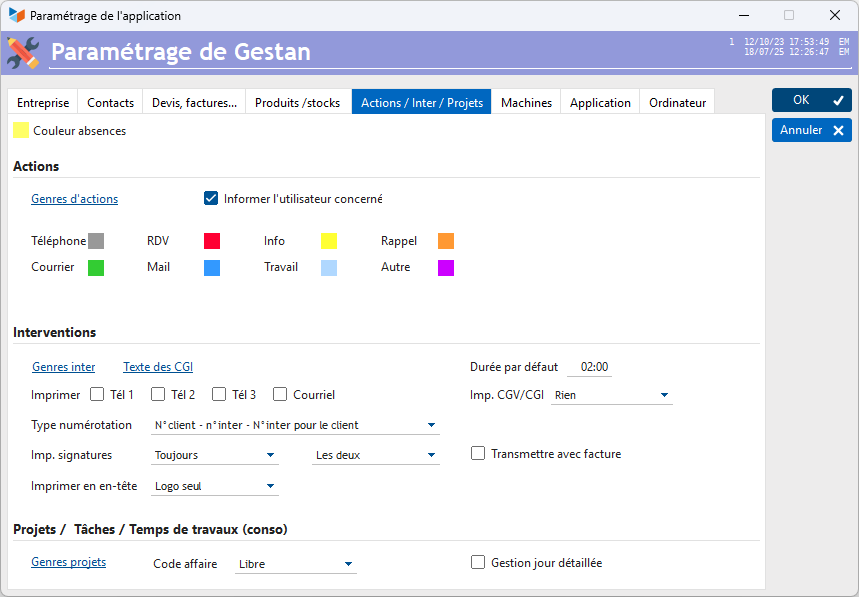
Actions
“Classic” actions belong to a type, namely:
- phone
- mail
- appointment
- mail
- information
- work
- reminder
- other
These types correspond to a color, which will be used for display in the calendar.
The Action type button allows you to create and modify action types. For each type of action, it is also possible to associate a color. These colors will be used for display in the list screens.
If the Notify the user concerned box is checked, then when a modification or deletion is made by a user who is not the assignee of the action, an “information” type action will be created to inform the assignee of the modification or deletion.
If the all resources box is checked, all types of actions will be displayed on the schedule, even if there are none for the period considered.
Interventions
The Inter genres button allows you to declare as many types of interventions as necessary.
The CGI Text button allows you to enter the text of the general intervention conditions, which can be edited at the end of the intervention sheets.
The Default duration field is the default duration of the intervention, when created.
The other parameters are essentially the setting of the INT1 state (Intervention sheet). It is thus possible:
- to print, or not, the telephone numbers of the customer concerned by the intervention via the check boxes Tel 1, and/or Tel 2, and/or Tel 3 (This are the three numbers which are recorded on the contact form, professional tab if it is a company, personal tab if it is an individual), as well as the email address, below their postal address.
- to print, or not, the CGV and/or the CGI, via imp CGV/CGI.
- to print, or not, the signatures of the technician and/or customer concerned, via Imp signatures
- to print, or not, the ingredients of the intervention, via Print ingredients
The numbering type of intervention sheets can be configured, like the numbering type of quotes, invoices, etc.
The conventional duration of the intervention day makes it possible to calculate the quantities, when one or more interventions are billed. It is also what will be used to calculate the number of days of an absence, from the start and end dates/times.
If the Send with invoice box is checked, the intervention form will be transmitted at the same time as the invoice, during normal transmission (transmission by email), if the invoice is linked to the intervention.
 The INT1 Intervention sheet state may have a different title. To do this, simply translate “Intervention sheet” by a completely different wording, for example “Work order”, via the translation of labels.
Please note that the T&Cs and CGIs may contain all the keywords available to contacts.
Projects
Using the Project type button, you can declare as many project types as you want, by associating a color. This color will be used for display in the project list screens.
The Business Code combo allows you to trigger automatic numbering of cases, according to a configurable type of numbering.
Check the box Detailed day management if you want to manage the details of the days, in particular the costs of transport, accommodation, catering, or packed lunches (The packed lunch bonus is a fixed allowance paid each month. The method of calculating this basket bonus depends on the collective agreement which put it in place or the commitment that the employer has made. The same is true for the amount of the basket bonus).
 Other articles “General settings”