Table des matières
Stock status
 A1 proofreading not yet effective for this page. In the meantime, you can ask any questions on the forum.
This screen presents the inventory status of the managed products.
Using the screen
//Access: Products → Stock status //
The screen presents the list of products whose stock is managed. The drop-down lists at the top of the screen allow you to specify selection criteria for the display.
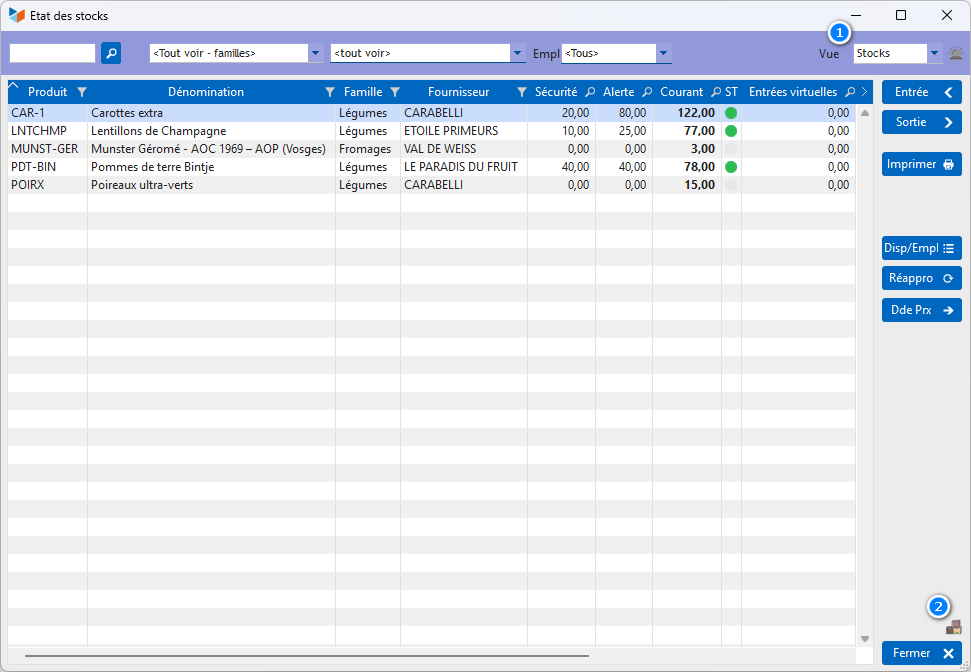
The V Inputs and V Outputs columns are the virtual inputs and outputs. For example, depending on the settings you have chosen, a product may enter virtual stock between the date the order is sent to your supplier, and the date the product is received in your physical stock. And exit virtually between the customer order date and the delivery note date (the reference parts can be configured via the general settings).
The inclusion in the virtual stock on entry or exit begins from the moment the reference part is no longer in the “draft” state, and stops from the moment the reference date of the part is indicated, according to the table below:
Virtual entries
- supplier orders: date of receipt
- supplier invoices: payment date
- receipt vouchers: date of receipt
Virtual outings
- customer quote: date of acceptance
- customer order: validation date
- customer invoices: collection date
- BL: delivery date
The Potential stock at DD/MM column displays the virtual stock calculated to date, which gives greater precision for the overall virtual stock, expressed without notion of date. It is displayed according to the settings of replenishment options.
The ST (status) column displays the stock status of the product, based on the defined stock thresholds (alert, safety, maximum stocks).
The 1 drop-down list allows you to select other views:
- the Valuation view presents the valuation of the stock for sale (in PU Sale and PAMP)
- the Stock+Valo view presents the elements of the two previous views
- the Order view presents the number of products to order immediately, based on current stocks and stock alerts
The Enter and Exit buttons allow you to enter stock entries and exits for the product selected in the table.
The Availability/Empl button displays availability by location, if the locations are managed.
The Replenishment button initiates a supplier order for the products selected in the table, which require replenishment, based on your stock management objectives, while the Dde prx button generates a price request based on the same rules.
The 2 button limits the display to products with non-zero current stock.
Stock valuation view
The Valuation view has the following columns:
- Valuation presents the valuation of the stock on sale, the stock being valued by the formula: PU excluding VAT sale * Qty in stock
- PAMP Valuation presents the valuation of the stock according to the weighted average purchase price (PAMP), the stock being valued by the formula: PU excluding VAT sale * PAMP
Note: The PAMP is calculated using one of the methods specified in the general application configuration (CUMP, PEPS/FIFO, or DEPS/LIFO).
Before using the PAMP valuation column, it is necessary to ensure that the last PAMP calculation was carried out on the reference date that suits you, as described on the page Calculation of PAMP. For example, if you want the day-to-day valuation, recalculate the PAMP on today's date then consult this screen, or if you want it on the closing date of your financial year, recalculate the PAMP on this date then consult this screen (the screen does not recalculate the PAMP, which must be calculated first).
Context menu options
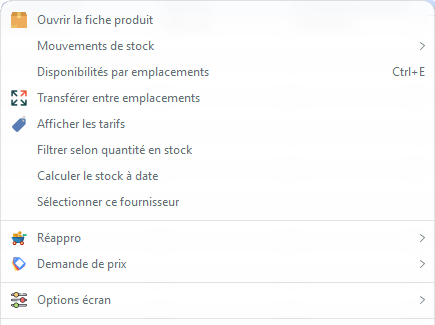
- Stock movement: opens the list of stock movements for the selected product, either the general screen or the detail screen including virtual stocks.
- Transfer between locations: allows you to transfer a quantity of the selected product to another (if the locations are managed)
- Filter by quantity in stock: allows you to display only products whose stock is below a threshold
- Select this supplier: allows you to select all products from the same supplier, for a supplier order or a price request
- Restock and Price Request allow you to perform the same actions as the Restock and Price Request buttons, but with additional restock options
The screen options menu offers: * Do not display products without alert allows you not to display products “without stock alert”, i.e. whose alert stock and minimum stock are at zero.
- Show archived products: allows you not to display archived products.
 Other “Stocks” articles