Sending text messages
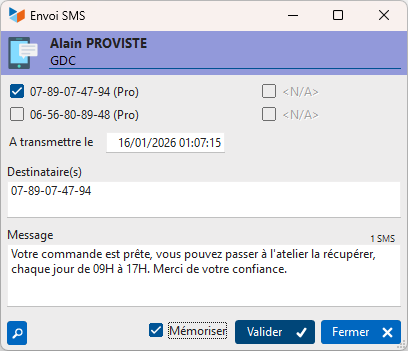
You can send text messages directly from Gestan.
The text message will be saved in the contact’s file (as an action).
Settings
Access: Tools → Application settings → SMS settings
First, you must select the SMS service you intend to use.
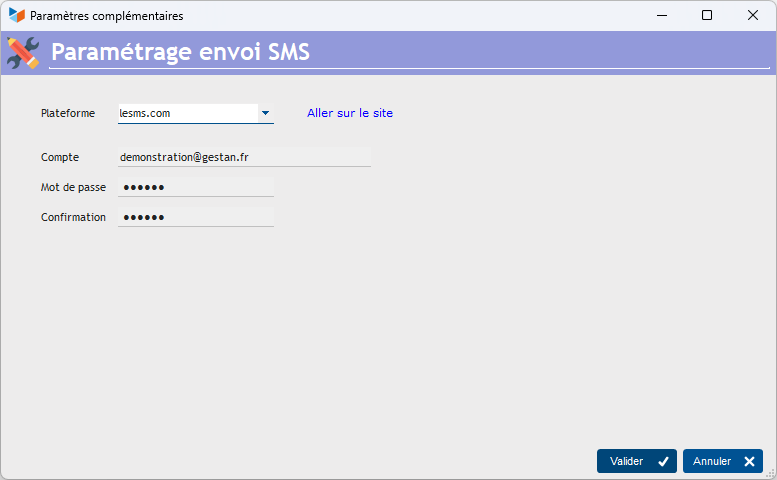
- Open an account with an SMS service provider (currently, Gestan can use lesms.com, clickatell.com, reach-interactive.com and smseco.com – we can develop an interface with any other provider on request)
- You will receive a code and a password as soon as you open your account: enter this code and password at Gestan, in the settings options under the Tools menu.
By selecting the option <Forfait> in the drop-down menu Platformdrop-down menu, you can use the SMS package on your smartphone, whether it is connected to the Internet (C/S or Cloud mode) or to the same network (C/S mode). This option requires the SMS: Envoyer des SMS avec Gestan SMS sending extension.
Usage
You can send SMS messages via:
- the context menu of the contacts list
- the context menu of the list of quotes, invoices, etc.
ℹ️ Other “Settings” articles
Assistant de création d'entête
Champs complémentaires
Connexions
Envoi de SMS
Etats et fenêtres de remplacement
Identités commerciales
Imprimante virtuelle
Paramétrage général : Actions / Interventions / Projets
Paramétrage général : Application
Paramétrage général : Contacts
Paramétrage général : Devis, Factures...
Paramétrage général : L'entreprise
Paramétrage général : Machines
Paramétrage général : Ordinateur
Paramétrage général : Produits/Stocks
Traduction des libellés pièces