SMS
 A1 proofreading not yet effective for this page. In the meantime, you can ask any questions on the forum.
You can send SMS messages directly from Gestan, either from an SMS service provider or via a smartphone account.
The SMS will be saved in the contact's folder (as an action).
Use
**Access : ** Tools → Application settings → SMS settings
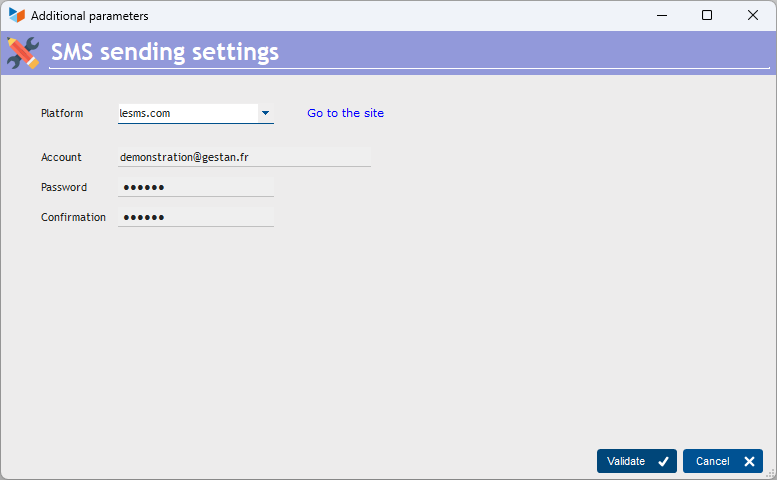
Sending via an SMS service provider
- Open an account with an SMS service provider (currently, Gestan can use lesms.com, clickatell.com, reach-interactive.com and smseco.com - we can develop an interface with any other provider on request).
- You will receive a code and password as soon as you open your account: enter this code and password in Gestan's settings options in the Tools menu.
- Right-click on the contact list to send an SMS to the selected contact.
Send via smartphone
By selecting the <Package> option in the Platform combo, you can use the SMS package of your smartphone connected either to the Internet (C/S or Cloud mode) or to the same network (C/S mode).
This option requires the envoi SMS extension.
 Other “Settings ” articles
Additional fields
Connections
Corporate identities
General settings: Actions / Interventions / Projects
General settings: Computer
General settings: Contacts
General settings: Machines
General settings: Miscellaneous
General settings: Parts
General settings: Products/Stocks
General settings: The company
Header creation wizard
Part headers
Replacement reports and windows
SMS
Virtual printer
Connections
Corporate identities
General settings: Actions / Interventions / Projects
General settings: Computer
General settings: Contacts
General settings: Machines
General settings: Miscellaneous
General settings: Parts
General settings: Products/Stocks
General settings: The company
Header creation wizard
Part headers
Replacement reports and windows
SMS
Virtual printer