Compound Products
 A1 proofreading not yet effective for this page. In the meantime, you can ask any questions on the forum.
Gestan allows you to manage:
- composite products (or works in construction, and certain other trades)
Composite products are groupings of simple products: for example, you could create a composite product which would be an “installed door”, which would include a door unit, a lock, three hinges, and two installation times.
When you invoice this product, the invoice will have a single titled line (as opposed to the model product, which would have as many lines as there are components.
If you manage stocks, the stocks of the component products will be updated.
The compound product manufactures tracking screen displays the quantity of product that can be manufactured from the available stocks of components.
Product composition (list of components)
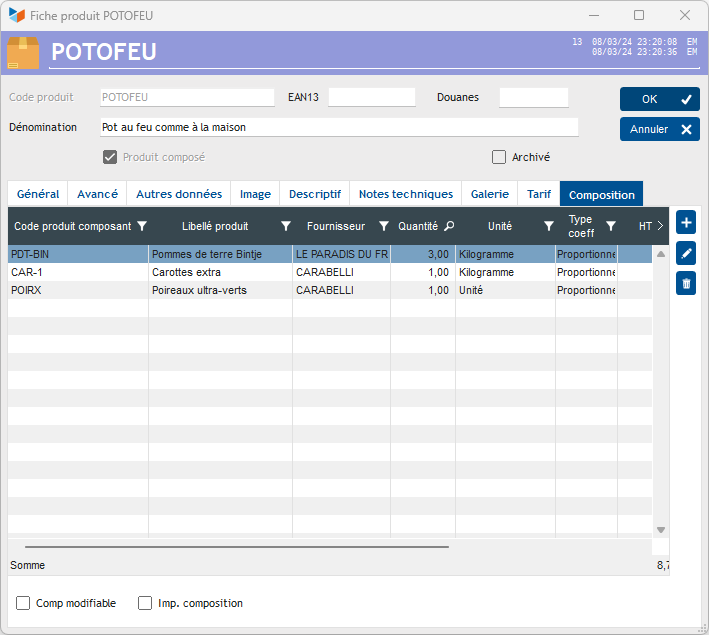
The composition of compound products is displayed in the Composition tab of the product sheet.
Context menu
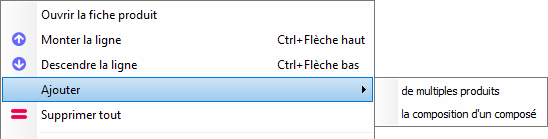
The available options include:
- Add multiple products: allows you to add a set of selected products in a single selection. They will be by default in quantity 1, and proportional coefficient
- Add the composition of a compound: allows you to add the composition of another compound product, with the original quantities and coefficients.
Product composition (component sheet)
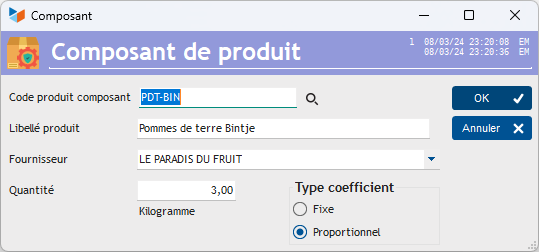
A compound product component can be:
- or in fixed quantity: whatever the variation in quantity of the compound product, the quantity of component will remain unchanged. This corresponds to lump sum items, or other special cases such as for example a pallet in the case of lost packaging.
- or in proportional quantity: the quantity of the component varies according to the quantity of the compound product
The price of the composite product is by default the sum of the price of all the components. Each time the composition is updated, Gestan will offer to update the price of the compound product according to the component products. But you can specify a rate that is different from the sum of the component rates.
 The composition of the compound product may or may not be modifiable (check box on the product sheet). If it is modifiable, it will be possible to modify it (modification of quantity, price, addition, replacement or deletion of a simple product) in the parts.
Use case: negative quantities
It is possible to enter negative quantities in a product composition.
Let's say you sell wheelchairs, the basis of which is a normal frame. On this chassis, you offer either standard or reinforced wheels, and a seat in either synthetic or leather.
Your main “Wheelchair” product will consist of a normal chassis, standard wheels, and a synthetic seat, plus armrests, a headrest, footrests, and other components.
But you will declare
- a composite product “reinforced wheel”, composed of 1 pair of reinforced wheels, and -1 pair of standard wheels
- a “leather seat” product, composed of 1 leather seat and -1 synthetic seat.
Thus, when ordering a chair with reinforced wheels and leather seat, you can make an invoice with the composite product “wheelchair”, adding the two options “reinforced wheel” and “leather seat”.
This way, your stocks will be correct, because when you go to destock everything.
( Thanks to Michel from New Live Mobilité for this clever idea!)
 Other “Products” articles