Tracking work times
Gestan features a stopwatch to make it easier to track the time spent on assigned tasks.
How to use
Access : Projects → Timer
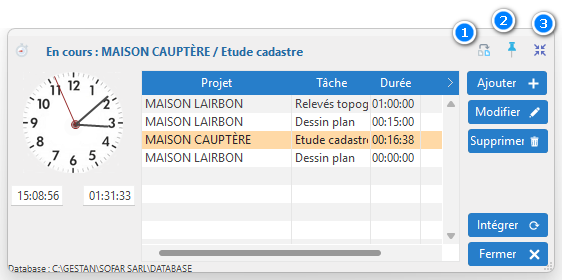
Chrono can be launched either within Gestan or independently of it (i.e. you can close Gestan to use Chrono on its own).
The button 1 adds to the table the projects/tasks to which you allocated time the previous day.
The screen is automatically minimised to the hidden icon bar after 10 seconds, but you can also use the 3to do so. If you’d prefer it never to minimise automatically, use the pin 2.
The Add allows you to select a project/task and add it to the list of tasks you are currently working on.
Double-clicking on a row starts the timer for the selected task. The row is then highlighted in orange.
Edit allows you to add a description of the work in progress and to edit the duration. You can also use the shortcut Ctrl++ to add 15 minutes to the task, or Ctrl+- to remove 15.
The Integrate button opens the time-logging window.
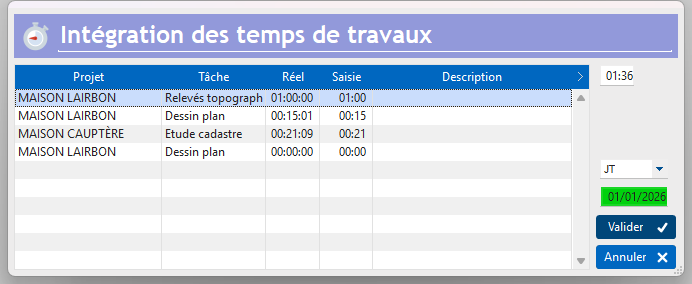
You can edit or add to the data before saving it via the Confirmbutton.
 Other articles on “Projects, tasks, working hours”