Additional fields
For the main files in Gestan (contacts, products, machines, etc.), it is possible to manage additional data alongside the native data.
Five fields per type are available, making a total of 25 fields:
- 5 text fields, such as the make of a car or the name of your contacts’ favourite animal;
- 5 numeric fields, such as a car’s horsepower or the number of years of education;
- 5 Boolean (yes/no switches), such as whether the car has a metallic paint finish or not;
- 5 date fields, such as the date the vehicle was purchased;
- 5 drop-down fields, such as the vehicle’s colour.
This data can be recorded via a dedicated tab on the contact, product, machine, etc. records and used either natively or by extensions that require it.
Example
With the settings indicated above, a tab Additional Information tab will appear on the contact record, as shown below.
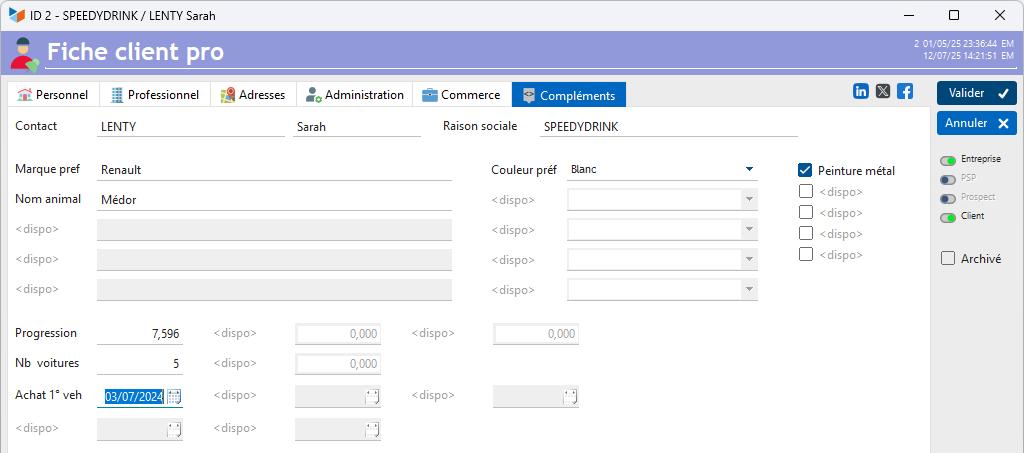 ===== Using the ‘ =====’ screen
Access: Tools → Settings → Additional fields
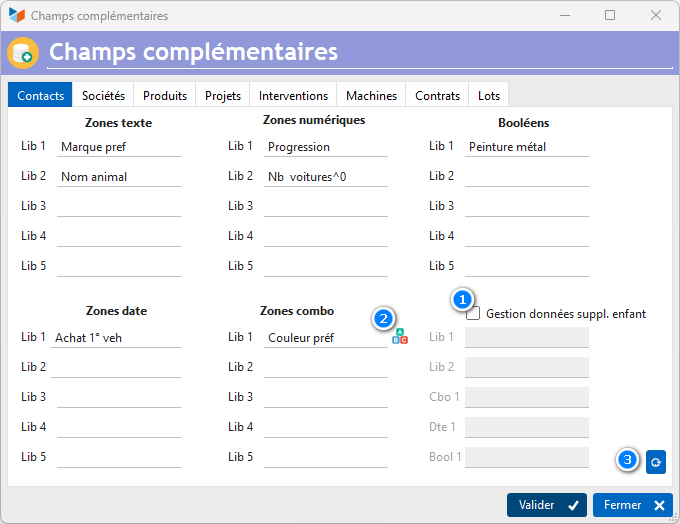
For each additional field you wish to manage, enter a label describing it.
In the specific case of the contacts file, it is also possible to manage customisable fields for children; to do this, tick the box 1.
Configuring numeric fields
You can specify the number of decimal places for configurable numeric fields, as well as whether or not to include a thousands separator.
To do this, simply enter the number of decimal places at the end of the label, preceded by the sign ^, and followed by the sign - if you do not want a thousands separator.
For example, the label “Card code^0-” will allow a number to be stored without decimals or a thousands separator, whilst the label “Sequence ^2” will store a number with two decimal places.
Configuring combo boxes
Entering a label in a combo box displays the button 2button, which allows you to manage the criteria items.
Updating additional fields
Using the 3, you can reset or update all records in the file to any value for the relevant additional field.
 Other “Configuration” articles
Champs complémentaires
Connexions
Envoi de SMS
Etats et fenêtres de remplacement
Identités commerciales
Imprimante virtuelle
Paramétrage général : Actions / Interventions / Projets
Paramétrage général : Application
Paramétrage général : Contacts
Paramétrage général : Devis, Factures...
Paramétrage général : L'entreprise
Paramétrage général : Machines
Paramétrage général : Ordinateur
Paramétrage général : Produits/Stocks
Traduction des libellés pièces