Buttons, menus, widgets
As the name suggests, this screen allows you to configure the menus at Gestan, the buttons for opening programmes, and the display of widgets on the main menu screen.
Accessibility
It is accessible to all users, but validation is only permitted for users with the User privileges “ privilege.
===== Using the ' =====' screen
Access: From the context menu on the Gestan home screen.
Managing buttons

The buttons displayed on the Gestan main menu screen can be customised according to the user’s profile: for example, the “Entries” button is not required if the user does not enter any accounting data.
The ‘Joker 1’, ‘Joker 2’ and ‘Joker 3’ buttons can be used to open any screen in Gestan that does not have a dedicated button, as well as any external programme such as a calculator or notepad, for example.
Menus and tabs

This tab allows you to configure the menus on the main screen of Gestan: you can thus enable or disable the Gestan modules depending on the user’s role.
In addition, you can configure the tabs displayed on:
- the contact list
- the project list
- the product list.
Resources

This screen allows you to configure shortcuts that will be accessible via the main menu of Gestan (the ‘Shortcuts’ menu). Here, you can specify an executable, a URL, a directory or a file.
Items are added to the Resources button on the Toolstab.

==== ==== widgets

Widgets allow you to display information on the main screen of Gestan. To change where they are displayed on the main screen, switch to Edit Mode via the context menu on the home screen.
The widgets currently available are listed below:
| Counter widgets | ||
| widget Description | ||
|---|---|---|
 | Action: Displays the number of actions with the statuses ‘to do’, ‘in progress’ and ‘pending’ | |
 | Uncompleted jobs: Displays the number of jobs with the statuses ‘to do’, ‘in progress’ and ‘pending’ | |
 | Quotations in progress: Displays the number of quotations with the statuses “to be sent” or “awaiting client approval”, along with the corresponding amount. | |
 | ||
 | Customer invoices: This displays the number of invoices with the statuses “pending” or “requiring a reminder”, as well as the outstanding balance (including VAT) due on these invoices.  Please note that this widget may or may not include invoices that have been debited, and may or may not display invoices that have been sent but are not yet due, depending on the options selected via a right-click on the Invoice reminder. |
|
 | Supplier invoices: It displays the number of supplier invoices with the statuses ‘pending’ and ‘to be paid’, as well as the total balance (including VAT) due for these invoices. Please note that this widget may or may not include invoices paid by bank transfer, and may or may not display invoices for which payment is not yet due, depending on the options selected by right-clicking on the Invoice reminder. | |
 | Maintenance: It displays the number of maintenance tasks with the statuses ‘to do’, ‘in progress’ and ‘pending’ | |
 | Invoices to be sent to customers. Handy for the company’s administrative assistant! | |
| Graphical widgets | ||
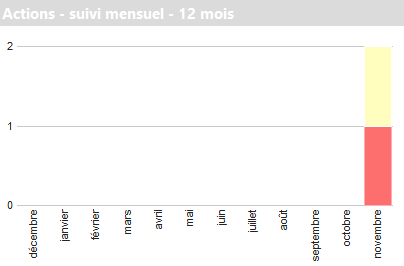 | ||
 | Monthly tasks: Monthly tasks by status. | |
 | Monthly invoicing: Monthly invoices by status. | |
 | Monthly income and expenses: Displays expenses in red (calculated as the sum of entries linked to an allocation attached to an expense account), income in green (calculated as the sum of entries linked to an income account), the difference between the two in blue, and the cumulative difference in yellow. | |
| //Other Widgets // | |
 | |
Gestan || |Calendar, which displays the saint of the day. The button lets you view the list of contacts with that first name – feel free to wish them a happy name day!
||
 |To quickly add a contact or an invoice (based on an idea from Julian! )
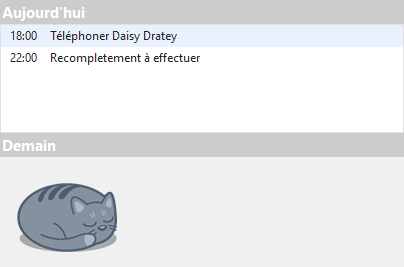
  Today/Tomorrow: displays tasks to be done today and tomorrow.
  To-do list: Displays the list of tasks and/or jobs to be done, depending on the widget’s settings (via the context menu)
 ||
 | ||
 | || Clock widgets||
 |
|| Goals widgets ||
 | Targets: Displays a target figure (for invoicing, turnover, expenses, profit, etc.) in the central dark blue bar, and compares it with the amount achieved against the target, as well as a potentially achievable amount calculated on a pro-rata basis for the time elapsed in the financial year. Here, we have set a 2019 turnover target, of which we had achieved 62% as at 23 May 2019, meaning we should reach 160% of the target by 31 December (and these are real figures, too!) |
 | Reminder pop-up |
—————–
 Other “Users” articles