Table des matières
General settings: Contacts
 A1 proofreading not yet effective for this page. In the meantime, you can ask any questions on the forum.
The settings describing contact management are grouped on this tab.
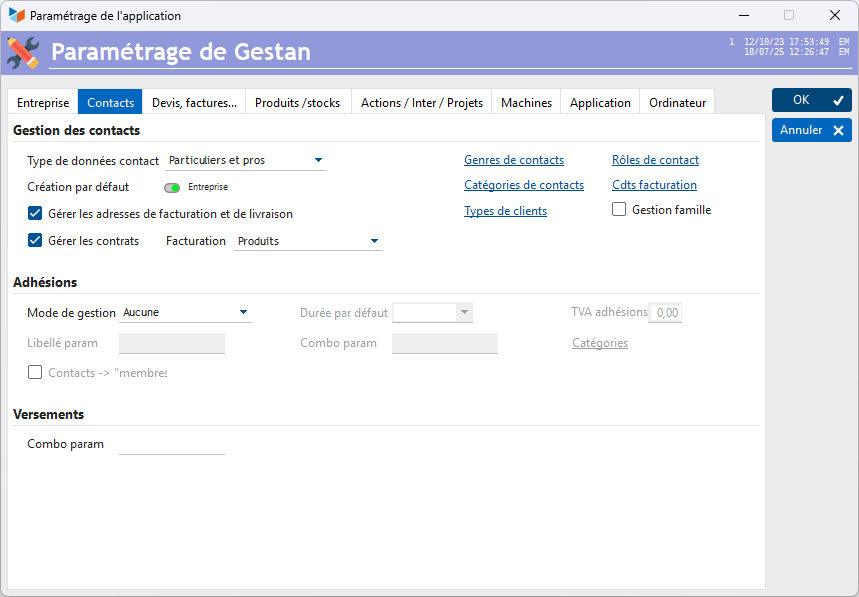
It is possible to manage the professional and/or personal data of contacts, depending on the Contact data types combo.
If the Manage billing and delivery addresses box is checked, an additional tab on the contact screen will allow you to manage these addresses, and any additional addresses that may be necessary (construction site address, vacation address, destination address). apartment, etc.).
If the Manage commercial data box is checked, an additional tab will display customer commercial data: discount rate, whether the customer is subject to VAT or not, special customer instructions for orders, invoices, BL, etc.
The Contact Types, Contact Categories, and Customer Types allow you to segment your contact file by grouping them into Types and categories. If options have been defined for these segmentation criteria, then the corresponding combo will be displayed on the contact sheet. It is possible to associate a color with a type of contact, to view the contacts more quickly in the list. The customer type can be used to refine the accounting assignment of entries.
The Contact roles button allows you to define the possible options for the role of a contact on a project, to keep the project contact directory up to date (screen list of projects).
The Invoicing terms button allows you to define the different invoicing conditions used by your company (eg: 10% discount, or 20% order, delivered balance). It will then be possible to associate them with contacts (commercial information tab of the contact sheet). This information will be displayed, when a contact is selected, on the parts sheet screen (invoices, quotes, etc.).
The Family management box allows you to manage family information, and in particular information concerning children.
If the Manage contracts box is checked, it will be possible to declare the different types of invoicing possible for the management of contracts subscribed to by your customers.
Contract management
It is possible to manage contracts: maintenance, insurance, etc., and possibly manage invoicing linked to these contracts.
If you check the Manage contracts box, you can choose between 5 types of invoicing, the details of which are described on the page dealing with contracts.
Membership management
These areas allow you to manage what concerns memberships, that is to say straight for a contact, valid between two dates.
The management type combo allows you to specify the management mode used.
The default duration combo allows you to specify a default duration for memberships: when creating a new membership, the end date will be calculated based on this parameter.
Depending on the type of management, a Membership VAT field allows you to specify the applicable VAT rate. It can be rubbish.
The Param label field allows you to specify the meaning of an additional label which can be stored for memberships, such as for example a license number, or a type of equipment.
The Combo param field allows you to specify the meaning of a configurable combo, such as for example the type of license, or any other information related to membership. In this case, the button located to the right of the field allows you to enter the different possible options, such as for example beginner, advanced, professional, if it was the type of license.
The Categories button allows you to specify the different possible membership categories (simple, benefactor, support, etc.).
The Contact→Member checkbox is a box that just allows you to replace the word “contact” with the word “member” on certain buttons, screens, and menus. This is a bit of semantic coquetry, but its still nice!
Payments
This area allows you to manage what concerns payments, that is to say any payment of money which does not relate to an invoice or a membership: for example donations to an association, a political party, a religious movement , or any other group.
The Combo param field allows you to specify the meaning of a configurable combo, such as the reason for the payment, or any other information related to the payment. In this case, the button located to the right of the field allows you to enter the different possible options.
 Other articles “General settings”