====== ======Incident Management
Incident management allows you to record any incident that occurs in your business, and how it was resolved.
This tool is essential if you wish to obtain ISO 9000 or another certification for your company.
Incidents can be linked to:
- Contacts,
- Users,
- Products,
- Purchase or sales documents (orders, quotations, invoices, etc.),
- Machines,
- Entries,
- Service calls.
Activation
Defect management is activated, and the management mode is configured, via the== ==Paramétrage General.
Defect management can be handled in two modes:
- the simple mode, in which the fault and its status are simply recorded
- the detailed mode, in which you record the anomaly and all the steps involved in resolving it
Record an anomaly
In the relevant tables, the context menu allows you to open the anomaly management screens.

Here, on the list of contacts (you can also use the Ctrl+F1 shortcut):
- if no fault has been recorded, the creation screen is displayed.
- if one or more issues have not been resolved, the screen listing the issues associated with the contact will be displayed.
In simple mode

This screen allows you to describe the fault in detail, using the Descriptiontab.
You can attach documents to it (photos, spreadsheet or word processing files, PDFs, etc.).
In detailed mode

In detailed mode, the additional tab Steps tab allows you to track the various stages involved in resolving the issue.
List of issues
Access: Statistics → Issues
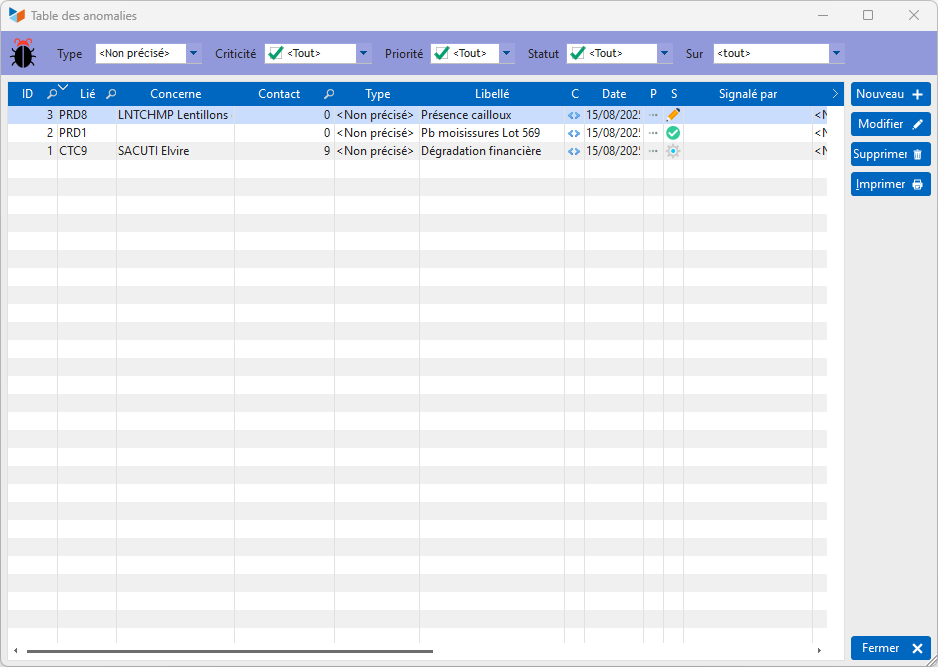
The list shows all the anomalies recorded for the activity.
ℹ️ Other articles on “Miscellaneous functions”