Expense reports
 A1 proofreading not yet effective for this page. In the meantime, you can ask any questions on the forum.
You can manage your expense reports with Gestan, that is to say record a set of expenses, take them into account according to your company's management rules, and make payment, which will be directly integrated into your accounting.
List of expense reports
Access: via Utilities → Expense reports → List of expense reports
The screen presents the list of recorded expense reports, with their status.
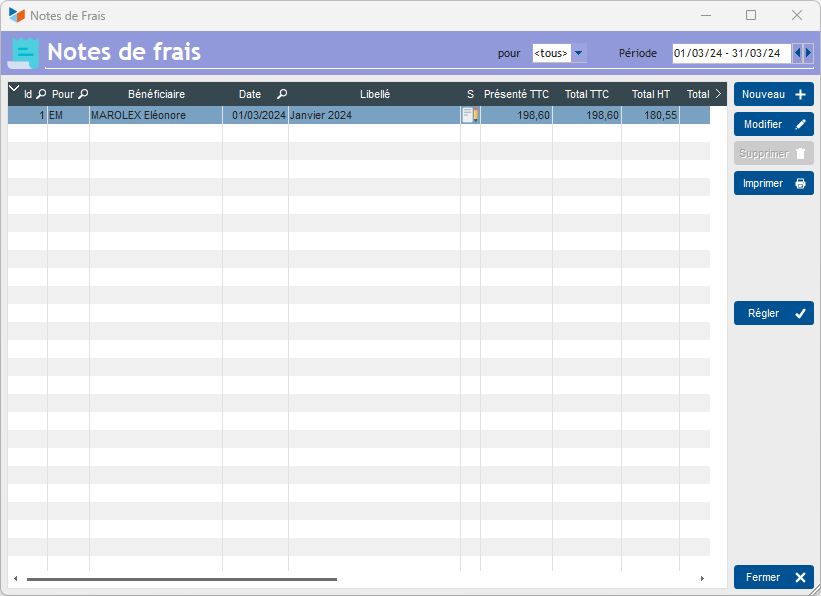
The Set button allows you to record that, for the selected expense report, payment has been made. An expense report can only be paid in full (no partial payment). The payment will feed into the payment date of the expense report.
A disbursement will be generated in accounting. This entry will be linked to the expense report considered. And it will be broken down into as many entry items as expense report lines.
Expense report sheet
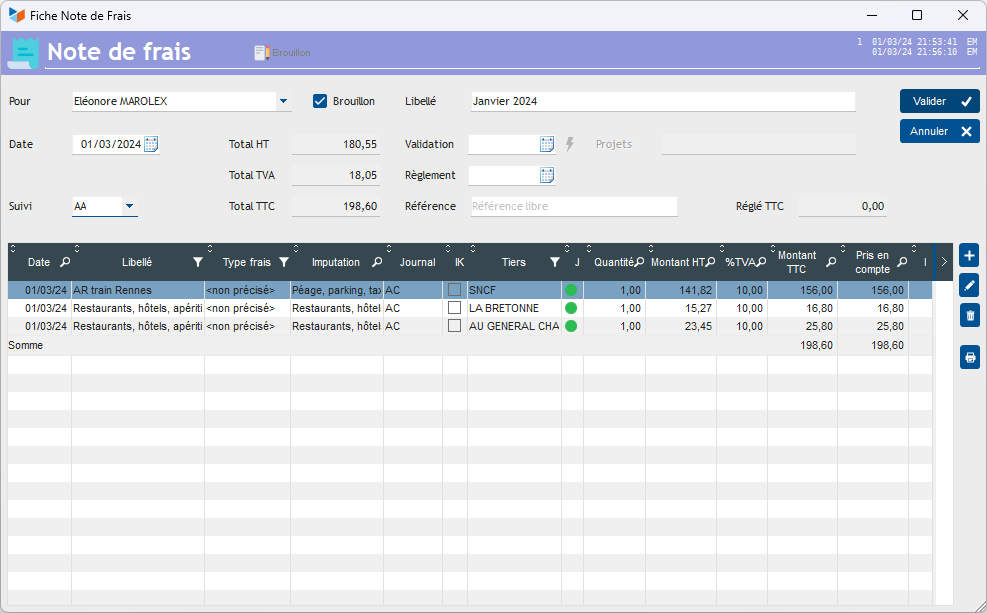
An expense report is established for a user, and can be followed by another user.
An unlimited number of lines can be attached to it.
As long as the In Progress box is checked, it will be possible to make any changes to the expense report. As soon as it is no longer checked, only the following user can modify it.
If the validation date (agreement on the items of the note, and their amount taken into account) is entered, it is only possible to enter a payment date. If the latter is entered, the note will only be modifiable by a Gestan administrator. This date is not intended to be entered manually, unless you do not manage any accounting in Gestan. In fact, it will be filled in automatically when you click on the set button on the list screen.
Expense line sheet
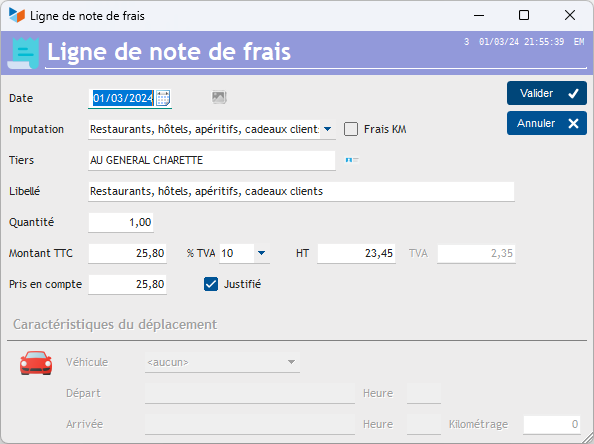
The imputation to which the expense report is linked makes it possible to automatically inform the third party (possibly), and the nature, kilometric or not, of the line.
The quantity can represent the number of meals, the number of nights, the number of kilometers, etc.
It is possible to declare a type of expenses (via the configurable labels), which allows the storage of a deductible VAT rate. Indeed, depending on the tax rules of your country, the deductible tax rate may vary depending on the type of expense, a very unnecessary complication very common in France… If at least one type of expense is declared, the **VAT deducted field ** allows you to enter the maximum deductible VAT rate (Enter 100 if all the VAT on the line is deductible).
The amount including tax is the amount actually paid, while the amount taken into account is the one that will ultimately be retained as the basis for reimbursement by the company. For example, your company can decide to cap the amount of a meal at a restaurant for a sales executive at 'a simple steak and fries.
The justified box allows you to specify that proof has been presented (restaurant bill, train or plane ticket, hotel bill, toll ticket, etc.). If proof is not presented, the amount will not be taken into account for reimbursement.
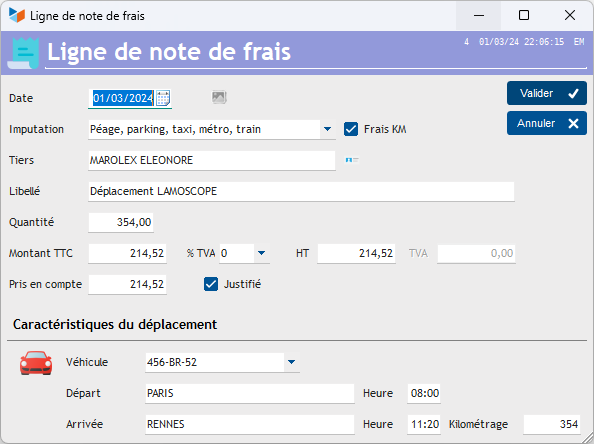
If the line is a mileage allowance (box KM costs), you will need to indicate a vehicle, a place of departure and arrival, possibly times, and mileage. If the cost per kilometer of the selected vehicle is entered in the vehicle file, the amount of the item will be calculated (number of kms * cost per km).
 Find out everything about expense reports: this link.
 Other articles “Miscellaneous functions”