WAPP: Weighted average purchase price
 A1 proofreading not yet effective for this page. In the meantime, you can ask any questions on the forum.
The weighted average purchase price is an accounting concept that allows you to calculate the value of your stock.
With the valuation of your stock at the beginning and end of the accounting year, you will be able to calculate a value difference, which will impact the accounting result for your year.
For example: if a company begins its financial year with stock valued at 400,000 euros, and ends it at 500,000 euros, the stock variation is -100,000, which increases the result by 100,000 euros, which can have a tax impact important.
How to evaluate the value of the initial stock and the final stock?
If, during the financial year, you purchased 12 items at a unit price of 10 euros excluding tax, and you have 4 left at the end, your final stock value is easily established at 4 * 10, or 40 euros. On the other hand, the calculation is more difficult when, for example, you bought 6 items at 10 euros, then 4 at 12, and 2 at 9, and you bought 5 last year at 8 euros, for example.
It is the concept of weighted average purchase price (WAPP) which is used for this evaluation. There are many calculation methods, the accounting evaluation of a stock variation is not an exact science. Gestan can use:
- the weighted average unit cost method (WAUC),
- first in first out (FIFO),
- or last in first out (LIFO)
The WAUC and FIFO methods are approved by the French tax administration.
The WAUC method
The weighted average unit cost method (WAUC) consists of calculating a weighted average cost by dividing the total acquisition costs by the total quantities acquired. This method is generally used for stock valuation of non-perishable materials, which can be stored over a long period. Its calculation can be carried out:
- either at the time of each entry into stock (particularly in the case of permanent inventories),
- or at the end of each period (particularly in the case of intermittent inventories, which often corresponds to the average storage duration).
With each new entry, the WAPP could be calculated as follows:
WAUC = (Value of previous stock at the old WAUC + Acquisition cost of the new entry) / Total quantities in stock
Or
WAUC = Total acquisition cost of entries over the period / Total quantities entered over the period
In fact, Gestan rereads all purchase invoices, and divides the total purchase amount by the quantities.
The FIFO method
The first in first out method, or FIFO, is based on the first acquisition or production costs. It is often used for inventory assessment of perishable products.
To do this, each outgoing stock is valued at the cost of the oldest product in stock.
The LIFO method
The last in first out method, or LIFO, is based on the latest acquisition or production costs. To do this, each stock issue is valued at the cost of the most recent product in stock.
Examples
For example: Over a financial year, here are the movements affecting a product whose initial stock was 20 items purchased at 8 euros:
- purchase of 100 products at a unit acquisition cost of 10 euros,
- sale of 90 products,
- purchase of 50 products at a unit acquisition cost of 11 euros,
- sale of 30 products,
- sale of 30 products,
- purchase of 50 products at a unit acquisition cost of 9 euros.
As of December 31, purchases were 200 and sales were 150, the final stock is therefore 70.
The valuation of the final stock of this product is:
- in WAUC: (20*8 + 100*10 + 50*11 + 50*9) * 70 / 220, or 687.27
- in FIFO: (20*8 + 100*10 + 30 * 11) * 70 / 150, or 695.33
- in LIFO: (50*9 + 50*11 + 50*10) * 70 / 150, i.e. 700
How to update WAPPs in Gestan
The WAPP can be calculated by any external tool, or calculated automatically by Gestan.
Calculation from an external tool
You can use any external tool (inventory management program, excel spreadsheet, etc.) to calculate product WAPPs.
You can :
- for a one-off calculation, directly update the WAPP fields of the product sheet.
- to update all or part of the file, use the text file import program, in which you will use a two-column spreadsheet, the product code and the Calculated WAPP.
Automatic calculation
To automatically calculate WAPP in Gestan, you must record the purchases you make, via entering supplier invoices, and record stock movements as input and output.
You will then be able to:
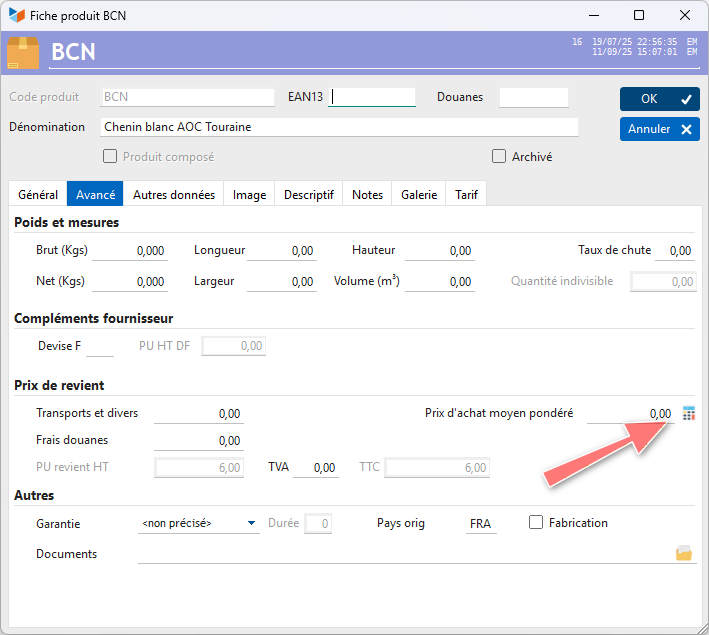
- for a one-off calculation, use the WAPP calculation button in the product sheet. The calculation is made on today's date.
- to update the entire product file, use the calculation program described below.
Calculation of WAPP
Access: Products → Calculate WAPPs
The calculation date is the date which serves as a reference: you can calculate the WAPP on 12/31 of a year, for example, for the valuation of stocks to communicate to your accountant, while you are already in February of the year. Next year.
In the calculation process, if the program does not find any movement, the WAPP will be populated with the purchase price appearing in the customer file.
The Copy WAPP in purchase price check box copies the WAPP found in the Purchase price excluding tax area of the product sheet.
The stock status screen allows you to view the stock valuation for the calculated WAPPs.
 Other “Products” articles