Contact addresses
The contact form allows you to enter a business or home address directly.
If the box ‘Manage billing and delivery addresses’ is ticked in the general settings, an additional panel in the contact record allows you to manage the contact’s billing and delivery addresses, as well as other types of addresses.
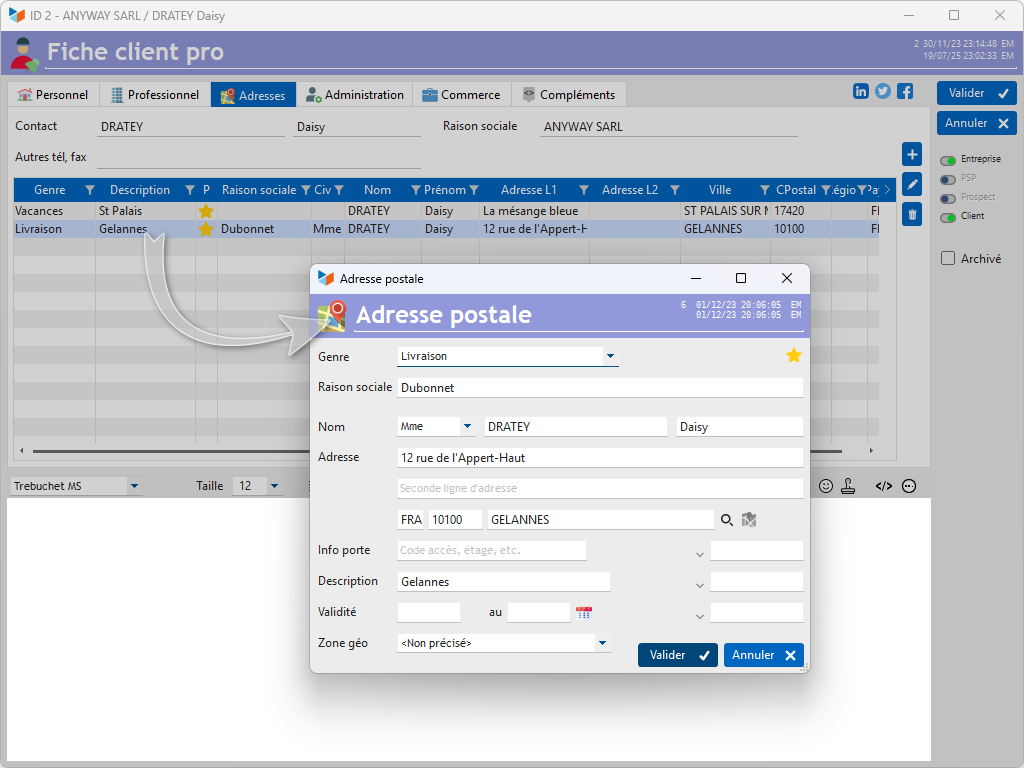
The following types are available by default:
- Home address
- Business address
- Billing address: used when generating an invoice for the customer;
- Delivery address: used when generating a delivery note for the customer;
- Holiday address: used depending on user actions.
The context menu for address types allows you to save additional types, for example:
- ‘Parent 2’ address: used by the EDUC extension in the case of separated parents (report cards generated for both parents)
- ‘Owner’ address: the address of the owner of the contact’s property (used by certain property management programmes)
 The context menu for the field Company Name allows you to copy the contact’s business or home address.
ℹ️ Other “Contacts” articles