Sending emails using Gestan
The SMTP server is the ‘pipeline’ through which you send your emails. This pipeline is configured at Gestan (on the paramétrage General screen):

In recent years, internet service providers have introduced numerous restrictions on sending emails in an attempt to reduce spam.
Consequently, greater care is needed in this area to ensure that the emails you send are not classified as spam.
This page outlines the criteria for choosing which SMTP server to use, as well as recommendations for ‘best practice’, for those who wish to go further.
Which SMTP server should you use?
You can use, in order of effectiveness:
- your domain’s SMTP server: the optimal solution
- a professional SMTP service such as Brevo, MailGun, etc.: a useful solution for bulk mailings or email tracking
- the SMTP server at Gestan: a convenient but imperfect solution
- the generic SMTP server associated with your personal email address, if you use one, such as Gmail, Yahoo or Orange: the worst of all the options
Your domain’s SMTP
This is the best solution.
To use this, you must have a domain name, such as “masociete.com” or “maboite.fr”.
If you do not have a domain name, we recommend … that you buy one! (Annual cost approximately 15 euros. We can purchase one for you if necessary).
You’ll need to ask the company from whom you purchased the domain for the SMTP settings to use:
- the SMTP server, usually in the format smtp.provider.fr
- its communication port and protocol, usually 587 using TLS or 465 using SSL
Enter your email address and password, then click the test button 1 to check the settings. You will usually need to tick the box Auth G3
Dedicated SMTP services
This is a useful solution, particularly if you have a large number of emails to send, or if you want to track your emails (i.e. to know precisely whether your email has been delivered, opened or clicked on).
To do this, sign up for a service such as Brevo, SMTP2GO, Sendgrid or similar (see liste), and configure Gestan using the settings provided by the service. Gestan natively integrates with Brevo (formerly SendInBlue), which offers a very satisfactory quality of service (see: suivi</ignore><ignore> emails).
Gestan ’s SMTP server
Whilst using the SMTP server Gestan is very convenient (no configuration required), it is not the recommended option. This is because:
- Emails sent via Gestan ’s SMTP server include the message “Sent with Gestan ”.
- Mass mailings are prohibited via this SMTP server
- even if the sender’s address is indeed yours, the technical sending address is mail-service@gestan.fr: a recipient who has blacklisted this domain would not receive your emails.
- Since September 2026, the sender address, as displayed by some email clients, has been suffixed with ‘brevo’, as shown in the image below. The reply-to address will indeed be your own, but this may confuse some of your recipients. Furthermore, your email is more likely to be categorised as a ‘newsletter’.

GDPR : The SMTP server provided by Gestan is operated by Brevo (a French company not subject to the Patriot Act or Cloud Act) and is subject to the data protection conditions set out by Brevo in its <ignore></ignore>politique</ignore><ignore> privacy policy. ICS-Informatique staff have access to the same information as Brevo staff, and are bound by the confidentiality and data protection obligations set out in its <ignore></ignore>CGV and its politique privacy policy.
The generic SMTP server for your personal email address
Some companies use personal email addresses for professional purposes, for example:
- marcel.sanzot.pro@orange.fr, instead of contact@boucherie-sanzot.fr
- plomberie84@gmail.com, instead of monplombier@plomberie84.fr
- or piecesauto@yahoo.fr instead of contact@pieces-auto.com
This is still possible, but it is not good practice.
In these cases, you should use the settings provided by the email service provider, in this instance in the order orange.fr, gmail.com, or yahoo.fr.
The settings can easily be found online (settings Orange, Google, Yahoo), if you cannot find them, you can contact these companies’ support teams.
With some providers, an additional setting is required:
- with Google, you need to go to the Google Admin console to authorise Gestan to send emails via Google SMTP. See SMTP Gmail.
- With Microsoft Office 365, it’s even more complicated! See SMTP Office 365.
Sender address and email account
The sender address may be different from the email account you use to send emails.
For example, you can send emails using the address c.limen@masociete.com from an email account such as a.rosoir@servicemail.com
As for the email address, it is preferable to use a business address, such as contact@masociete.com or b.lisaire@masociete.com, rather than a personal address, such as those from Orange, Free, Wanadoo, Hotmail, Gmail, GMX, Outlook, etc. This is particularly important because emails sent from a personal address are more likely to be classified as spam.
When you use the SMTP server Gestan: your email will be sent from your own address, for example contact@masociete.com, but the sending account will be mail-service@gestan.fr. When your recipient receives your email, depending on their email client, they may see your name and the sending account, but if they click ‘Reply to’ from their email client, the reply will be addressed to contact@masociete.com. This is one of the reasons why it is preferable to use an address linked to your business domain name, with the associated SMTP server.
Best practices for sending emails
As the proportion of unsolicited emails (spam) has become very high (ranging from 55 to 95 per cent of traffic depending on the time and measurements taken), organisations managing email transmission have significantly tightened the restrictions that apply to sending emails. Consequently, if a sender deviates too far from ‘best practice’, the emails sent will not be delivered to their recipients. In the worst-case scenario, the IP address of the sending server will be blacklisted, and subsequent emails – even legitimate ones – will no longer be delivered.
It is therefore useful to be aware of best practices to improve the deliverability of your emails.
The basics of sending emails
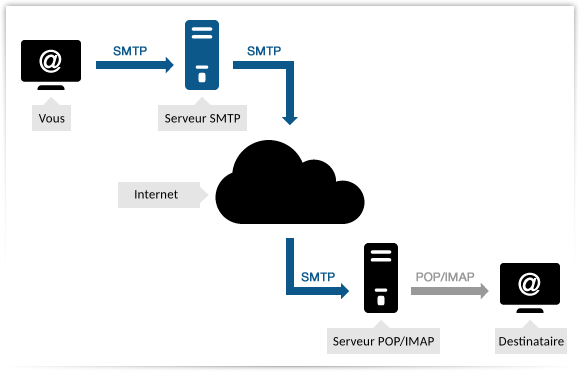
To send an email, your computer will use the SMTP service (Simple Mail Transfer Protocol) to send your email to the SMTP server you have specified. This SMTP server will forward your email to the recipient’s POP/IMAP , to which the recipient will connect to read your message. To put it simply, an SMTP server is the ‘outlet’ for your emails.
For example, if you (moi@monentreprise.com) have sent an email to contact@gestan.fr, your email will travel via the SMTP protocol until it reaches the mail server for the monentreprise.com domain, from where it will be forwarded to the mail server for the gestan.fr domain. When your recipient logs into their email account, they will connect to their domain’s mail server and retrieve their messages via the IMAP (or POP3) protocol.
The entire transmission process can be illustrated as follows:
During transmission, the servers carry out checks to ensure that your email is not unsolicited (spam). Your message will be assigned a ‘spam score’: if this score is too high, your message will either be placed in your recipient’s spam folder or deleted altogether. This is known as ‘deliverability’ is the likelihood of your email not being classified as spam: you need your deliverability to be as high as possible (i.e. for it to have the lowest possible spam score).
How can you ensure your emails don’t end up in the spam folder?
Whilst it used to be possible, in the early days of email (from the 1960s up to around the 2000s), to send emails without restrictions, this is no longer the case today, as all SMTP service providers have tightened up their email sending policies.
If you repeatedly breach the rules for sending emails, not only will your emails fail to reach their recipients, but your SMTP server’s IP address may be blacklisted, and subsequent emails – even legitimate ones – will be classified as spam. Expertise in email deliverability has almost become a profession in its own right.
Here are the points to check to ensure your emails are delivered successfully.
Use a professional domain name
An email address from a generic domain such as wanadoo.fr, orange.fr, free.fr, gmail.com, etc. (for example, plomberie84@gmail.com or boucherie-sanzot@orange.fr) is not considered a professional address: a professional email address professional ends with the company’s domain (for example, contact@gestan.fr or recrutement@gestan.fr).
Use a genuine professional email address, such as contact@plomberie83.fr, and your own SMTP server (more information on the Mailjet).
By using a business email address instead, you benefit from three major advantages:
- you improve the deliverability of your emails, notably by being able to configure your DKIM and SPF records.
- you build your brand identity : no ‘respectable’ company communicates using a generic domain.
- you protect your business data and that of your customers : when you use a generic address, emails pass through servers where confidentiality is not guaranteed, particularly services offered by foreign companies such as Google’s Gmail, which are subject to the Patriot Act and the Cloud Act. Your business data, as well as that of your customers, is therefore at risk of being exploited or resold by these third-party companies without your consent.
Use your own SMTP server, or a professional SMTP service
When you send emails, you specify which SMTP server you are using.
For example, you could specify that emails sent from the address contact@plomberie83.fr must use Gmail’s SMTP server. This is not a good idea, as emails passing through Google’s servers are scanned and used for advertising purposes.
Instead, use:
- either the SMTP server associated with your domain name. If you’ve purchased a domain such as maboite.com, your domain name provider will provide you with an SMTP server. And it’s free.
- or a professional SMTP server; there are plenty available pléthore. These services aren’t free, but their infrastructure is powerful and efficient, and they offer some very useful additional features (tracking, archiving).
Authenticating your emails
To authenticate your emails, you need to configure:
- your SPF record
- your DKIM record
- your DMARC record
These are elements of your DNS settings, which are configured via your domain name’s management interface, depending on your domain name provider.
Consult the documentation provided by your domain name provider to find out how to configure them.
Avoid words associated with spam
Avoid as far as possible words that are often associated with spam, such as: “Free”, “no charge”, “Exceptional offer”, “Guaranteed”, “Increase sales”, “Order now”, “Risk-free”, “Special promotion”, “Winner”, “Money”.
Also avoid text written entirely in capital letters, excessive use of exclamation marks, overuse of emojis, as well as grammatical or spelling mistakes.
HTML coding
If you send emails in HTML format (as opposed to plain text), follow these recommendations as closely as possible:
- Use a maximum width of 600 to 800 pixels
- Ensure that the HTML code is as clear and simple as possible. Avoid JavaScript and Flash.
- Avoid including too many images in relation to the text
- Optimise and reduce the file size of your images.
Attachments
Send as few attachments as possible.
If you have a large number of attachments, or large files, create a ZIP archive and make them available either by sending them via a service that ensures confidentiality (for example, SwissTransfer, which is free), or via a storage service such as an FTP location on your website (avoid services such as Dropbox or Google Drive, as confidentiality is not guaranteed).
Precautions for mass email campaigns
If you send more than 100 identical emails to different recipients, this is considered a “mass email campaign”. Whether you carry out a mass mailing using the email sending functions at Gestan, or by any other means, please ensure you comply with the following requirements:
- You must include your contact details and an unsubscribe button, which must be visible at the top or bottom of your message. If you make it difficult to unsubscribe, some of your recipients may report you as a spammer, thereby damaging your online reputation.
- Avoid sending too many emails at once: if you usually send emails to 1,000 subscribers and suddenly increase this to 100,000, you will trigger ISPs’ anti-spam filters. If you have a large mailing to send, notify your domain host, or better still, use a specialised service such as Brevo, Mailjet or similar.
- Clean up your mailing list regularly: if the proportion of invalid addresses exceeds a certain threshold, your email campaign may be classified as spam.
- Keep an eye on your spam complaint rate. This rate must remain below 0.10 per cent.
French regulations : In France, sending regular messages is only lawful if the recipient has given their prior consent to receive emails. You must therefore obtain a subscription and subsequent explicit confirmation from the recipient. The holding of any personal data file is subject to notification to the CNIL. It is prohibited to collect personal data without the consent of the person concerned: as such, email tracking is theoretically not permitted (Gestan does not do this).
=== === blacklisting
If certain criteria are met (message content, volume, frequency of sending, etc.), the servers through which the emails pass may blacklist the sender’s IP address and block any emails sent from that machine. Your IP address may be blacklisted quite rightly, because you are sending spam, but it may also be blacklisted by mistake, or because a third party has spoofed your domain name or taken control of your machine.
How can you find out if your IP address is blacklisted
You can, for example, use the website multiRBL, which will query the main mail servers.
If your IP address is blacklisted, all you need to do is contact the list’s administrators to find out why you’re on it and what you need to do to get removed.
Further reading
Training
Technical
SPF, DKIM, DMARC
Tools
News
Test your deliverability
You can test the deliverability of your emails using services such as:
ℹ️ Other ‘Technical’ articles
Arrondis
Développements spécifiques
e-Mailing, spam : les bonnes pratiques
Envoyer des mails avec Gestan
Etats et Requêtes
Etendre les fonctionnalités de Gestan
Externalisation du courrier
Gestan sur MAC
Mettre en place un certificat SSL
Migration de la version 15 vers la version A1
Mise en réseau de Gestan
ODBC sur HFSQL
Paiement en ligne (Paypal)
Paramétrer la recherche
Présentation générale de Gestan
Répertoires et fichiers
Sauvegarde des données Gestan
Sauvegarde des données Gestan Cloud
Serveur SMTP Google
Serveur SMTP Office 365
Serveur Spare
Temps de réponse
Tester la communication
Tester votre connexion Internet
Transférer Gestan d'ordinateur
Tuto détaillé SuperPDP
Téléphonie SIP-TAPI
Utiliser Linux