Gestan data backup
 A1 proofreading not yet effective for this page. In the meantime, you can ask any questions on the forum.
Backing up your professional data is essential! You must be able to answer this question: In the event of a fire in my office, am I able to continue my activity?
 This page concerns Gestan users in local mode. In the Cloud, backups are carried out by our services (without excluding the possibility of additional local backups).
What should be backed up?
A1 proofreading not yet effective for this page. In the meantime, you can ask any questions on the forum.
The entire Gestan data directory must be backed up.
You can view it via Tools → Administration → Directories and Files.
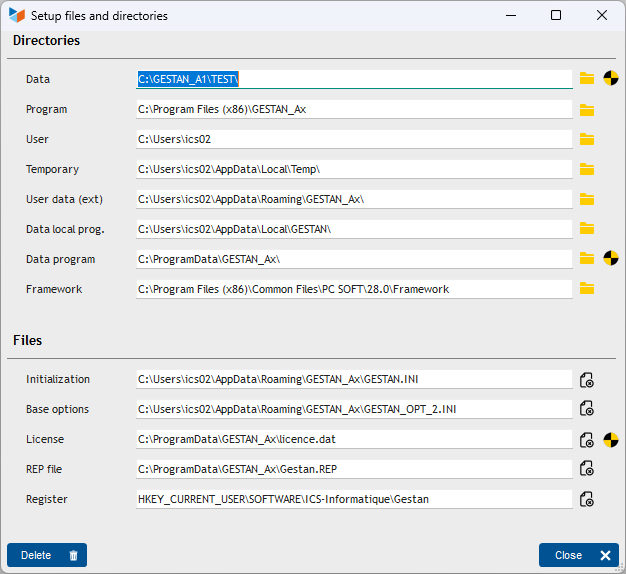
By default, this directory is C:\GESTAN\[company].
The data directory contains the subdirectories to save:
- DATABASE,
- DOCUMENTS,
- RESOURCES,
- BACKUPS.
If you are limited on storage space, you can exclude .ndx files, as they can be recreated. Likewise, you can also possibly exclude the BACKUPS directory, but it is sometimes very useful to have a photograph of the database from one or more months ago.
 Take advantage of the implementation of a Gestan data backup strategy to extend it to all your other professional data. If you already had a backup strategy, integrate Gestan data into this strategy.
When should you save?
A1 proofreading not yet effective for this page. In the meantime, you can ask any questions on the forum.
Adapt your backup frequency to your use of Gestan.
If you use Gestan every day, a daily backup is recommended.
On what support?
A1 proofreading not yet effective for this page. In the meantime, you can ask any questions on the forum.
It is necessary to have a backup set outside the company premises at all times.
Also, the most practical solution is a remote NAS accessible via the Internet.
You can also use any Cloud storage location (you will find many Cloud providers. Avoid storing your data in the USA, for data privacy issues.)
Finally, you can use any removable media, such as an external hard drive or USB stick.
NAS are most often sold with efficient and easy-to-use backup suites.
Copy, or synchronization?
A1 proofreading not yet effective for this page. In the meantime, you can ask any questions on the forum.
There are two main backup options:
- the copy of files, in native form or in proprietary form. It is triggered manually, or scheduled regularly.
- file synchronization: in this option (which is the one carried out by consumer drives such as OneDrive, Google Drive or DropBox), each file is copied to the cloud whenever a change is detected.
Synchronization is not suitable for a database, due to bandwidth consumption and synchronization conflicts. You may lose data when using it.
You must use file copy. If your backup software allows it, it is always useful to keep several successive versions of the backed up files.
Backup Strategy Examples
There is no single backup solution. In existing solutions, you must look for the most automatic solution possible, and remember to regularly check its proper execution.
If you are unsure, seek advice from your local IT specialist.
Using a cloud
You can use backup software, and schedule a daily backup of your Gestan data to a location in the Cloud. So you have an automatic backup, with data backed up elsewhere.
When choosing your Cloud space, we do not recommend spaces hosted in the USA (Dropbox, Google Drive, OneDrive, etc.), for reasons of data confidentiality. You can set up your own service, or use a Cloud in Europe or Switzerland, below are some interesting proposals:
Double save
The backup, in the event of a large volume, can last long enough to be penalizing for production computers. Also, you can proceed in two steps:
- daily backup in LAN (very fast), for example during lunch break, on a NAS or any other storage device in your local network
- then backs up every night to another NAS outside the company premises, a cloud, or any other remote storage space, via SFTP (slower)
The monthly backup carried out by Gestan
A1 proofreading not yet effective for this page. In the meantime, you can ask any questions on the forum.
This functionality was developed to overcome common deficiencies in company backup strategies.
Every month, Gestan makes a copy of your database, and stores it in the BACKUP directory (it is also possible to trigger it manually, via Tools → Administration → Maintenance → Force periodic maintenance).
This backup is called Backup_FINGERPRINT_[date]_[time].zip;
The history is kept over 12 rolling months. Experience shows that this rolling backup over a year can prove very valuable (this may make it possible to find old data, or to ensure that it never existed).
The monthly backup carried out by Gestan is a minimum backup. Stored locally, no data is saved outside your company or at ICS-Informatique. It in no way exempts from the implementation of a complete backup strategy.
Backup software
A1 proofreading not yet effective for this page. In the meantime, you can ask any questions on the forum.
For information, here is a list of backup software, free or paid, that we have tested.
Selection of free backup software
** Major references **
- EchoSync A very nice development, by a Frenchman too, well done!
- Kopia a newcomer, free and open-source.
- Backup Easy, very nice development written in Windev (like Gestan), by EMJYSOFT - free up to 10 GB.
- SyncBack V9.3.11.0 Syncback exists in free, SE and pro versions, but the free version is enough to make a backup on a local network. Does not support free versioning. English interface.
- Duplicati: backup in proprietary format, but the software is open-source.
- FBackup The free version of Backup4All software
- Veeam The reference for backup software, with a free version.
- EaseUS A simple, fast tool, with a fluid and clean interface. However it is Chinese software…
- AceBackup free with file versioning.
- Saft Backup for German speakers.
** Abandoned developments (programs not recommended) **
- EAB (Every day Automatic Backup) V3.5 Too bad, the software is very ergonomic. No response from the publisher, contacted.
- Cobian Backup V11 Created by Luis Cobian, taken over in 2015 by James Sweeney. Development seems abandoned, latest version from December 2012.
- SyncApp: via the P2P protocol. Abandoned development.
- ProBackup Developed in Windev (by PCSoft?). Abandoned development - site offline.
- FullSync 0.10.4: super nice interface. But consumes a lot of memory. The developer always responds (in English). Dev abandoned in 2016
- XXClone: is mainly used for disk cloning. Pixelab, the publisher, has ceased its activity.
- Synchronicity V6.0: Development seems abandoned - latest version March 2012
Paid
- Backup4All: after the marriage4All, the manif4All, the PMA&GPA4All, there is Backup4All, which remains the best option.
- GoodSync: supports SFTP. Excessive price (800 euros) for the server version, acceptable (25 euros) for the desktop version
- Syncovery: Supports SFTP. Even more complete than GoodSync but with a fairly old-fashioned interface. 30-330 euros.
- CloudBerry Backup: At 80 euros, an excellent price-performance ratio for SFTP operation. For very large backups that do not have time to execute within the allotted range, the behavior of the software is not great, because it starts the ENTIRE backup again, without limiting itself to the files modified since the last backup. .
- Backup Easy exists in a free version
- BackupChain very professional, effective with VMs.
See also The best backup software by Logitheque.
And the catering?
A1 proofreading not yet effective for this page. In the meantime, you can ask any questions on the forum.
Depending on the software you use, the archives are saved either in a proprietary format, always a little stressful, or in native format, compressed, or not.
In the first case, you must use the restoration tool included in the software.
In the second case, copying and pasting the directories concerned is sufficient.
Restoring a backup is a sensitive operation that cannot be entrusted to a beginner.
 Other Technical articles
Configure Gestan
Configure the search
Email marketing, spam: best practice
etatsetrequetes
Extending the functionality of Gestan
General Overview of Gestan
Gestan CS - Client/Server mode
Gestan data backup
Gestan on a MAC
Google SMTP Server
libcef.dll file not found
Migration from version 15 to version A1
ODBC on HFSQL
Online payment
Outsourcing of post handling
Remote access
Request a bespoke development
Rounding
Sending emails using Gestan