Absences
Gestan allows you to manage users’ absence dates, for whatever reason:
- holidays, of course,
- but also: sickness, training, maternity leave, etc.
List of absences (user view)
Access: Company → All absences
The screen, as seen by any user registered in the database, displays the list of absences for the logged-in user, for all reasons combined (including holidays);

Using the table’s context menu, it is possible to view them from January to December, or from June to May (in France, annual leave is counted from June to May).
The button Schedule button opens the absence schedule.
Absences are also displayed on the list of working hours screen (depending on the screen settings).
List of absences (HR department view)
Access: HR → Absences
The screen, as seen by any user registered in the database and with HR privileges, displays a list of absences for all users, which can be filtered by user, reason for absence and date.

The Approve allows the HR manager to approve the absence. This is particularly useful for annual leave requests from employees whose leave dates must be approved by management. The status change is recorded in the absence history.
Context menu
The context menu on this screen allows you to:
- display only absences requiring approval, for greater clarity
- automatically notify the relevant user by email that their request has been approved===== Absence record =====
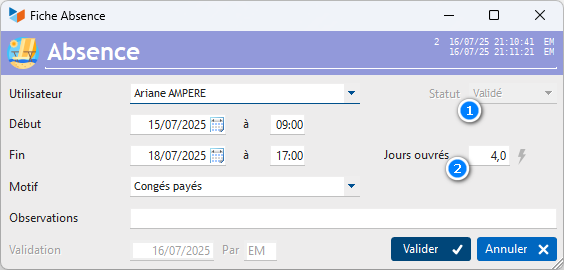
If the Approved 1 is ticked, the absence can no longer be amended (unless it is unapproved by a user with time management administration privileges).
The programme automatically calculates the number of working days 2 corresponding to the period of absence, taking into account weekends and public holidays. It is entirely possible to deduct a number of days that differs from the number calculated. In this case, this field is highlighted in a specific colour.
Note:
 Working days : these are all days of the week except the weekly rest day (Sunday) and public holidays; Saturday is not usually counted as a rest day. It is therefore a working day. Thus, in a standard week (excluding public holidays), there are 6 working days.
Working days : these are the days on which your business is open; they are the days actually worked within the business. Thus, when the business is open from Monday to Friday or from Tuesday to Saturday, there are 5 working days in the week, i.e. 5 working days.
**How is the number of days calculated? ** First, work out the time between the start and end of the period. For example, there are 2 hours between 14:00 on 26/06 and 16:00 on 26/06. Then we divide this duration by the standard working day, as defined in the general settings.
ℹ️ Other “Users” articles