====== Gestan database HFSQL operates databases ======Gestan HFSQL, a database management system developed by PCSoft, in Classic or Client/Server mode.
HFSQL databases can be used freely and do not require a licence.
It is a robust and high-performance system.
File types in an HFSQL database
An HFSQL database comprises four types of file:
- File .FIC : for example, CONTACT.FIC. .FIC files contain the structured data of the file
- .NDX : these contain the data indexes (the ‘table of contents’)
- File .MMO (if present): contain unstructured data – text, binary data, images, etc. – with no size limit. For example, the ‘client name’ field can store a maximum of 25 characters in the .fic file, but the ‘remarks’ field can store an unlimited number of characters in the .mmo file. Some files do not have an .mmo file, as they consist solely of structured fields.
- File .FTX (optional): contains full-text indexes. This acts as a sort of table of contents, enabling efficient indexing not only of structured fields but also of unstructured fields. The full-text index is only enabled for files where it is genuinely useful.
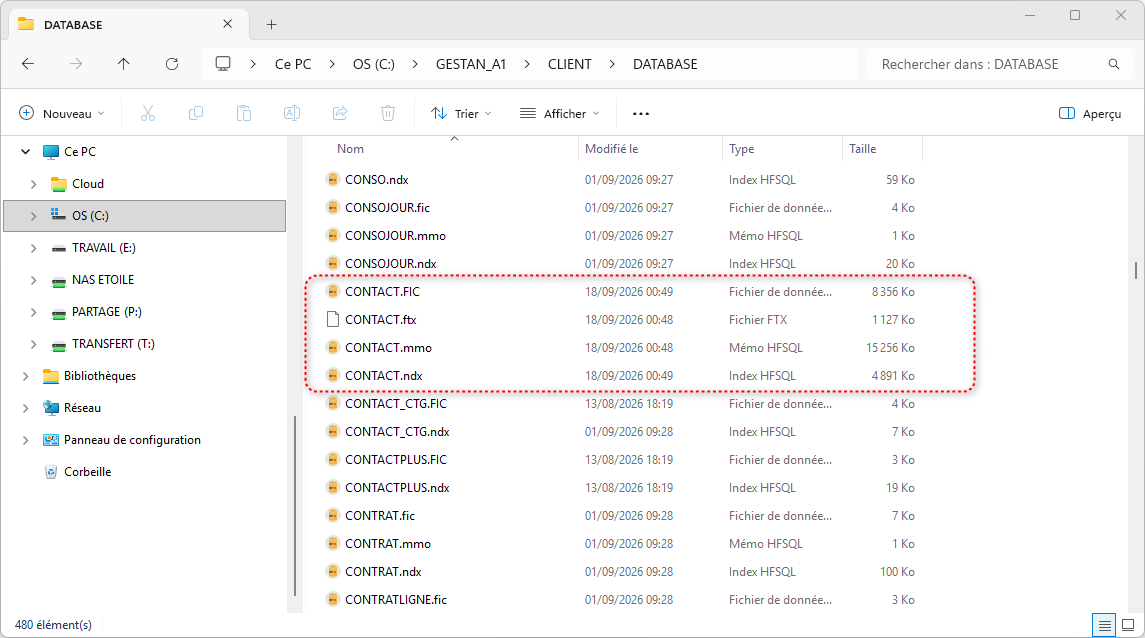
NEVER mix files from different databases: you risk causing serious data consistency errors.
Maintenance of HFSQL files
The HFSQL database management system (DBMS) is very robust: maintenance is limited to checking the indexes. In fact, as with any database system, it can happen (due to network issues, brief outages, Wi-Fi instability, etc.) that the index files become out of sync and no longer correspond to the data files.
Gestan checks the indexes every month, but it may be necessary to carry out this operation on an ad hoc basis, using the programme described below.
==== Using the ‘ ====’ screen
Access : Tools → Admin → Maintenance → HFSQL File Index.
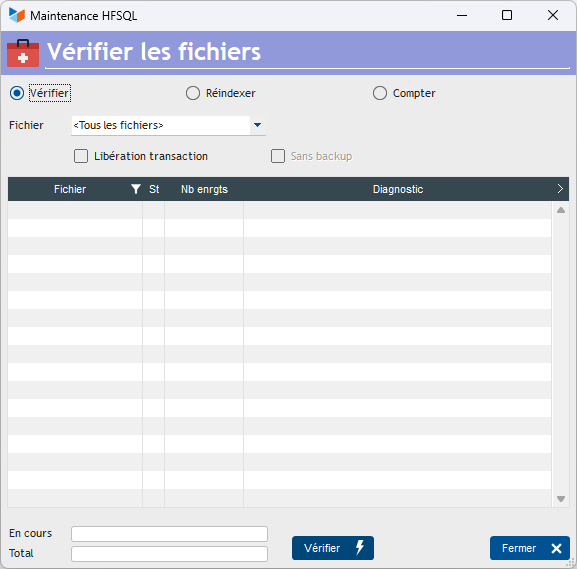
Three options are available:
- Check : simply checks the file index
- Re-index : performs re-indexing
- Count : counts the records contained in the files.
You can process a single file, or the entire database, using the drop-down menu Files
Release Transaction allows you to release any transactions that may have been interrupted. A transaction is a set of operations that are logically ‘indivisible’, for example, invoices and invoice lines, which must be recorded together. This tick box allows you to restore the files to a state where new transactions can be carried out.
Launching a reindexing operation first creates a backup of the relevant file or database in the BACKUPS directory (Backup_REINDEX_SSAAMMJJ_HHMMSSCC.zip). If necessary, you can disable this backup using the no backup.
How to resolve an index issue at start-up
On start-up, Gestan accesses certain files, notably the user file, the actions file and the scheduled actions file. If any of these files has an index issue, Gestan will be unable to start.
You must then open the re-indexing screen from the outils_de_l_ecran_de_connexion login window at Gestan.
If this solution does not work, you must then use the shortcut ‘Re-index Gestan files’, located in the Gestan programme directory (normally C:\Program Files\GESTAN). This shortcut opens the re-indexing screen directly, using the last database you were connected to.
ℹ️ Other “Tools” articles
Connexion à Gestan
Démarrage rapide
Exporter la base Gestan
Importer des contacts Google ou Outlook
Importer des contrats
Importer des documents d'achat ou de vente
Importer des données dans Gestan
Importer des imputations
Importer des lignes de pièce (écran dédié)
Importer des traductions de libellés produit
Importer un plan comptable
Importer une base Gestan
L'écran principal de Gestan
Minification de la base
OCR
Procédures compilables
Recommander Gestan
Réaffecter à un utilisateur
Réimputation des écritures
Réinitialisation des catégories de contact
Réinitialiser les champs complémentaires
Réorganisation des contacts
Structure des répertoires Gestan
Suppressions en masse
Traducteur
Transférer vos données au support
Trucs et astuces
Versions du programme Gestan
Zipper la base