Table des matières
License extensions
 A1 proofreading not yet effective for this page. In the meantime, you can ask any questions on the forum.
Gestan's functionalities can be extended with a wide range of free extensions.
However, for functions that are specific to a particular business, the use of certain extensions may be subject to licensing.
Unlike Gestan Enterprise licenses, extension licenses are allocated on a per-company basis, but “for life” (definitively, with no time limit or subscription).
Extensions are developed by ICS-Informatique, or any other company registered as Partner-Developer.
Buy an extension license
When the extension's trial period (usually 30 days) has expired, a pop-up window suggests that you purchase the license.
If you respond positively, the next screen displays the billing address, established from the data in the general settings. These can be modified using the Modify button.
Please note that the license will be issued for the company name declared, so make sure it is valid.
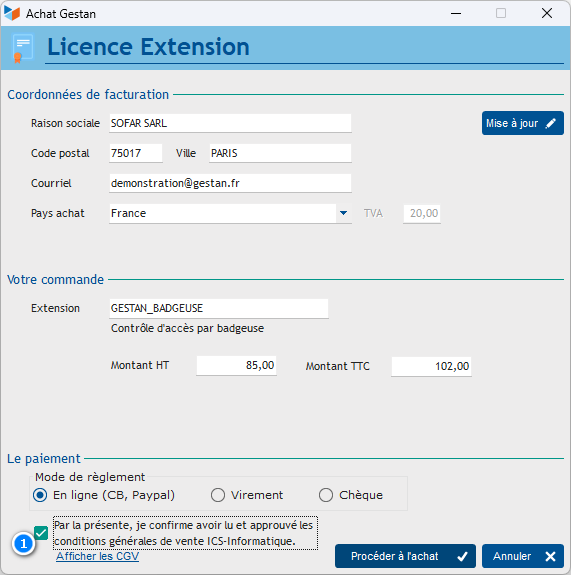
The 1 checkbox provides access to the Proceed to purchase button, which opens the payment method selection screen.
Depending on the payment method you choose, the corresponding screen allows you to enter the necessary information.
After payment, you'll receive an e-mail with a download link to the corresponding invoice, and the license key for the extension, specific to the company for which you purchased it.
Register an extension license
If you paid online, license registration is automatic.
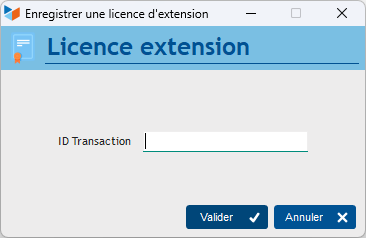
If you paid by any other means, you need to register the extension license manually via menu ? → Gestan Enterprise → Register extension
On the screen, simply enter the ID number shown on your invoice.
 Other “Admin ” articles
Benchmark readings
Change history
Cleaning C/S connections
Customer account
Data audit
Deactivatable messages
Enterprise License
Free Gestan licenses
Gestan extensions
Installing Gestan
License extensions
Migrate your current ERP to Gestan
Multilingualism
Network Computers
Printing labels
Sessions
Test base