Benchmark readings
 A1 proofreading not yet effective for this page. In the meantime, you can ask any questions on the forum.
This program tests the reading speed of supposedly the largest files in databases.
It also makes it possible to optimize the settings for all users, if necessary, in order to select the most economical options in terms of file access time, therefore improving the response times of the application.
 See also: page response time.
Using the screen
Access: Tools → Administration → Special tools → Benchmark readings
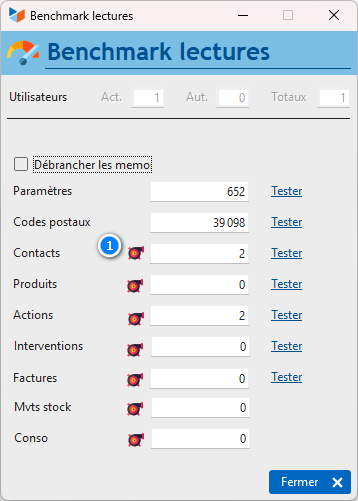
At the top of the screen, the number of active (non-archived) users authorized to connect is displayed, as well as the total number of users (for information).
The screen displays the number of recordings of parameter files, postal codes, contacts, products, actions, interventions, invoices, stock movements and hourly consumption. You can request a lower number of readings by putting a smaller number there.
The Disconnect memos switch allows you to perform the reading test in the contact and product files without reading the memo areas (observations linked to contacts or product images, for example).
The Test buttons start readings in the affected files.
The Test C/S Connection button is displayed for Client/Server installations in the context of frame compression, specifically to compare the performance of a connection compressed and those of an uncompressed connection (see connections). The connection quality index is influenced by different parameters, for example: the CPU load of the client and server, the use of the network resource by other programs, the load on network equipment (switch, router, etc.). ..).
The “turbos” buttons 1 allow, for all users, to set up screen options favoring speed (see below). These options are accessible via the options of the screens considered: they can be modified later by each user.
Results
The results reflect stable characteristics (processor performance, RAM, etc.), but also variable characteristics (other tasks executed in parallel by the machines, network traffic) at the time of the test. They may therefore vary. It is recommended to repeat them, to estimate their degree of stability, and take an average of the results.
In direct connection:
- 1500 readings in the contacts or products file should be carried out in approximately 4 hundredths of a second (between 2 and 6)
- 1000 readings in the settings file should be done in about 3 hundredths of a second (between 2 and 5)
- 30,000 reads from the postal code file should be completed in approximately 30 hundredths of a second.
Other tips
In the product sheets, you can store photos of the product: avoid taking photos of the catalog (intended to be published at most in 5*5, 5MB images - seen by customers! - this can slow down the operation of Gestan. Use the automatic image optimization function (see general configuration).
For the quotes, invoices, etc. screens, if you produce a lot of documents, display them by month and not year, you will save response time. The same goes for stock movements, or consumption.
 Other “Admin” articles
Benchmark readings
Change history
Cleaning C/S connections
Customer account
Data audit
Deactivatable messages
Enterprise License
Free Gestan licenses
Gestan extensions
Installing Gestan
License extensions
Migrate your current ERP to Gestan
Multilingualism
Network Computers
Printing labels
Sessions
Test base