Network Computers
 A1 proofreading not yet effective for this page. In the meantime, you can ask any questions on the forum.
Access: Tools → Administration → Users → Network
This screen allows you to control the access of physical machines to Gestan, via their Mac address: you can only authorize this or that machine on your network.
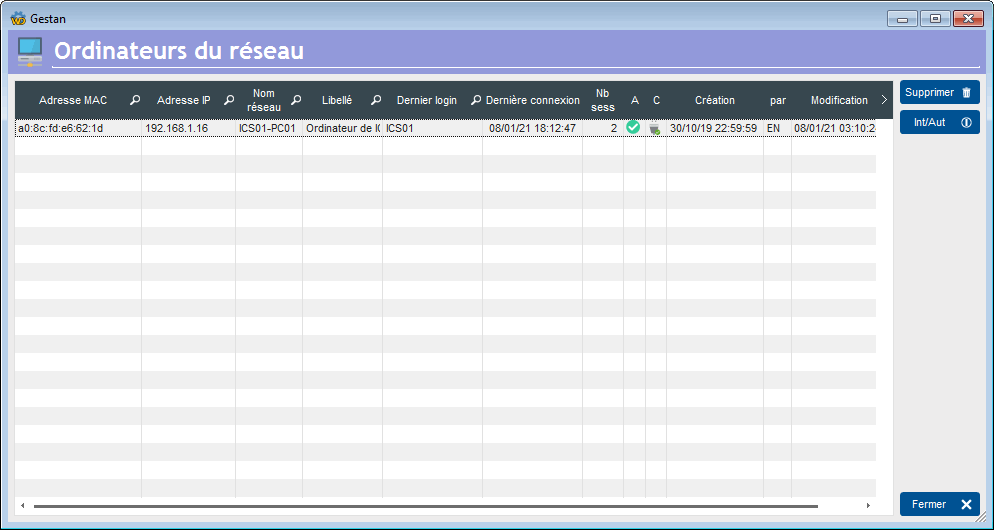
The screen presents the list of computers that have connected to the base.
The Int/Aut button allows you to manage connection authorizations by MAC address: you can prohibit or authorize each machine on the network to connect to the Gestan database. Column A indicates the connection authorization status for the MAC address in question.
The C column indicates the connection status of the machine concerned (connected/not connected), while the Nb Sessions column displays the number of active sessions.
According to the general configuration (see explicit network), if a machine whose MAC address is not listed connects:
- if explicit network is checked, the connection is refused
- if explicit network is not checked, a new record is created, with connection authorization.
 Other “Admin” articles
Benchmark readings
Change history
Cleaning C/S connections
Customer account
Data audit
Deactivatable messages
Enterprise License
Free Gestan licenses
Gestan extensions
Installing Gestan
License extensions
Migrate your current ERP to Gestan
Multilingualism
Network Computers
Printing labels
Sessions
Test base