Test base
 A1 proofreading not yet effective for this page. In the meantime, you can ask any questions on the forum.
Gestan makes it very easy to clone your production base, for testing or experimentation purposes.
 This page only concerns local Gestan. For Gestan Cloud, make this request to Cloud Support.
Creation of a test base
**Access: **Tools → Administration → Multi-company management.
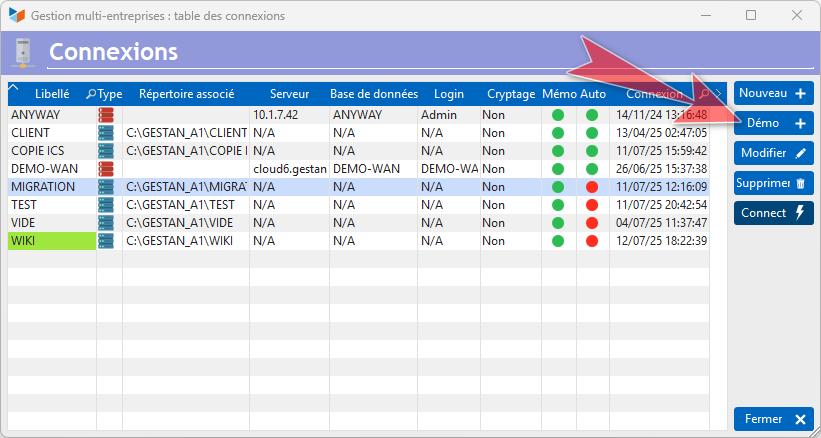
Use the Clone for test menu item.
A copy of the database will be made in your temporary directory C:\Users\[your Windows user]\AppData\Local\Temp\GESTAN\DEMO\DATABASE\
At the bottom of the main screen, a “Demo” logo will tell you that this is your test base.

 Other “Admin” articles
Application event log
Benchmark readings
Change history
Cleaning C/S connections
Customer account
Data audit
Deactivatable messages
Enterprise License
Free Gestan licenses
Gestan extensions
Installing Gestan
License extensions
Migrate your current ERP to Gestan
Multilingualism
Network Computers
Printing labels
Sessions
Test base
Benchmark readings
Change history
Cleaning C/S connections
Customer account
Data audit
Deactivatable messages
Enterprise License
Free Gestan licenses
Gestan extensions
Installing Gestan
License extensions
Migrate your current ERP to Gestan
Multilingualism
Network Computers
Printing labels
Sessions
Test base