Send emails with Gestan
 A1 proofreading not yet effective for this page. In the meantime, you can ask any questions on the forum.
The proportion of unsolicited emails having become very significant (from 55 to 95% of traffic depending on the times and measurements), emails have an increasing tendency to arrive as spam to your recipients if you deviate from good email practices. mail sending.
Here are the things you need to know to improve the deliverability of your shipments.
The basics of sending email
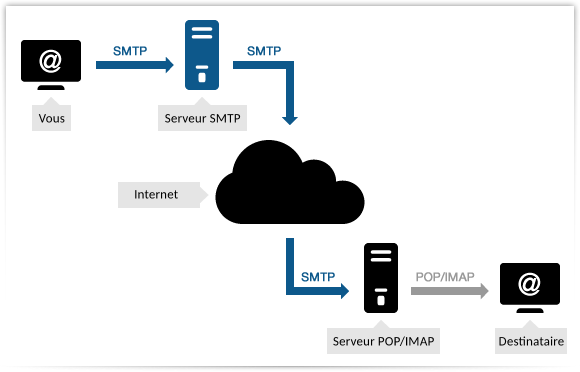
To send an email, your computer establishes a dialogue with an SMTP server: this is another computer, which will be able to send your email to its recipient via the Internet network, using a technical standard electronic communication called SMTP. Your email will then arrive on one of the computers managed by your recipient's email provider. For example, if you sent an email to contact@gestan.fr, your email will pass through until it reaches the email server of the gestan.fr domain.
For their part, your recipient, when they connect to their email, will connect to their domain's email server, and will retrieve their messages via the IMAP (or POP3) protocol.
The entire transmission can be represented as follows:
During transmission, SMTP servers and IMAP/POP3 servers perform checks to verify that your email is not unsolicited email (spam). Your message will obtain a “spam score”: if this score is too high, your message will either be classified in your recipient's spam box or completely deleted. We call “deliverability” the potential of your email not to be classified as spam: your deliverability must be maximum (therefore it must obtain the lowest spam score possible).
You can use different SMTP servers:
- that of the supplier from whom you pay for an internet subscription (not recommended)
- that of Yahoo, Google or another company from which you requested an email address (not recommended)
- that of your domain name, such as masociete.com (recommended)
- an SMTP provider like Brevo, Mailjet, etc. (interesting for mass mail and tracking)
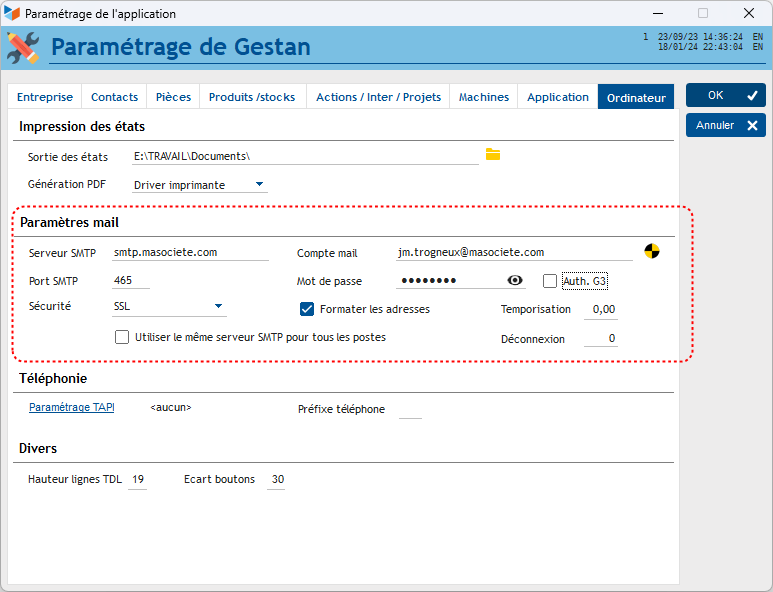
As for radio, an SMTP server uses a port (such as 101.1 for Classic Radio), and an encryption protocol possibly: either TLS mode or SSL mode.
Conventionally, SMTP uses:
- port 25 for unsecured shipments
- port 465 in SSL
- port 587 in TLS.
Additionally, there is additional authentication, called G3, required for some SMTP servers.
You will find these elements in the mail parameterization of Gestan.
How can you ensure that your emails do not arrive as spam?
The number of spam messages sent being very high (from 55 to 95% of traffic depending on the times and measurements), all SMTP services are gradually tightening their rules of use and their anti-spam filters. In the old days of the beginnings of email, in the 60s, it was about sending emails without constraints, this is no longer the case today, expertise in deliverability has become almost a separate profession whole. If you violate the email sending rules too much, not only will your emails not arrive, but the IP address of your SMTP server may be blacklisted, and subsequent emails, even legitimate ones, will be classified as spam.
You must therefore comply as much as possible with the requirements of SMTP servers.
Here are easy-to-adopt measures that will increase the deliverability of your emails.
Use your domain name
Using a generic email address, for example plumbing83@gmail.com is not a professional solution (see below). Use a real professional address, such as contact@plomberie83.fr, and your own SMTP server.
Did you know: you can obtain your own domain name, such as plumbing83.fr in 10 minutes flat for 10 euros per year from Gestan services! To do this, contact support by telephone. More details on this offer.
Authenticate your emails
To authenticate your emails, you must configure:
- your SPF record
- your DKIM record
- your DMARC record
These are elements of your DNS settings, which are carried out from the management interface of your domain name, depending on your domain name provider.
Avoid words related to spam
Avoid as much as possible words that are often linked to spam, such as: “Free”, “no charge”, “Exceptional offer”, “Guarantee”, “Increase sales”, “Order now”, “No risk” , Special Promotion, Winner, Silver.
Also avoid text entirely in capitals, too many exclamation points, overuse of emojis, as well as grammatical or spelling mistakes.
HTML coding
If you're sending emails in HTML format (as opposed to plain text), follow these recommendations as closely as possible:
- Use a maximum width of 600-800 pixels
- Make sure the HTML code is as clear and simple as possible. Avoid Javascript and Flash.
- Avoid putting too many images in relation to the text
- Optimize and lighten your images.
Attachments
Send as few attachments as possible.
If you have a large number of attachments, or large ones, make a zip archive and make them available either by transmitting them through a service that respects confidentiality (for example swisstransfer, free), or via a storage service such as a location FTP to your website (avoid services like Dropbox or Google Drive, confidentiality is not guaranteed).
Caution for mass emails
Beyond 100 identical emails sent to different recipients, we can start to talk about mass mailing. Whether you carry out a mass mailing using Gestan's email sending functions, or by any other means, be sure to respect these provisions:
- you must include your contact details and an unsubscribe button, which must be visible at the top or bottom of your message. If you make it difficult to unsubscribe, some of your recipients may report you as a spammer, and thus damage your Internet reputation.
- avoid sending too many emails at once: if you usually send emails to 1000 subscribers and suddenly increase to 100,000, you will trigger the ISP spam filters. If you have an important shipment to make, notify your domain host, or better, go through a specialized service like Brevo, Mailjet or another.
- regularly clean your mailing list: above a certain rate of incorrect addresses, your mailing may be considered spam.
- pay attention to the rate of reporting as spam. The spam complaint rate must remain below 0.10%.
France regulations: in France, regular sending of messages is only legal if the recipient has expressed their prior consent to receive emails. You therefore need registration and explicit confirmation from the recipient afterwards. The possession of any personal file is subject to declaration to the CNIL. It is prohibited to collect personal data without the consent of the person concerned: as such, email tracking is theoretically not authorized (Gestan does not do this).
Blacklisting
If a certain number of criteria are met (message content, volume, sending rate, etc.), the servers through which the sent emails pass can blacklist the sender's IP address, and block any transmission of an email coming from the corresponding machine. Your IP address may be blacklisted rightly, because you send spam, but it may also be blacklisted by mistake, or because a third party has usurped your domain name, or taken control of your machine.
How to find out if your IP is blacklisted
You can use for example the site multiRBL, which will query the main mail servers.
If your IP address is blacklisted, all you have to do is contact the administrators of the list to find out why you are there, and what to do to get out.
Note: Why you shouldn't use a home address for your business communications
An email address from a generic domain such as wanadoo.fr, orange.fr, free.fr, gmail.com, etc. (for example gestan@orange.fr or gestan@gmail.com) is not intended to be a professional address: a professional email address is suffixed by the company domain, (for example contact@gestan. fr or recruitment@gestan.fr).
So, Bernard Arnault's professional address is certainly not b.arnault@gmail.com, but rather something like b.arnault@lvmh.fr.
However, support notes that many companies use personal email addresses, particularly Gmail addresses, for their professional communications.
By using a business address instead, you gain three major advantages:
* you improve the deliverability of your emails, in particular by the possibility of entering your DKIM and SPF records.
- a professional address helps build your brand identity: no respectable company communicates with a generic domain. Using your company's domain, you reinforce your image of professionalism.
- you protect your commercial data and that of your customers: when you use a generic address, emails pass through servers whose confidentiality is not guaranteed, especially services offered by foreign companies like Google with gmail , falling under the Patriot Act and the Cloud Act. Your commercial data, but also that of your customers, may therefore be used or resold by these third-party companies, without you being notified.
To go further
Training
Technical
SPF, DKIM, DMARC
Tools
News
Test your deliverability
Test your deliverability
You can test the deliverability of your emails with services such as:
 Other Technical articles
Configure Gestan
Configure the search
e-Mailing: good practices
Gestan CS - Client/Server mode
Gestan data backup
Gestan on a MAC
Google SMTP Server
libcef.dll file not found
Mail outsourcing
ODBC on HFSQL
Online payment
Reports and Queries
Rounded
Send emails with Gestan
Specific developments