Mail merges
 A1 proofreading not yet effective for this page. In the meantime, you can ask any questions on the forum.
The principle of mail merge is as follows:
- you select in the contacts table those to whom you want to write
- you select the standard mail you want to send
- Gestan, replacing the keywords in the standard letter, produces a result file.
This result file is stored
- in the contact's Gestan directory (This directory is the CONTACT_XXX directory located under the root directory of Gestan, XXX being the contact number), in the case where the mailing was carried out for a single contact
- in the Gestan mailing directory (MAILING directory located under the Gestan root directory), in the case where the mailing was carried out for several contacts.
It is also possible to create mail merges by groups.
Using the screen
Access: Contacts → List of contacts, then Write to button
First select the contacts you want to write to, then click the button.
The screen below then opens:
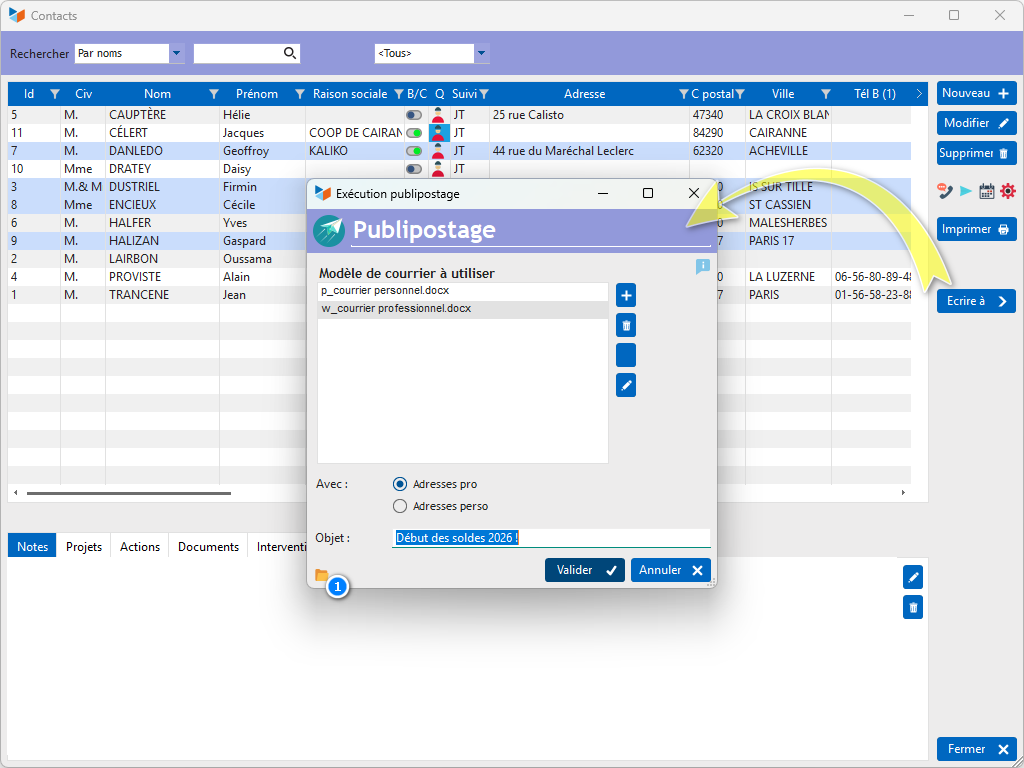
The list allows you to select the standard mail you want.

The standard emails are stored in the \RESSOURCES\MODELES directory of the Gestan installation directory (generally C:\Program Files (x86)\GESTAN\RESSOURCES\MODELES on a local network, and V:\RESSOURCES\MODELES for Gestan Cloud ).
The 1 button opens this directory. The context menu of this same button allows you to change the directory of model documents.
You can delete, duplicate or modify the standard letters using the buttons.
If the Professional address selector is chosen, the professional address will be used for writing the letter, the personal address in the opposite case.
The subject of the email will be used as the label for the document record which will be attached to the contact.
 By convention, business emails will be called w_[filename].docx, while personal emails will be called p_[filename].docx
Keywords usable for standard letters
For the mail target contact
- %social_reason%: social name of the contact
- %civilite%: mail civility, for example Madam, Sir
- %civ_court%: short civility, for example Mr. & Mrs.
- %civ_long%: long civility, for example Mr. and Mrs.
- %firstname%: first name of the contact
- %name%: contact name
- %address1%: first address line
- %address2%: second address line
- %address%: address line1 + 2
- %postal_code%: postal code
- %city%: city
- %tel1%, %tel2%, %tel3%: phones 1, 2, and 3
- %email%: email address
- %subject%: subject of the mail
- %chrono%: chrono number, composed of the user code, and the document number (automatic increment)
For the mail writer
- %redac_firstname%: first name
- %redac_nom%: name
- %redac_noapparent%: apparent name
- %redac_tel_pro%: professional phone
- %redac_tel_perso%: personal telephone
- %redac_tel_mob%: mobile phone
- %redac_mail_perso%: personal email
- %redac_mail_pro%: personal email
- %redac_address1%: address line1
- %redac_address2%: line2 address
- %redac_address%: address line1 + 2
- %redac_code_postal%: postal code
- %redac_ville%: city
(note: the key words are in lowercase and without accents!)
 Other Contacts articles