Additional fields
 A1 proofreading not yet effective for this page. In the meantime, you can ask any questions on the forum.
For the major Gestan files (contacts, products, machines, etc.), it is possible to manage specific additional fields.
You can store in Gestan:
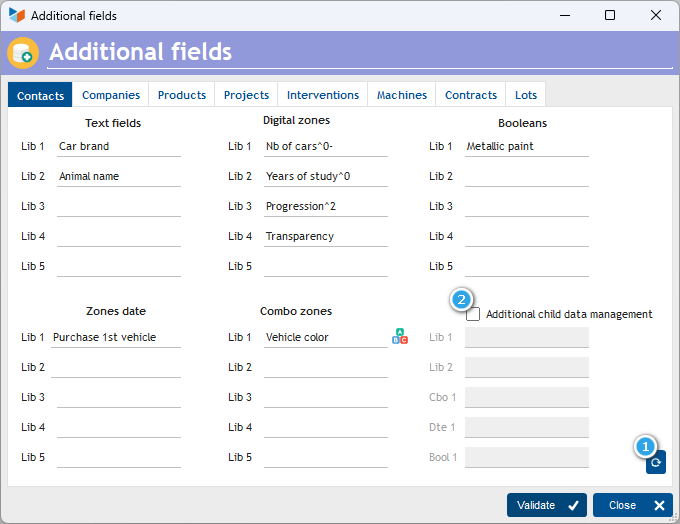
- text fields, such as the make of the car or the name of your contacts' favorite animal;
- numeric areas, such as the number of cars, or years of study;
- booleans (yes/no switches), such as whether the car has metallic paint or not;
- date fields, such as the vehicle purchase date;
- combo zones, such as the color of the vehicle. In this case, the button on the left will allow you to specify the different possible colors.
Gestan thus makes 5 fields per type available to you (i.e. 25 zones available).
Using the screen
**Access: **Tools → application settings → additional fields
For each additional field that you want to manage, enter a label describing it.
In the particular case of the contacts file, it is also possible to manage configurable fields for children, to do this you must check box 2.
Setting numeric fields
You can specify the number of decimal places for configurable numeric fields, as well as the presence, or not, of the thousands separator.
To do this, simply enter the number of decimal places at the end of the label, preceding it with the sign ^, and following it with the sign - if the presence of the thousands separator is not desired.
For example, the label “Code CB^0-” will allow you to store a number without decimal places or thousands separator, while the label “Progression ^2” will store a number with two decimal places.
Update of additional fields
Using the 1 button, it is possible to reset, or update with any value, all of the records in the file for the additional field considered.
Example
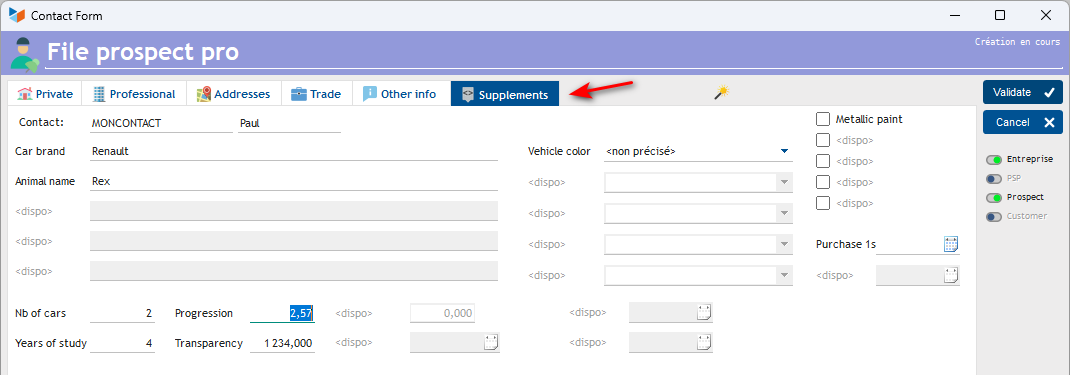
With the settings indicated above, a Supplements tab will be displayed on the contact card, as below.
 Other Configuration articles
Connections
Corporate identities
General settings: Actions / Interventions / Projects
General settings: Computer
General settings: Contacts
General settings: Machines
General settings: Miscellaneous
General settings: Parts
General settings: Products/Stocks
General settings: The company
Header creation wizard
Part headers
Replacement reports and windows
SMS
Virtual printer