Review of entries
If there is an anomaly in the entry of cash receipts or payments, particularly when there are a large number of them, identifying the cause can be a tedious process.
This tool makes it easier to carry out a consistency check.
Using the screen
Access: Accounting → Checks → Review entries
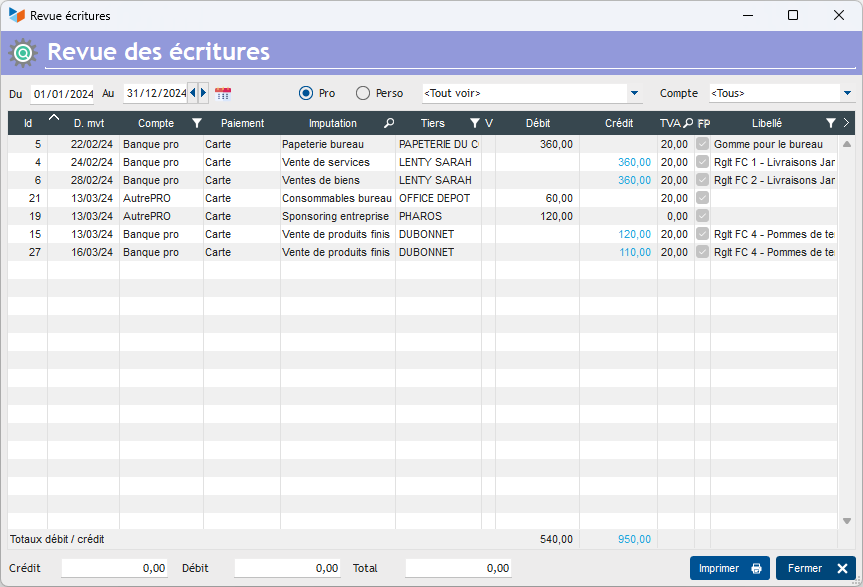
You can select entries within a date range, for a specific account, or by account code.
You can select multiple lines on the screen: the bottom of the screen will then display the total for the selected lines.
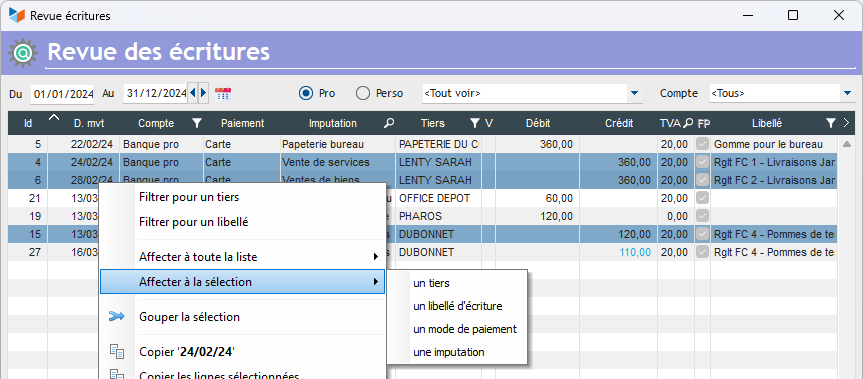
The table’s context menu allows you to:
- display journal entries based on additional selection criteria (counterparty or description)
- amend the journal entries for all displayed lines or for all selected lines
Group the selection allows you to combine a set of journal entries into a single one. For example, if you have paid an invoice in three instalments, this allows you to combine the three journal entries and check that the total is correct. This produces a ‘virtual’ entry – a display feature that does not alter the original journal file.
 Other ‘Accounting’ articles
Arrêtés de TVA
Balance
Balance tiers
Calcul de la TVA
Certification des logiciels de caisse
Clôture comptable / Exercices comptables
Comptabilisation des DEEE
Comptabilisation des écritures
Comptabilité avec Gestan : principes de base
Comptabilité en partie double
Compte bancaire et de caisse
Compte de résultat
Créances irrécouvrables
Encaissements/Décaissements
Export CFONB
Export SEPA
Export XIMPORT des données comptables
Facturation par taux de taxe
Grand Livre
Immobilisations
Imputations comptables
Journal
Journaux comptables (codes)
Lettrage
Liaisons comptables
Liaisons en masse : écritures
Micro-Entreprise / Auto-Entreprise
OD (opérations diverses)
Options des documents comptables
Paramétrage comptabilité
Pièces sans imputation
Plan comptable
Pointage TVA
Produits et Charges
Rapprochement bancaire
Relevés de compte bancaire
Remise de chèques
Revue des écritures
Soldes de gestion
Taux de TVA
Ticket Z
Trésorerie prévisionnelle *
Trésorerie simplifiée
Ventilation des factures par échéances
Ventilation des écritures
Ventilation détaillée par taux de taxe