Deactivatable messages
 A1 proofreading not yet effective for this page. In the meantime, you can ask any questions on the forum.
For certain operations, Gestan displays a deactivatable message.
For example, this is what appears when you generate a BL from an invoice:
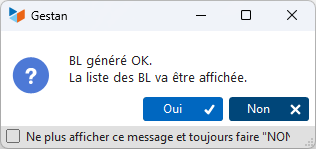
Gestan displays the list of delivery notes.
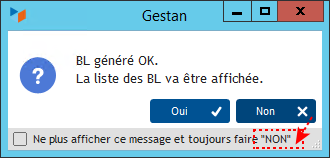
If you move the mouse over Yes or No, the checkbox option label changes from yes to no, depending on the option chosen.
If you check the box, the option will be memorized.
For example, if you always wish to display the list of delivery notes when you have generated a new BL from an invoice, check the box first, then click Yes. The next time, the delivery note list will be displayed directly, without a confirmation message.
These options are user-specific.
Reactivate deactivatable messages
It may happen that you change your mind and no longer wish to display the list.
In this case, use the menu Enterprise→User options→Reactivate deactivatable messages: the next time BL is generated, you'll see the message again, and can choose the opposite option (or choose not to memorize the option).
 Other “Admin ” articles
Benchmark readings
Change history
Cleaning C/S connections
Customer account
Data audit
Deactivatable messages
Enterprise License
Free Gestan licenses
Gestan extensions
Installing Gestan
License extensions
Migrate your current ERP to Gestan
Multilingualism
Network Computers
Printing labels
Sessions
Test base