Deposit invoices (France)

The concept of a deposit invoice is somewhat flawed. In fact, a business does not invoice a deposit, but rather a supply comprising goods or services, the fulfilment of which is either complete or partial at the date of the invoice (as in the case of progress invoices).
The primary purpose of the advance payment invoice was either to trigger the payment of the advance by the customer to the supplier, or to serve as proof that the payment had been made. It is also perfectly possible to use a receipt or an acknowledgement of receipt.
This conceptual flaw meant that the notion of an ‘advance payment invoice’ was interpreted in quite different ways depending on the company. Consequently, in France – with the administrative ingenuity that characterises us and which the rest of the world envies – Article 289 of the General Tax Code (CGI) has been amended to make the definition more rigid. From now on, in France, the new concept of a deposit invoice defines it as an unrecorded document, issued upon receipt of a deposit payment.
The new deposit invoice has a sequential reference number distinct from that of invoices. Recording advance payments enables, in particular, the recovery of VAT amounts when operating under the cash basis scheme. The concept therefore remains as flawed as ever, but its flaws are now set in stone.
Enabling the feature
- Tick the box Manage advance payment invoices in the general settings.
Generating a deposit invoice in Gestan
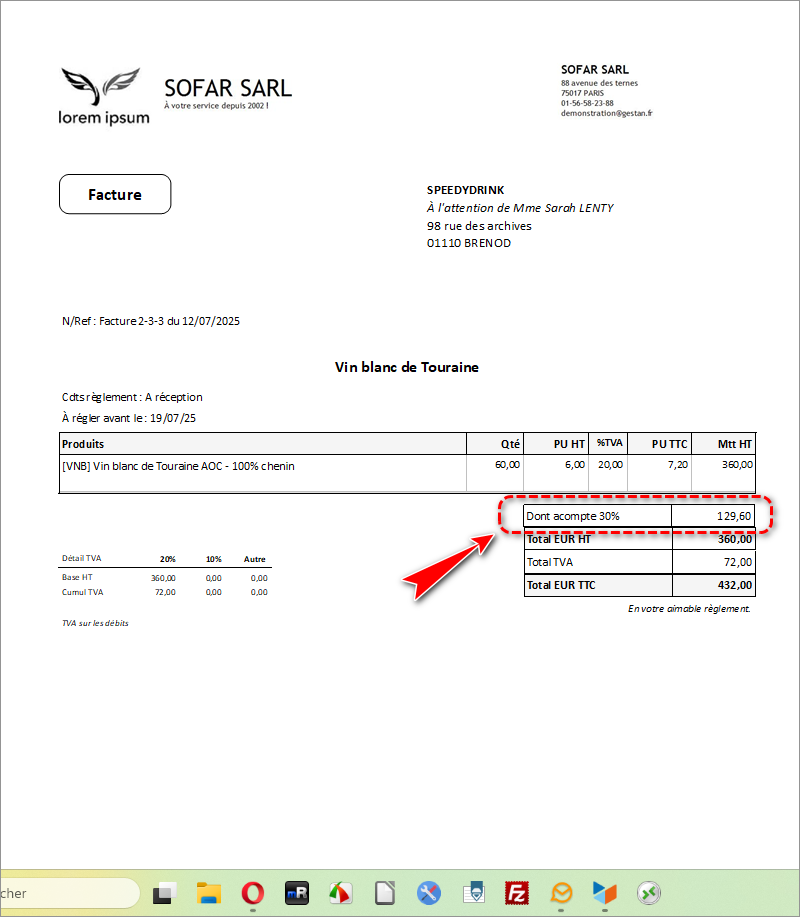
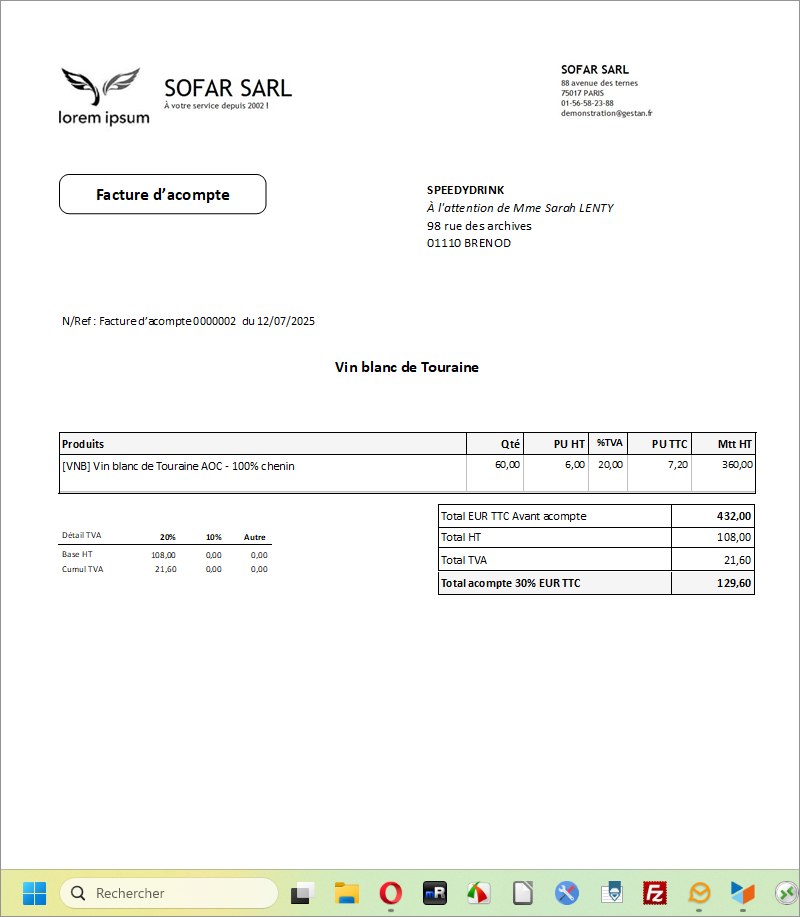
For this example, we have issued an invoice for 432, with a 30 per cent deposit, i.e. 129.60.
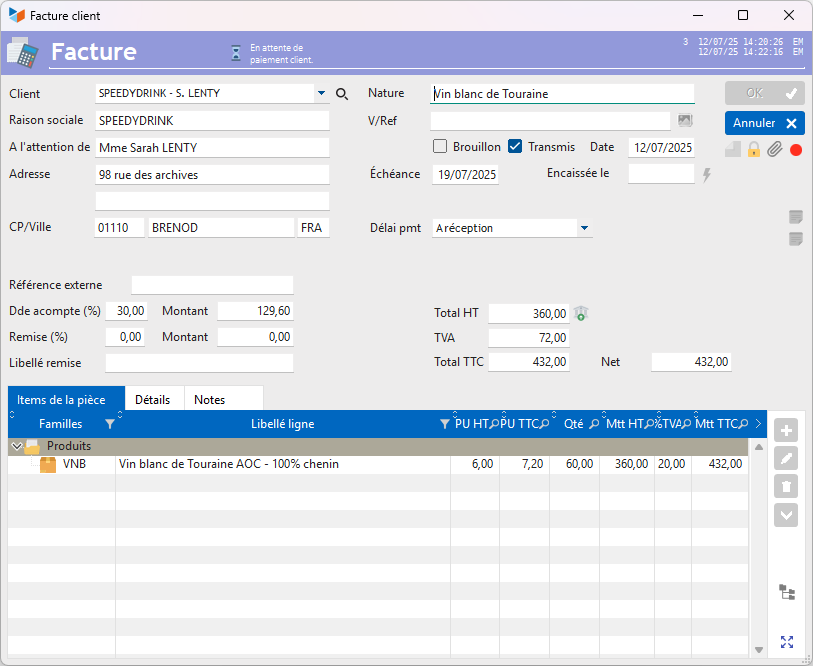
The sales invoice will show the deposit due.
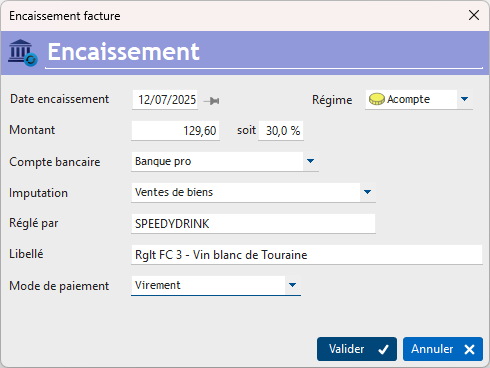
When we receive payment of the deposit, Gestan will display the screen below, offering the option to record the deposit under the Deposit.
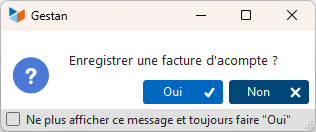
Gestan It will then ask you whether or not to create a deposit invoice for the recorded payment.
When you request a printout or to have the invoice sent by email, an intermediate screen will ask you to specify which of the two documents you wish to print or send by email: the deposit invoice (there may be several) or the original ‘master invoice’.
Further information on deposit invoices: theoretical overview
A deposit (also known as an ‘advance’) is any partial payment made upon conclusion of the sales contract or after it has been concluded. It is a payment “towards” a purchase. It is not possible to withdraw from the purchase of the product once the deposit has been paid, unless a new agreement is reached with the seller (excluding consumer credit).
It is possible to claim a refund of a deposit, along with compensation where applicable, if the seller fails to fulfil their primary obligation (such as the delivery of a product).
The deposit (and its amount) must be specified as such in the sales contract; otherwise, the sums initially paid may be regarded by the buyer as a down payment (in the latter case, the buyer forfeits the entire sum paid if they cancel their order or withdraw from the contract).
VAT becomes payable upon payment of the deposit, or upon the issue of the sales contract that provides for it, depending on your VAT status.
Regarding Article 289 of the CGI
 The implementation of the amendments to Article 289 of the CGI is currently underway, as is the drafting of this article!
L'article Article 289 of the CGI has recently been amended. The version in force since 1 January 2023 contains new provisions concerning deposit invoices. Let’s be clear about the intention: an invoice is required when goods are sold.
And when a deposit is paid, a receipt specifying the amount of VAT is required so that the VAT can be identified on the payments received.
If you call this receipt an invoice, the person receiving it will record it as an invoice – in other words, as a ‘partial sale’, so to speak – which increases the sales ledger and therefore turnover.
However, recording a deposit involves recording a financial transaction from a bank account to a customer account; it has nothing to do with a sale.
To avoid confusion, Gestan has chosen not to issue a deposit invoice but a receipt – either an order with a deposit paid, or a quotation with a deposit paid – which serves as proof for VAT purposes (useful in the case of services). Because, yes, we fully agree with the tax authorities that a document is required which specifies the VAT and not just the amount paid.
Accounting:
Illustrative example for the sale of services worth 1,000 excluding VAT with a deposit of 250 – VAT on receipt of payment
1-Deposit =: cheque and quotation stating ‘deposit paid’
| 512 | Bank | 250 | |
| 4191 | Client advance and deposit | 250 | |
| 4458 | VAT pending | 50 | |
| 44571 | VAT collected | 50 |
2-Then sale = document: invoice
| 411 | Customer | 750 | |
| 4191 | Customer advance | 250 | |
| 707 | Sales | 1000 | |
| 4458 | VAT pending | 200 |
3-Then payment of the balance = document: cheque
| 512 | Bank | 750 | |
| 4191 | Customer advance | 750 | |
| 4458 | VAT pending | 150 | |
| 44571 | VAT collected | 150 |
Risk with the “deposit invoice”: that it is recorded as a sale
1-Deposit = document: deposit invoice (sale of goods) and a cheque
| 512 | Bank | 250 | |
| 707 | Sales | 150 | |
| 44571 | VAT collected | 50 |
2-And when the ‘real’ invoice arrives
| 411 | Customer collective | 750 | |
| 4191 | Customer advance | 250 | |
| 707 | Sales | 1000 | |
| 4458 | VAT pending | 200 |
Firstly, the figures do not balance, and the sale relating to the deposit has been entered twice (sale in account 707 for 1,150 rather than 1,000).
The entries were made on the seller’s side, but this is more likely to happen on the buyer’s side, as the party issuing the invoice needs to be more vigilant about this.
If you want to issue an invoice at all costs, you need to issue two invoices:
- A partial invoice at the time of the deposit and collect payment
- A final invoice at the time of the balance and collect payment
Reference
Invoicing: common elements
Cas concret : Intermédiation
Entêtes des pièces
Facturation : éléments communs
Factures : options spécifiques
Frais de port
Généalogie des pièces
Importer des lignes de pièce (tableur)
Liaisons des pièces
Ligne pourcentage
Livraison partielle
Numérotation des factures
Optimiser les achats
Retenues de garantie *
Surtaxes nationales
Tri des lignes de pièce
Customer Invoicing
Bons de livraison (BL)
Certification numérique des factures
Commandes client
Devis
Echéancier de facturation
Factur-X, PEPPOL
Facturation client : éléments communs
Facturation horaire
Factures client
Factures d'acompte (France)
Factures d'avancement
Feuille de marge
QR-Facture
Relance des factures
Suivi détaillé des commandes client *