Import parts into Gestan
 A1 proofreading not yet effective for this page. In the meantime, you can ask any questions on the forum.
This program allows you to import documents (quotes, orders, invoices, etc.) into Gestan, whether they come from your previous program, or from an external invoicing machine.
The input file must comply with the constitution standards described below.
Using the screen
Access: Tool → Administration → Data import → Import parts
This program is reserved for users with administrative privileges. As with all programs performing mass updates, it is recommended to make a backup of the database before use, or to carry out the operation on a test database before launching the operation on a production database.
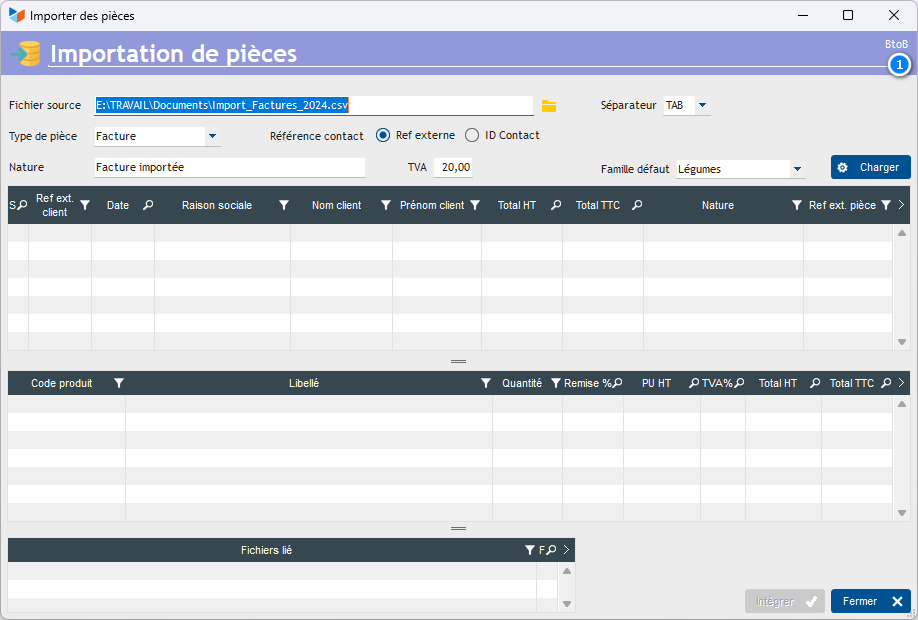
Select the source file to process. It must respect the constitutional standards explained below. Specify the separator used in the input file.
Select the part type to generate in the database.
Indicate via the Contact reference selector what is the meaning of the REFEXTERNE column (see below): Either it designates the external reference of the customer (in this case, the REFEXTERNE column contains the external reference of the customer ), or it designates the Contact ID (in this case, the REFEXTERN column contains the contact ID in Gestan).
Indicate a default document type, for example “Previous year invoice” if you were processing invoices. You will be able to set the default nature for one or the other invoice by entering it directly into the table.
Indicate a default VAT rate, which will apply by default to invoice lines, unless the customer has been read into the database and benefits from another rate.
Finally, specify a Default product family, which will be used when loading a non-catalog product line.
The Load button allows you to load the data for processing.
The program indicates in red any non-catalogue products, and any differences between the catalog price and the price read in the input file.
It also indicates the contacts that will be created, and those that already exist in the database. If the reminder 1 is on BtoC, the customers created will be individuals, and professionals if it is BtoB (depending on the setting of the type of contact to be created by default, see general configuration.
The Integrate button then allows you to create the records in the database.
Input file format
The input file must be a separator text file (TAB, comma, semicolon, or any other character). To do this, you can use a spreadsheet like LibreOffice Calc or Microsoft Excel (remember to save the file in text format with separator)
This file will contain three types of lines:
- C lines, such as Customer, are required. They concern the customer of your part.
- P lines, like Product, need at least one. They concern the parts lines.
- D lines, like Document, are optional. They concern the documents which can be attached to the parts (7 maximum).
Here is an example file ready to upload.
Note that you can put any necessary comment line, starting it with the “#” character.

The C lines
The C lines must be structured as follows:
1 2 3 4 5 6 7 8 9 10 11 12
C | REFEXTERN CLT | NAME | FIRST NAME | REASON | ADDRESS | CPOSTAL | CITY | DATE | REFEXTERN | NATURE | ADDITIONAL NOTES
This is the type of line
REFEXTERNE CLT is the clients external reference. If this customer is not referenced in your database, it will be created with the information of NAME, FIRST NAME, COMPANY NAME, ADDRESS, POSTAL CODE, and CITY. You can also put the Client ID in Gestan in this column.
Note that for the countries CANADA, USA, BRAZIL and AUSTRALIA, the postal code must be formatted like this: REG XXXXXX in which REG is the postal region code, separated by a blank from the postal code. This way, the region code will be correctly entered.
DATE is the possible date of the invoice. If it is not provided, the current date will be taken into account. It can be in the format YYYYMMDD or DD/MM/YYYY.
REFEXTERN is the possible external reference of the part. This area is optional.
NATURE is the nature of the piece. Optional, it will be replaced by the default nature, if it is not specified.
NOTES COMPLEMENT is an (optional) field of unlimited size, which will be integrated into the Notes tab of the piece. Note that in this field, the strings <TAB>, <RC> and <LF> are converted into TAB, RC, and charact(10) respectively.
P lines
P lines must be structured as follows:
1 2 3 4 5 6 7
P | CD_PROD | QTY | PU HT | %R | LIBPRODUCT (optional) | %VAT (optional)
P is the line type
CD_PROD is the product code. If this product code is not entered, the part line will still be created, with a “non-catalogue” product attached to the first product family read in the product family file.
QTE is the quantity
PU excluding tax is the unit sales price excluding tax
%R is the possible discount percentage on the line.
LIBPRODUIT is a possible product label, which would replace the product label read in the database. (In this wording, the <BR> sequences will be replaced by line breaks).
%VAT is a possible % of VAT, if the default VAT should not apply.
Lines D
Any D lines must be structured as follows:
1 2
D | FILE_PATH
P is the line type
FICHIER_PATH is the path of the file to link to the part.
 Other “Tools” articles
Connection to Gestan
Database minimization
Export Gestan database
Gestan base import
Gestan directory structure
Gestan on a USB stick
Gestan Versions
Import a chart of accounts
Import account assignments
Import contracts into Gestan
Import Google/Outlook/Notes contacts
Import parts into Gestan
Import product translations
Importing data into Gestan
Maintenance of HFSQL files
Mass Parts Removal
Quick start
Reallocation of contacts by region
Reassignment of users
Rebooking entries
Reset additional fields
Reset categories
Resetting files
Tips and tricks
Transfer your data to technical support
Zip the base