Gestan on a USB stick
 A1 proofreading not yet effective for this page. In the meantime, you can ask any questions on the forum.
 You can use Gestan on a USB key or external disk, either by installing it directly, or by exporting a database installed on your machine.
For example, you use Gestan in the office. When you go out on business, you export the database to your USB key. When you return to the office, all you have to do is import your database to take into account the work carried out at the customer's premises.
Importing the database will overwrite any changes made to the main database in your absence. This mode of operation is therefore not relevant for a company with many people, but it can be interesting in the case of a one-man business, or confidentiality imperatives.
A USB key is a particularly vulnerable medium: it's easily lost or stolen, and can't withstand a trip through the washing machine. Using Gestan on a USB stick is therefore not recommended for “normal” use, and should always be carried out with great caution: take particular care to always have a backup.
Using the export program
Access : Tools → Administration → Export Gestan database
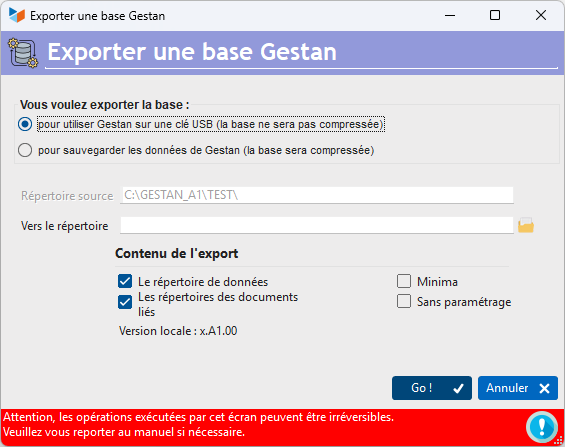
The export procedure copies all the necessary files into the export directory, following the same tree structure as shown below.
If, via this procedure, you export a version of Gestan Entreprise to your USB key, you will be able to use Gestan Entreprise on your key.
Export at least the data directory, and the linked document directories if you have files linked to contacts.
The Minimal option does not export the framework. If it is not present on the USB key, it will be downloaded automatically.
The Without settings option does not export the user's settings files, in particular the saved codes and passwords that enable automatic connection to the databases.
 Other “Tools ” articles
Connection to Gestan
Database minimization
Export Gestan database
Gestan base import
Gestan directory structure
Gestan on a USB stick
Gestan Versions
Import a chart of accounts
Import account assignments
Import contracts into Gestan
Import Google/Outlook/Notes contacts
Import parts into Gestan
Import product translations
Importing data into Gestan
Maintenance of HFSQL files
Mass Parts Removal
Quick start
Reallocation of contacts by region
Reassignment of users
Rebooking entries
Reset additional fields
Reset categories
Resetting files
Tips and tricks
Transfer your data to technical support
Zip the base