Reallocation of contacts by region
 A1 proofreading not yet effective for this page. In the meantime, you can ask any questions on the forum.
Has your new sales manager decided to reorganize the geographical areas assigned to your sales reps?
This screen is designed to manage this situation, allowing you to reassign contacts based on zip code criteria.
Using the screen
Access : Tools → Administration → Mass data processing → Contacts → Reassign by region
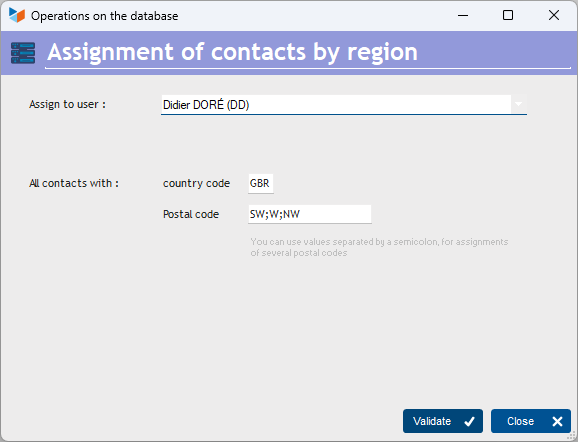
The Assign to user combo lets you select the user to whom contacts meeting the criteria will be reassigned.
The criteria are country code or post code. Multiple zip codes separated by a semicolon are possible.
 Other “Tools ” articles
Compilable procedures
Connection to Gestan
Database minimization
Export Gestan database
Gestan base import
Gestan directory structure
Gestan on a USB stick
Gestan Versions
Import a chart of accounts
Import account assignments
Import contracts into Gestan
Import Google/Outlook/Notes contacts
Import parts into Gestan
Import product translations
Importing data into Gestan
Maintenance of HFSQL files
Mass Parts Removal
Quick start
Reallocation of contacts by region
Reassignment of users
Rebooking entries
Reset additional fields
Reset categories
Resetting files
Tips and tricks
Transfer your data to technical support
Zip the base
Connection to Gestan
Database minimization
Export Gestan database
Gestan base import
Gestan directory structure
Gestan on a USB stick
Gestan Versions
Import a chart of accounts
Import account assignments
Import contracts into Gestan
Import Google/Outlook/Notes contacts
Import parts into Gestan
Import product translations
Importing data into Gestan
Maintenance of HFSQL files
Mass Parts Removal
Quick start
Reallocation of contacts by region
Reassignment of users
Rebooking entries
Reset additional fields
Reset categories
Resetting files
Tips and tricks
Transfer your data to technical support
Zip the base