Import Google/Outlook/Notes contacts
 A1 proofreading not yet effective for this page. In the meantime, you can ask any questions on the forum.
Gestan allows you to import contacts from Outlook, Notes, or Google with a view to creating or updating contacts stored in the Gestan database. It can also sync Outlook or Google contacts.
Using the screen
External applications, and especially Google, are modified regularly and without notice. We therefore advise against using third-party applications for applications of strategic importance.
You must first configure the user settings (and not the general settings); - for Outlook contacts: the name of the Outlook profile - for Google contacts: the Google account and password, plus the name of the calendar, plus the OAuth identifiers (ClientID and ClientSecret). - for Notes contacts: a screen is displayed to enter the connection parameters.
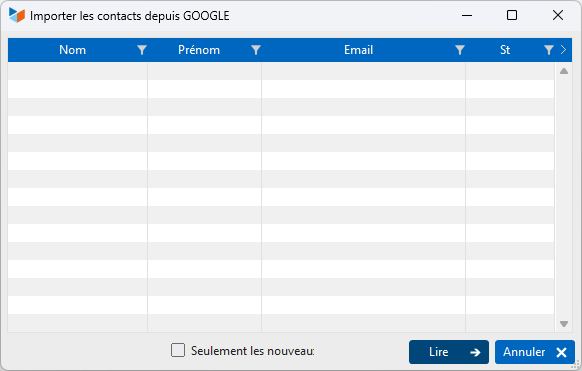
The Read button triggers the reading of contacts in the relevant external application (Outlook, Google, or Notes). If the “Only new” box is checked, only new contacts will be read, i.e. those for whom the first and last name do not exist in the Gestan database.
At the end of playback, the recorded recordings are displayed. The Status column specifies whether the record will be created or updated in Gestan. If the first or last name is missing, the registration will not be taken into account.
 In the case of import, updates of the external application (Google, Outlook or Notes) are systematically reported in Gestan: in fact, the last update date in the external application does not is not known to the import program.
 Calendar synchronization only takes into account unexpired appointments: any past appointments will not be imported or synchronized (this is to avoid processing times which could be very long in the event of a significant history)
For Google, web fields are not processed;
For Google, the types of telephone numbers must be specified with the labels: Home, Office, Fax, GSM pro, GSM personal;
Importing phones. Gestan manages masks for phones and displays international prefixes by itself. For a telephone number to be imported into Gestan from Outlook, it must be entered in the application in the same format as the mask you declared in Gestan. For example, if you had declared a mask 99-99-99-99-99 for France telephone numbers, under the external application, enter +33 (0)9-99-99-99-99, or 09- 99-99-99-99
 Other “Tools” articles
Connection to Gestan
Database minimization
Export Gestan database
Gestan base import
Gestan directory structure
Gestan on a USB stick
Gestan Versions
Import a chart of accounts
Import account assignments
Import contracts into Gestan
Import Google/Outlook/Notes contacts
Import parts into Gestan
Import product translations
Importing data into Gestan
Maintenance of HFSQL files
Mass Parts Removal
Quick start
Reallocation of contacts by region
Reassignment of users
Rebooking entries
Reset additional fields
Reset categories
Resetting files
Tips and tricks
Transfer your data to technical support
Zip the base