Database minimization
 A1 proofreading not yet effective for this page. In the meantime, you can ask any questions on the forum.
This program can be used to reduce the volume of a Gestan database in two situations:
- the transmission of data to the medium (working in this case on a copy of the prod database).
- the problematic increase in size of certain files, notably due to the use of very large images.
The use of this program is reserved for users with administrative privileges. It is strongly recommended to use it only in accordance with precise instructions from technical support.
Using the screen
Access: Tools → Administration → Data processing → Minification
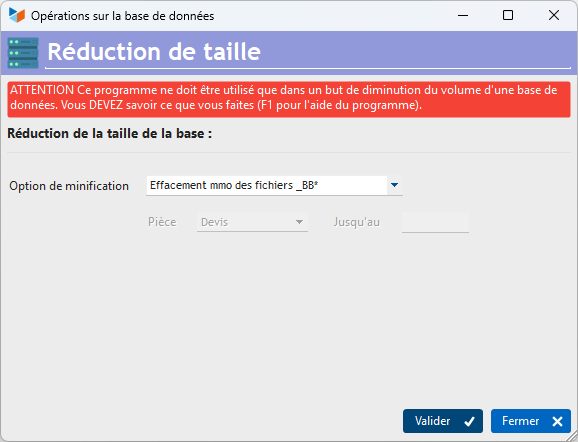
Available options
Options possibles on a production database_
- mmo deletion of _BB files: deletion of memos from BB files (room notes, before and after correspondence, signatures, additional notes, history notes). Permanently deleted data may be useful, but are not essential to the legal obligation defined by standard NF525 (France).
- Targeted mmo deletion: same as above, but with the choice of part types, and the date up to which purging is to be performed.
 Make a database backup beforehand!
Options forbidden on a production database
* mmo deletion of FACTURE files (customer side): deletion of memo fields on customer documents (quotations, orders, invoices, credit notes, delivery notes).
- Invoice file deletion (supplier side): deletion of memo fields on supplier documents.
- Delete DATAPLUS file mmo: supplementary parameters memo fields deleted.
- Delete SIGNATURE file mmo: delete signature memo zones
- Deleting the INTERVENTION file mmo: deleting the intervention memo fields
- Delete ACTION file: deletes action memo zones
- Delete PRODUCT file: deletes product memo zones.
- Empty CEDEX file: Empty zip code file
 Other “Tools ” articles
Connection to Gestan
Database minimization
Export Gestan database
Gestan base import
Gestan directory structure
Gestan on a USB stick
Gestan Versions
Import a chart of accounts
Import account assignments
Import contracts into Gestan
Import Google/Outlook/Notes contacts
Import parts into Gestan
Import product translations
Importing data into Gestan
Maintenance of HFSQL files
Mass Parts Removal
Quick start
Reallocation of contacts by region
Reassignment of users
Rebooking entries
Reset additional fields
Reset categories
Resetting files
Tips and tricks
Transfer your data to technical support
Zip the base