Case study: Intermediation
The process
 Here is a practical example of intermediation.
For example, you are the company MyCompany, and you are acting as an intermediary between your client MyClient and the suppliers you work with.
The process works as follows:
- MyClient makes a request to you
- You search for the suppliers best suited to your client’s request and find Supplier1 and Supplier2, each of whom offers part of the required service
- You place an order with them on behalf of MyClient
- You receive the orders from both suppliers, who both send you their invoices.
- At the end of the month, you issue an invoice to MyClient, summarising the amounts of the two suppliers’ invoices plus your fee as an intermediary
- MyClient pays this invoice to you
- You then pay the two suppliers, and the matter is settled.
How to do this with Gestan
Purchase processing
Start by sending, via Gestan, price enquiries to suppliers likely to be able to supply the requested goods.
Then select the most attractive offers from the responses and generate the corresponding supplier orders, either based on the requests for quotation if you had submitted any, or directly otherwise.
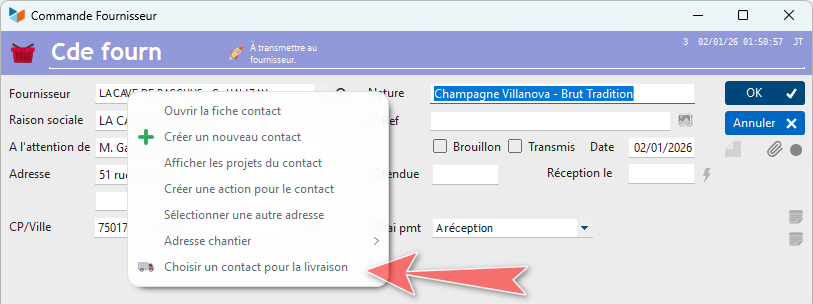
Right-clicking on the supplier order address allows you to select a “contact for delivery”, who will be MonClient.
When you receive the contents of your two orders (or once they have been fulfilled, in the case of services), you may issue a Receipt vouchers (RV) goods receipt note, in accordance with your company’s procedures.
Upon receipt of the corresponding supplier invoices, check that they are correct by comparing them with the corresponding supplier orders (or with the delivery notes if you have issued any).
Invoicing for the service
At the end of the month, at the end of your assignment, or at any other time in accordance with the terms of your contract with MyClient, you will invoice MyClient for the total value of the orders you placed on their behalf, plus the cost of your service.
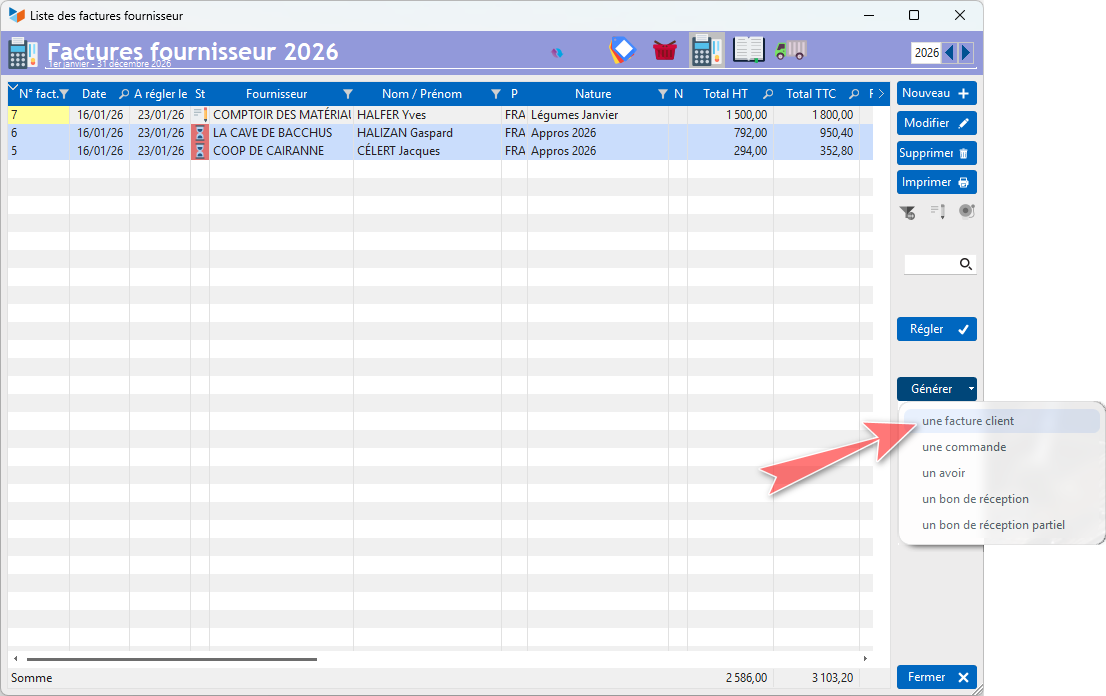
To do this, in the list of supplier invoices, select the invoices corresponding to the services provided by Supplier1 and Supplier2 for MyClient, and click the Generate → a customer invoice. This will generate a single customer invoice from your two supplier invoices. An intermediate screen allows you to select the end customer for this new invoice.
Once the customer invoice has been generated, you can:
- either add an additional line, which will correspond to the value of your intermediary services, and send it as an invoice;
- or send it as it is to your client (by right-clicking, you can change the title from ‘Invoice’ to ‘Disbursement Note’, for example), and generate a separate invoice for the value of your intermediary services;
With regard to VAT, depending on your agreements, you can set the VAT on the supplier service lines in the client invoice to zero. This is because you have paid or will pay the suppliers inclusive of VAT, whilst MonClient will simply reimburse you for the advance you have made on their behalf. MonClient will pay you the disbursements net of VAT, and your service fee inclusive of VAT, if you are liable for VAT.
 Other ‘Invoicing’ articles
Invoicing: common elements
Cas concret : Intermédiation
Entêtes des pièces
Facturation : éléments communs
Factures : options spécifiques
Frais de port
Généalogie des pièces
Importer des lignes de pièce (tableur)
Liaisons des pièces
Ligne pourcentage
Livraison partielle
Numérotation des factures
Optimiser les achats
Retenues de garantie *
Surtaxes nationales
Tri des lignes de pièce
Customer Invoicing
Bons de livraison (BL)
Certification numérique des factures
Commandes client
Devis
Echéancier de facturation
Factur-X, PEPPOL
Facturation client : éléments communs
Facturation horaire
Factures client
Factures d'acompte (France)
Factures d'avancement
Feuille de marge
QR-Facture
Relance des factures
Suivi détaillé des commandes client *