Maintenance of HFSQL files
 A1 proofreading not yet effective for this page. In the meantime, you can ask any questions on the forum.
Gestan operates a database HFSQL, a DBMS developed by PCSoft, in Classic or Client/Server mode.
This system uses files of file type:
- .FIC file: for example, CONTACT.FIC. .fic files contain the structured data of the file
- .NDX file: contain the data indexes (the table of contents)
- .MMO file (optional): contain unstructured data, text, binary, images, etc., without size limitation
- .FTX file (optional): contain full-text indexes, to facilitate searches on a set of data.
HFSQL databases can be used freely, and do not require a license.
This system is very robust: maintenance is limited to checking the indexes. Indeed, as with any database system, it can happen (network problem, micro-outage, instability of the Wifi network, etc.) that the index files are out of phase and no longer correspond to the data files.
Gestan checks the indexes monthly, but it may be necessary to do this occasionally.
That's what this program is for.
Using the screen
Access: Tools → Administration → Maintenance → Index of HFSQL files.
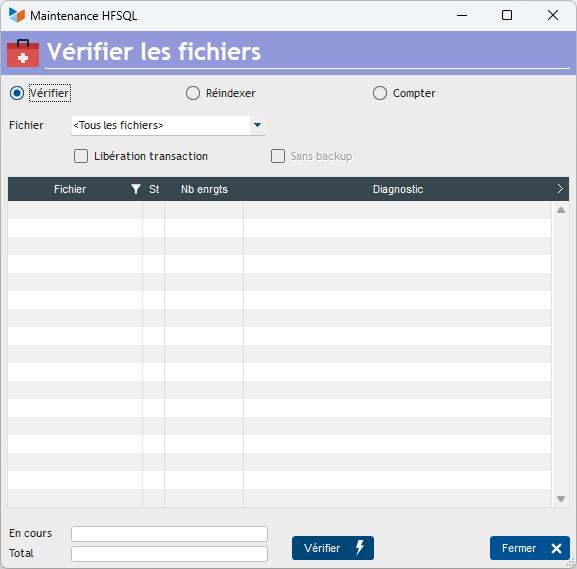
Three work options are available:
- Check: simply checks the file index
- Reindex: performs reindexing
- Count: counts the records contained in the files.
You can process a single file, or the entire database, using the Files combo
Transaction release allows you to release any interrupted transactions. A transaction is a set of operations that are logically “indivisible”, for example, invoices and invoice lines, which must be recorded together. This check box allows you to return the files to the state allowing new transactions.
Launching a reindexing performs a prior backup of the file concerned or of the database, in the BACKUPS directory (Backup_REINDEX_SSYYMMDD_HHMMSSCC.zip). You can, if necessary, disable this backup via the box without backup.
How to deal with an index problem at startup
At startup, Gestan accesses certain files, notably the users file, actions, and scheduled actions. If one of these files has an index problem, starting Gestan becomes impossible.
You must then open the reindexing screen from the connection window in Gestan.
If this solution does not work, you must then use the shortcut “Reindex the Gestan files”, present in the Gestan program directory (Normally C:\Program Files (x86)\GESTAN). This shortcut opens the reindex screen directly, on the last connected base.
 Other Tools articles
Connection to Gestan
Database minimization
Export Gestan database
Gestan base import
Gestan directory structure
Gestan on a USB stick
Gestan Versions
Import a chart of accounts
Import account assignments
Import contracts into Gestan
Import Google/Outlook/Notes contacts
Import parts into Gestan
Import product translations
Importing data into Gestan
Maintenance of HFSQL files
Mass Parts Removal
Quick start
Reallocation of contacts by region
Reassignment of users
Rebooking entries
Reset additional fields
Reset categories
Resetting files
Tips and tricks
Transfer your data to technical support
Zip the base