Ceci est une ancienne révision du document !
Balance
 A1 proofreading not yet effective for this page. In the meantime, you can ask any questions on the forum.
This screen presents the accounting balance, for all or part of the financial year.
Using the screen
Access: Accounting → Accounting documents → Balance
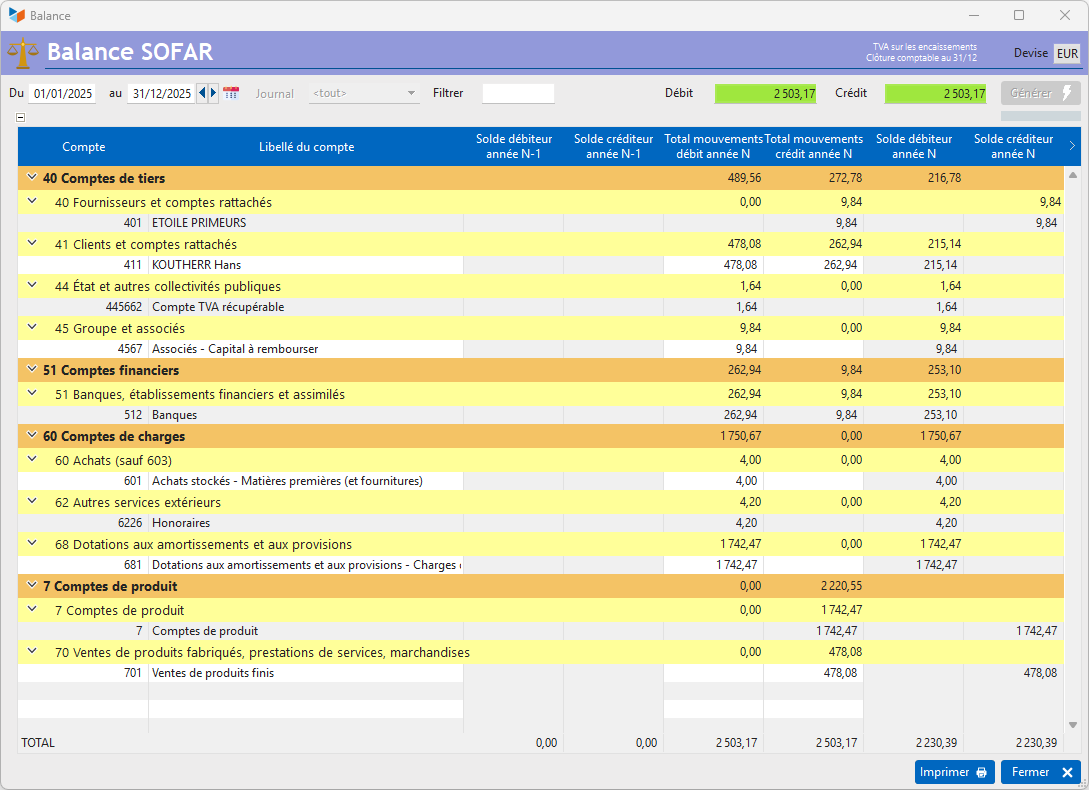
The Generate button triggers the calculation of the trial balance for the specified date range.
You can use the Filter area to specify the account (e.g. 411), accounts (e.g. 61*), or account range (e.g. 61-62) that interests you. You can also filter the export for a specified Journal.
 Use the context menu of the table to access the accounting document generation options.
The results can be presented in any currency other than the accounting currency, via a right click on the Currency field.
 Other Accounting articles
Accounting document options
Accounting entries
Accounting journals
Accounting links
Accounting settings
Accounting with Gestan: basic principles
Automatic accounting allocations
Bad debts
balance
Bank account details
Bank account statements
Bank reconciliation
Billing by tax rate
CFONB Export
Chart of accounts
cptresultat
Delivery of checks
Documents without imputation
Double-entry bookkeeping
Exporting and importing accounting data
Fixed assets
For further information
General Ledger
Income and expenses
Lettering
Log codes
Mass links: entries
Micro-Enterprise / Self-Enterprise
Payments
Pointing of supporting documents for VAT
Posting entries
Receipts/Payments
Recording WEEE
Review of entries
SEPA Export
Third-party balance
VAT Calculation
VAT statements