Delivery of checks
 A1 proofreading not yet effective for this page. In the meantime, you can ask any questions on the forum.
This screen allows you to edit check delivery slips, when you deliver a set of checks to your bank.
At the end of the remittance, a remittance number will be associated with the check collection entry.
Using the screen
**Access: ** Accounting → Check delivery
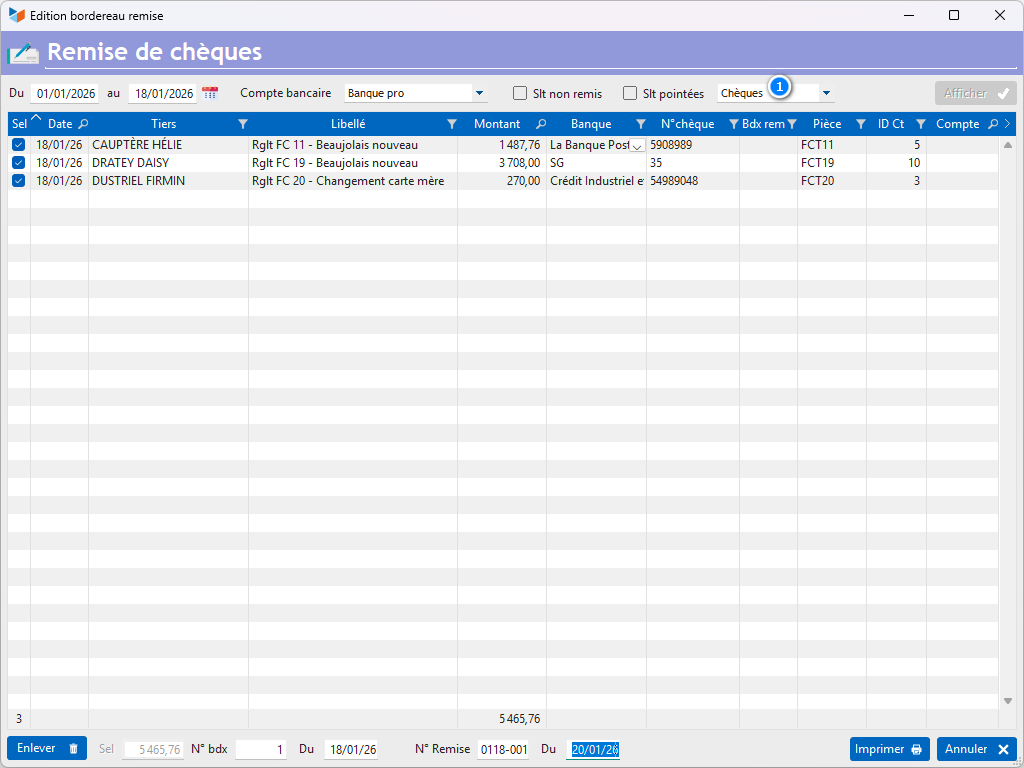
The screen displays the checks that you are going to give to your bank, namely all receipts recorded for a date range, with a check payment method. The 1 combo allows you to display other payment methods, which is useful for checking possible entry errors on payment methods.
If the Slt not remittance box is checked, only receipts without remittance number will be displayed. If the Slt pointed box is checked, only the receipts pointed out will be displayed.
If the entry does not have a remittance number, the Sel box is checked: the entry will be printed on the slip when the Print button is clicked. Otherwise, the Sel box has a blue background, and it is unchecked by default.
The Remove button allows you to remove an entry from the list (this does not delete the record).
It is possible to modify the banks and check numbers on the screen. Changes will be reflected in the records.
With the remittance entries selected, the Print button allows the printing of the remittance slip. At the end of printing, the program suggests “validating the remittance”: the affirmative answer allows you to record the remittance number in each entry printed on the remittance slip.
Upon validation:
- the date of the entries concerned becomes the delivery date + 2 days, average duration of check collection
- the invoice collection date becomes this same date, if the invoice was paid, the same for supplier credits.
Use case: check clearing several entries
It can happen that the same check pays two or more bills. In this case, you have normally created two (or more) entries, the sum of which equals the amount of the check.
There are two methods to handle this case:
- leave the entries as they are: in this case, the breakdown of the check will be indicated in the remittance slip;
- delete one of the two entries in the list, and manually modify the amount of the remaining entry, in order to have only one line on the remittance slip. The modification in the table will obviously not be reported in the file in this case.
 Other Accounting articles
Accounting document options
Accounting entries
Accounting journals
Accounting links
Accounting settings
Accounting with Gestan: basic principles
Automatic accounting allocations
Bad debts
balance
Bank account details
Bank account statements
Bank reconciliation
Billing by tax rate
CFONB Export
Chart of accounts
cptresultat
Delivery of checks
Documents without imputation
Double-entry bookkeeping
Exporting and importing accounting data
Fixed assets
For further information
General Ledger
Income and expenses
Lettering
Log codes
Mass links: entries
Micro-Enterprise / Self-Enterprise
Payments
Pointing of supporting documents for VAT
Posting entries
Receipts/Payments
Recording WEEE
Review of entries
SEPA Export
Third-party balance
VAT Calculation
VAT statements