Accounting document options
 A1 proofreading not yet effective for this page. In the meantime, you can ask any questions on the forum.
The options for generating accounting documents (Journal, General Ledger, Balance, Income statement, etc.) are configured via this common screen.
Using the screen
Access: From the context menu of the Export XIMPORT, Accounting Journals, Balance, General Ledger, Income Statement, Closing Balance screens.
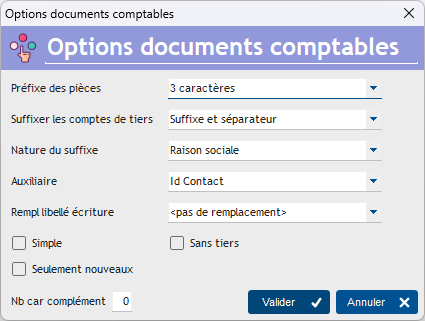
Part Prefix specifies the size of the prefix for part numbers. For example, the writing 123 will be referenced “E123” with a prefix size of 1 char, and “ECR123” with a prefix size of 3 char (the prefix on 3 is more readable, but some software has zones that are too short as input to accept prefixes on 3).
The coding of these prefixes is as follows:
| Type of part | On 3 char | On 1 char |
|---|---|---|
| Writing | ECR | E |
| Customer invoice | FCT | C |
| Have customer | APR | A |
| Supplier invoice | FFR | F |
| Have supplier | AVF | W |
Suffixing third-party accounts allows third-party accounts to be presented with a suffix, possibly separated by a hyphen. So account 411 can be displayed as 411Suffix or 411-Suffix.
The nature of the suffix is determined by the Nature of suffix combo. For example, you can choose the third party ID, name, or company name. For example, if you have an invoice for your customer Mr. Dupont, id 567, your customer collective account is 411, and you had opted for a suffix with the customer ID with separator, the entries concerning Mr. Dupont will be presented on account 411-567.
Use the Auxiliary combo to populate the auxiliary account with the desired content.
If no suffix is requested, then you can use the Without third parties box, which allows you not to generate entries on third party accounts. Conventionally, the entries corresponding to a customer invoice are a credit excluding tax on the product account, a VAT credit on the VAT account, a debit including tax on the bank account, and a debit/credit pair including tax on the third party account. Checking this box allows you not to generate these entries on the third party account.
It is possible to replace the labels of the entries (an entry whose description is not entered will be populated with the description of the imputation), via the Rempl. wording writing.
Check the Simple box to generate only one entry per document on the document allocation, instead of one entry per document line, on the product account. For example, you make an invoice with three invoice lines. The generation of movements would produce three entries excluding tax to the credit of the product account, one entry excluding tax to the credit of the collected VAT account, and one entry including tax to the debit of the customer account (41). If the Simple box is checked, a single line will be generated on the product account, for the total amount excluding tax of the invoice.
If the Only new box is checked, only new movements since the last export will be taken into account. This option is intended for those who do partial exports. For example, a first export is requested for the dates of the financial year, 03/31 of the year. At the end of the export, you will be prompted to save the export date. Then a second export is requested for the dates of the financial year, 06/30 of the year: only the movements which have never been exported will be exported. The context menu of the Export XIMPORT screen, or that for generating logs, allows you to reset this indicator to blank, if necessary.
Nb because complement is used to possibly complete the account numbers with zeros, up to the requested size. Thus, if you indicate “8” in this field, the account 411 will be presented on 8 characters, in the form 41100000.
 Other Accounting articles
Accounting document options
Accounting entries
Accounting journals
Accounting links
Accounting settings
Accounting with Gestan: basic principles
Automatic accounting allocations
Bad debts
balance
Bank account details
Bank account statements
Bank reconciliation
Billing by tax rate
CFONB Export
Chart of accounts
cptresultat
Delivery of checks
Documents without imputation
Double-entry bookkeeping
Exporting and importing accounting data
Fixed assets
For further information
General Ledger
Income and expenses
Lettering
Log codes
Mass links: entries
Micro-Enterprise / Self-Enterprise
Payments
Pointing of supporting documents for VAT
Posting entries
Receipts/Payments
Recording WEEE
Review of entries
SEPA Export
Third-party balance
VAT Calculation
VAT statements